

Wake Up Alarm Clock — Mission
Ankit Singh Bhandari Health & Fitness iPhoneiPadiPod touch
Wake Up Alarm Clock — Mission is a free Health & Fitness app for iPhone and iPad by Ankit Singh Bhandari. Requires iOS 26.0. Updated August 25, 2026.
- Price
- Free
- on the App Store
- Size
- 10 MB
- Age 4+
- Updated
- Aug 25
- 2026 · v1.1
Screenshots


About Wake Up Alarm Clock — Mission
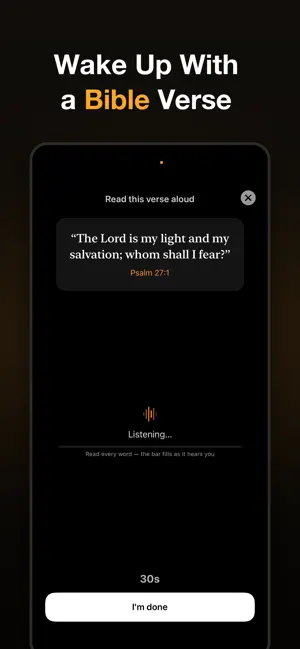
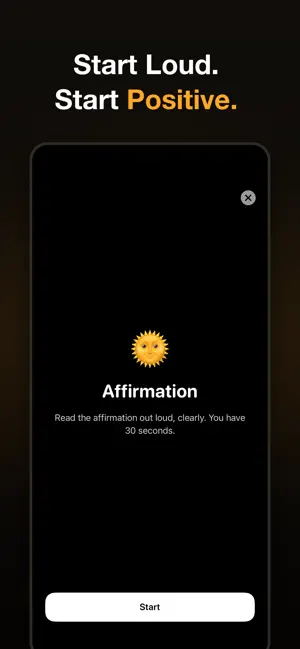
Your alarm has a design flaw: the off button. MissionAlarm doesn't stop ringing until you complete a wake-up mission — verified by your iPhone's sensors, not by a tap. The snooze tap costs nothing, so it always wins. A mission costs just enough to actually get you up. HOW IT WORKS Your alarm fires with full system authority. To silence it, you complete the mission you chose the night before: • Push-Ups — your camera counts real reps with on-device pose detection. Pointing it at the ceiling doesn't fool it; we checked. • Math — solve problems on the keypad until your brain is on. • Speech — read an affirmation or a Bible verse out loud; your mic verifies it. • Item Search — show a specific item (toothbrush, coffee mug) to the camera. • Shake — shake the phone until the meter fills. Simple, effective, exhausting. Missions are always your choice — pick what fits your morning. RINGS FOR REAL Built on iOS 26 AlarmKit, MissionAlarm rings through the Silent switch and Focus modes, and fires even if you force-quit the app the night before — the same authority as the built-in clock. STAKES THAT DO THE WORK • Streaks — every morning ends mission-passed or skipped. One skip resets your streak to zero. You can always quit; you just can't quit quietly. • Streak Freeze — protect a hard-earned streak on the rare rough night. • Home Screen widgets — your streak and next alarm, visible all day. • Wake Insights — charts of your wake times, pass rate, and trends over time. PRIVATE BY DESIGN Pose detection and speech recognition run entirely on your iPhone. No camera frame and no second of audio ever leaves the device. Nothing is recorded or stored. WHO IT'S FOR Chronic snoozers. Students who can't afford one more missed 8 AM. Professionals done negotiating with a ringtone at their weakest moment. PRICING 3-day free trial, then $6.99/week or $39.99/year (about $0.77/week) — or $79.99 once, yours for life. Three free mornings is enough to know. Strict, not cruel. Tomorrow starts at the first ring. TERMS Terms of Use (EULA): https://www.apple.com/legal/internet-services/itunes/dev/stdeula/ Privacy Policy: https://missionalarm.pages.dev/privacy
What’s new
Version 1.1 · Updated August 25, 2026
• 7 themes — Fitness, Focus, Faith, Calm, Dawn, Pop, Classic — plus Auto-match to your mission • New Today screen: next alarm, streak and all alarms in one place • Share your morning: a card for every mission you pass • Test any alarm in 10 seconds — it rings through Silent • One missed morning puts your streak at risk instead of resetting it • Bedtime reminder with tomorrow's plan • Item Search: faster detection, choose the items you keep nearby • Premium unlock now available
App privacy
The developer, Ankit Singh Bhandari, reported these privacy practices to Apple.
Data Not Collected
The developer does not collect any data from this app.
Alternatives to Wake Up Alarm Clock — Mission
Looking for apps like Wake Up Alarm Clock — Mission? Here are 6 similar apps on the App Store. The highest rated is Loud Alarm & Missions - Wake (5.0/5), and all 6 are free to download.
-
 Awayk: Alarm Clock to Wake Up
-
 Loud Alarm & Missions - Wake
5.0
Loud Alarm & Missions - Wake
5.0
-
 WakeBolt: Mission Alarm Clock
-
 UpMode: Alarm Clock to Wake Up
-
 Mission Alarm Clock & Wake Up
5.0
Mission Alarm Clock & Wake Up
5.0
-
 AI Calorie & Nutrition Tracker
| App | Rating | Price | Last updated | Compare |
|---|---|---|---|---|
| Wake Up Alarm Clock — Mission | – | Free | August 25, 2026 | |
| Awayk: Alarm Clock to Wake Up | – | Free | Sep 24, 2026 | Compare |
| Loud Alarm & Missions - Wake | 5.0 / 5 (1) | Free | Sep 13, 2026 | Compare |
| WakeBolt: Mission Alarm Clock | – | Free | Sep 9, 2026 | Compare |
| UpMode: Alarm Clock to Wake Up | – | Free | Oct 13, 2026 | Compare |
| Mission Alarm Clock & Wake Up | 5.0 / 5 (4) | Free | May 14, 2026 | Compare |
| AI Calorie & Nutrition Tracker | – | Free | Sep 1, 2026 | Compare |