

PickCam
Jongmin Choi Photo & Video iPhoneiPadiPod touch
PickCam is a free Photo & Video app for iPhone and iPad by Jongmin Choi. Requires iOS 17.0. Updated October 20, 2026.
- Price
- Free
- on the App Store
- Size
- 81 MB
- Age 4+
- Updated
- Oct 20
- 2026 · v1.1.0
Screenshots
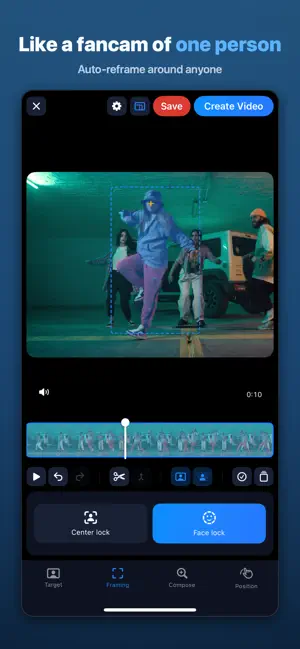


About PickCam
Like a fancam of just one person — PickCam makes it for you. Group dance videos, concerts, school recitals… ever wanted a video that follows just one person? Tap once to pick them, and PickCam's AI follows that person to the end of the video, automatically reframing every shot. ■ How it works 1. Import a video — AI finds everyone in it 2. Tap the person you want (color-coded, numbered) 3. Choose a ratio (9:16 · 1:1 · 16:9) — auto-reframe is done 4. Preview and export ■ Perfect for • Dance challenges & choreography practice — a choreo cam of just you • Concerts and stage videos — a fancam that follows your favorite • School recitals and sports days — keep your kid in frame • Turn landscape videos into vertical (9:16) for Reels, Shorts & TikTok ■ Features • Auto person tracking: remembers face and appearance through overlaps and occlusions • Face lock / center lock: choose where your person stays in the frame • Segment editing: switch the star per segment • Keyframes: manually fix framing anywhere you want • Re-detection: recover anyone the AI missed with a tap • Export up to 4K, HEVC/H.264, MP4/MOV ■ Privacy All analysis and editing happen entirely on your device. Your videos never leave it. ■ PickCam Pro (optional subscription) Free: 1-min videos · 720p · 5 exports/day · ad before export · watermark Pro: 10-min videos · 4K · unlimited · no ads · no watermark Payment is charged to your Apple Account. Subscriptions renew automatically unless cancelled at least 24 hours before the period ends. Manage in Settings > Apple Account > Subscriptions. Privacy Policy: https://cjmin.me/app/pickcam/ Terms of Use (EULA): https://www.apple.com/legal/internet-services/itunes/dev/stdeula/
What’s new
Version 1.1.0 · Updated October 20, 2026
• Now on iPhone Duo and iPad — on unfolded and wide screens, the preview and editing tools sit side by side • HDR videos now export with the same brightness and color as the Photos app • If an export is interrupted, you return to the editor and can retry right away • Unsupported video formats (such as AV1) are flagged when you import • Stability and performance improvements
App privacy
The developer, Jongmin Choi, reported these privacy practices to Apple.
Data Used to Track You
The following data may be used to track you across apps and websites owned by other companies:
- Identifiers: Device ID
Data Linked to You
The following data, which may be collected and linked to your identity, may be used for the following purposes:
- Location: Coarse Location
- Identifiers: Device ID
- Usage Data: Product Interaction, Advertising Data
Used for: Third-Party Advertising, Developer’s Advertising or Marketing, Analytics, App Functionality
Data Not Linked to You
The following data, which may be collected but is not linked to your identity, may be used for the following purposes:
- Diagnostics: Performance Data, Other Diagnostic Data, Crash Data
Used for: Third-Party Advertising, Developer’s Advertising or Marketing, Analytics, App Functionality
Alternatives to PickCam
Looking for apps like PickCam? Here are 6 similar apps on the App Store. The highest rated is DancePai - AI Dance Editor (5.0/5), and all 6 are free to download.
-
 TapSolo
-
 DancePai - AI Dance Editor
5.0
DancePai - AI Dance Editor
5.0
-
 Catchy Cam - Auto Tracking Cam
-
 SoloDance AI
-
 DanceShot: Dance Video Editor
5.0
DanceShot: Dance Video Editor
5.0
-
 Tally: Dance Practice & Editor
5.0
Tally: Dance Practice & Editor
5.0
| App | Rating | Price | Last updated | Compare |
|---|---|---|---|---|
| PickCam | – | Free | October 20, 2026 | |
| TapSolo | – | Free | Jul 20, 2026 | Compare |
| DancePai - AI Dance Editor | 5.0 / 5 (1) | Free | Oct 14, 2026 | Compare |
| Catchy Cam - Auto Tracking Cam | – | Free | Sep 7, 2026 | Compare |
| SoloDance AI | – | Free | Oct 9, 2026 | Compare |
| DanceShot: Dance Video Editor | 5.0 / 5 (1) | Free | Oct 6, 2026 | Compare |
| Tally: Dance Practice & Editor | 5.0 / 5 (10) | Free | Sep 21, 2026 | Compare |
Compare PickCam with the top alternatives: ratings, updates, ASO score and keyword gaps →