

Catchy Cam - Auto Tracking Cam
Eun Gyeong Cha Photo & Video iPhoneiPadiPod touch
Catchy Cam - Auto Tracking Cam is a free Photo & Video app for iPhone and iPad by Eun Gyeong Cha. Requires iOS 16.0. Updated September 7, 2026.
- Price
- Free
- on the App Store
- Size
- 7 MB
- Age 4+
- Updated
- Sep 7
- 2026 · v1.0.2
Screenshots


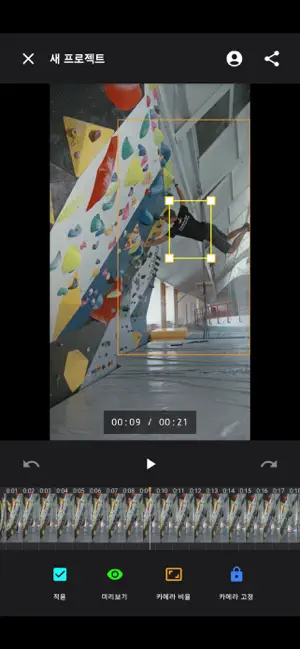
About Catchy Cam - Auto Tracking Cam
Filmed alone? It'll look like someone filmed you. That tiny subject in your tripod footage — Catchy Cam automatically tracks and captures it. Sports, pets, kids, performances: turn distant, dynamic movement into immersive footage with just a few adjustments. ■ Simple to use Import a video and draw a box around the subject for the camera to follow. Preview the auto-tracked result, then fix only the key moments where it drifts off. Tap Apply — subject positions are recalculated based on your corrected frames. Review, export, done. ■ As precise as you want Adjust the subject box and camera position frame by frame Zoom in or out as much as you like by adjusting the camera ratio Fix only the off-track sections — no need to redo the whole video Smooth camera work for natural results, like a real follow shot ■ Perfect for Solo sports footage: figure skating, climbing, golf, tennis, soccer Pets running around, kids on stage or at recitals
What’s new
Version 1.0.2 · Updated September 7, 2026
The app details have been updated.
App privacy
The developer, Eun Gyeong Cha, reported these privacy practices to Apple.
Data Used to Track You
The following data may be used to track you across apps and websites owned by other companies:
- Usage Data: Product Interaction, Advertising Data
Data Not Linked to You
The following data, which may be collected but is not linked to your identity, may be used for the following purposes:
- Usage Data: Product Interaction, Advertising Data
Used for: Third-Party Advertising, Analytics