

MarkDown Reader - MD Viewer
Edward Juden Productivity iPhoneiPadiPod touchMac
MarkDown Reader - MD Viewer is a free Productivity app for iPhone and iPad by Edward Juden. Requires iOS 17.0. Updated October 26, 2026.
- Price
- Free
- on the App Store
- Size
- 4 MB
- Age 4+
- Updated
- Oct 26
- 2026 · v1.9
Screenshots

About MarkDown Reader - MD Viewer
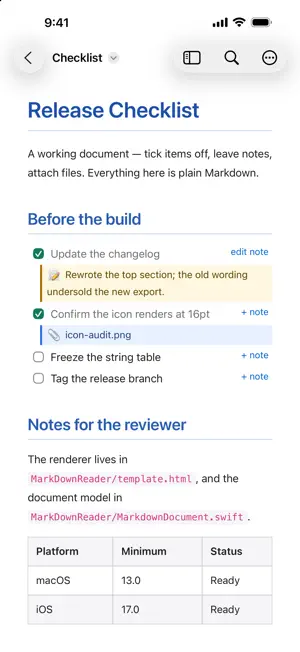
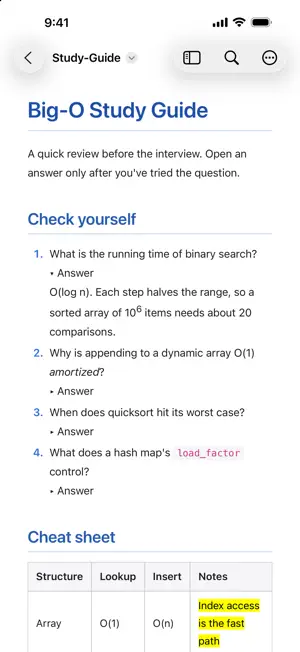
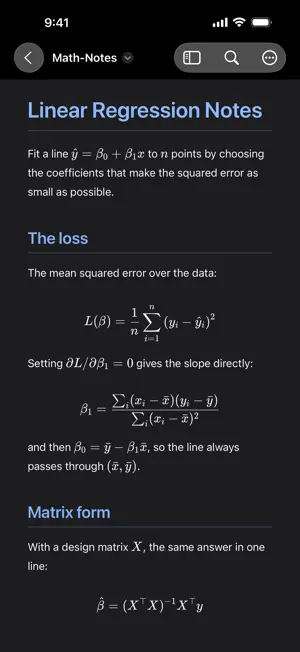
MarkDown Reader is a free, lightweight viewer for Markdown files. Double-click any .md file and read it beautifully rendered — no editor chrome, no distractions, just your document. It also turns a checklist into somewhere to work. Tick a task and the change is written straight back to the file, one character, instantly. Add a note to any item and it is saved as an ordinary indented bullet, so every other Markdown tool still reads it. On the Mac, drag a file onto an item to attach it, and click the chip to open it again later. Nothing is locked in a database. Everything this app writes is plain Markdown you can read in any editor. - Clean rendering of headings, tables, code blocks, and images, in colour, light or dark - Several documents in one window as tabs; drag Markdown files in from the Finder, and drag tabs between windows (macOS) - Your windows and tabs come back when you reopen the app (macOS) - Collapsible answers, superscripts, highlights and other HTML formatting tags - LaTeX math, typeset offline: $…$ inline and $$…$$ display - Interactive task lists: click a checkbox and the .md file updates instantly - Notes on any checklist item, saved as plain Markdown - Attach files to checklist items by dragging them in (macOS) - Clickable file references: a path in a code span opens in your editor (macOS) - Show Source: the file's raw text with line numbers, one keystroke away; on the Mac, edit it in place with a live preview beside the text - Table of contents sidebar for long documents, highlighting the section you are reading; hide it, or the tabs, per window (macOS) - Full-text search with match navigation - Live reload — edit the file elsewhere and the view keeps up - Safe saving: a tick or note never overwrites changes made in another app - Use the full window width for wide documents (macOS) - Zoom, print, and export to PDF; exported PDFs are always light - Light or Dark on your terms: follow the system, or pin the reader to either - Copy the document's path or reveal it in the Finder (macOS) - Opens .md, .markdown, .mdown, .mkd, and .mkdn files - Sandboxed and private: no accounts, no analytics, no data collection - Free, with an optional tip jar that unlocks nothing
What’s new
Version 1.9 · Updated October 26, 2026
Light or Dark, your call. • Appearance, in the document menu: follow the device, or keep the reader Light or Dark. The document browser follows too, and the choice is remembered. • Exported PDFs are always light, like the Mac's, so they read the same for whoever you send them to. • The Contents list highlights the section you are reading as you scroll. • The document menu now sits in the toolbar's overflow on iPhone and behind the More button on iPad. • Send Feedback opens our feedback page, and Support MarkDown Reader offers an optional tip. Tips unlock nothing; everything stays free.
App privacy
The developer, Edward Juden, reported these privacy practices to Apple.
Data Not Collected
The developer does not collect any data from this app.
Alternatives to MarkDown Reader - MD Viewer
Looking for apps like MarkDown Reader - MD Viewer? Here are 6 similar apps on the App Store. The highest rated is Marklens: Markdown Reader (5.0/5), and all 6 are free to download.
-
 Marklens: Markdown Reader
5.0
Marklens: Markdown Reader
5.0
-
 Markflow — Markdown Reader
5.0
Markflow — Markdown Reader
5.0
-
 Markdown Viewer Mobile
5.0
Markdown Viewer Mobile
5.0
-
 Dawn - Markdown
5.0
Dawn - Markdown
5.0
-
 .md Viewer
4.3
.md Viewer
4.3
-
 Markdown Editor and Reader
| App | Rating | Price | Last updated | Compare |
|---|---|---|---|---|
| MarkDown Reader - MD Viewer | – | Free | October 26, 2026 | |
| Marklens: Markdown Reader | 5.0 / 5 (3) | Free | Sep 6, 2026 | Compare |
| Markflow — Markdown Reader | 5.0 / 5 (2) | Free | May 12, 2026 | Compare |
| Markdown Viewer Mobile | 5.0 / 5 (2) | Free | Apr 29, 2026 | Compare |
| Dawn - Markdown | 5.0 / 5 (2) | Free | Oct 28, 2026 | Compare |
| .md Viewer | 4.3 / 5 (7) | Free | Jun 1, 2026 | Compare |
| Markdown Editor and Reader | – | Free | Oct 26, 2026 | Compare |