

Fast Jot for Notion: Widget
Ryu Iwasaki Productivity iPhoneiPadiPod touch
Fast Jot for Notion: Widget is a free Productivity app for iPhone and iPad by Ryu Iwasaki. Requires iOS 18.6. Updated November 5, 2026.
- Price
- Free
- on the App Store
- Size
- 25 MB
- Age 4+
- Updated
- Nov 5
- 2026 · v1.0.9
Screenshots
Save to Pinterest

About Fast Jot for Notion: Widget
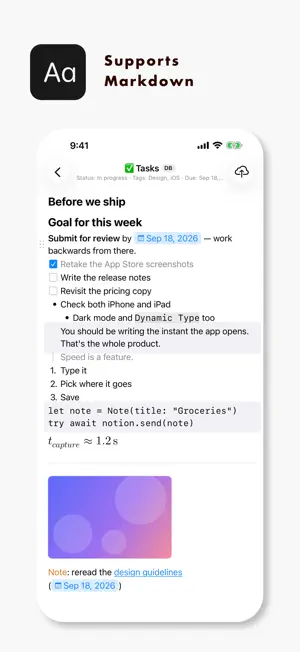
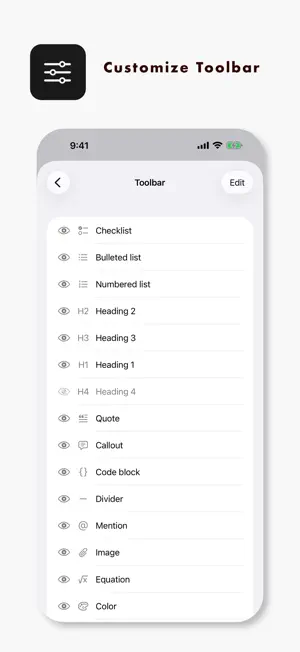
Capture the moment it hits you — straight to Notion. Fast Jot for Notion is an app built for one thing: getting your notes into Notion, fast. It opens straight to the editor, and saving takes a single tap. Notes written offline are sent automatically once you're back online. ◆ Built to get you writing instantly - First line automatically becomes the title - Templates pre-fill your defaults - Optional: send with the Return key - Optional: reopen right where you left off - Widget support - Markdown input supported [Supported blocks] Headings, to-do lists, numbered lists, quotes, callouts, code blocks, dividers, mentions, images, and equations ◆ Open and edit Notion pages - Edit any page you've granted access to, right in the app - Works with notes you've sent and with existing pages created in Notion ◆ Auto-save & offline support - Unsent notes are auto-saved as drafts - Notes sent while offline or in airplane mode go out automatically once you reconnect - Review sent notes in your history - Changes sync automatically ◆ No limits on destinations, full control over properties - Authenticate per workspace - Add new pages to any database you've granted access to - Set properties like status, tags, and dates in the app before sending [Premium] - Page editing: Open and edit any Notion page you've granted access to. - Templates: Save a body layout and property values as a set, and use it when creating new pages. - Multiple workspaces: Connect several Notion workspaces and switch where your notes are saved. - Draft recovery: Resume any of your past drafts, anytime. - Toolbar customization: Choose which buttons appear in the editor toolbar, and in what order. [About subscriptions] - Premium (yearly): $14.99 / year (includes a 1-week free trial) - Premium (monthly): $1.99 / month Payment will be charged to your Apple ID account at confirmation of purchase. Your subscription automatically renews unless auto-renew is turned off at least 24 hours before the end of the current period. Your account will be charged for renewal within 24 hours prior to the end of the current period. You can manage your subscriptions and turn off auto-renewal in your Apple ID account settings after purchase. Privacy Policy: https://jagaimopotato.com/apps/fast-jot-for-notion/en/privacy/ Terms of Use: https://www.apple.com/legal/internet-services/itunes/dev/stdeula/ This app is a third-party client that works with Notion through the official Notion API. It is not made or endorsed by Notion Labs, Inc. "Notion" is a trademark of Notion Labs, Inc.
What’s new
Version 1.0.9 · Updated November 5, 2026
• Fixed an issue where images added from your device to an existing page could turn into empty images in Notion. • Fixed an issue where the background color of empty lines could be lost after editing. • Minor fixes.
App privacy
The developer, Ryu Iwasaki, reported these privacy practices to Apple.
Data Not Linked to You
The following data, which may be collected but is not linked to your identity, may be used for the following purposes:
- Location: Coarse Location
- Usage Data: Product Interaction
- Diagnostics: Crash Data, Performance Data
Used for: Analytics, App Functionality
Alternatives to Fast Jot for Notion: Widget
Looking for apps like Fast Jot for Notion: Widget? Here are 6 similar apps on the App Store.
-
 ExNotion
-
 脳死ブロッカー
-
 OneTap Tasks
-
 Prompt Petal AI Prompt Manager
-
 Nagi Planner
-
 Timiew / 作業時間記録・調整・通知・時給計算
| App | Rating | Price | Last updated | Compare |
|---|---|---|---|---|
| Fast Jot for Notion: Widget | – | Free | November 5, 2026 | |
| ExNotion | – | Free | Jun 27, 2026 | Compare |
| 脳死ブロッカー | – | Free | Aug 6, 2026 | Compare |
| OneTap Tasks | – | Free | Jun 24, 2026 | Compare |
| Prompt Petal AI Prompt Manager | – | Free | Oct 11, 2026 | Compare |
| Nagi Planner | – | Free | Nov 8, 2026 | Compare |
| Timiew / 作業時間記録・調整・通知・時給計算 | – | Free | Aug 28, 2026 | Compare |