

Meeting Transcriber: AI Notes
TLM Software Design, Inc. Productivity iPhoneiPadiPod touch
Meeting Transcriber: AI Notes is a free Productivity app for iPhone and iPad by TLM Software Design, Inc. Requires iOS 16.4. Updated October 10, 2026.
- Price
- Free
- on the App Store
- Size
- 53 MB
- Age 4+
- Updated
- Oct 10
- 2026 · v1.2.2
Screenshots


About Meeting Transcriber: AI Notes
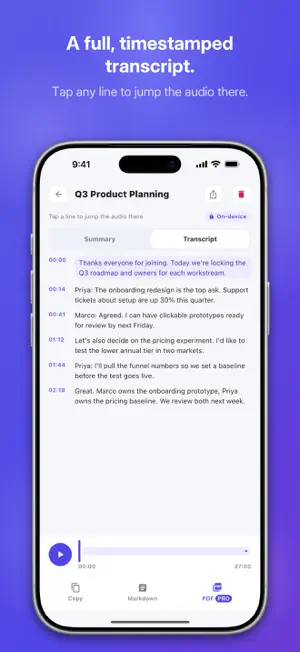
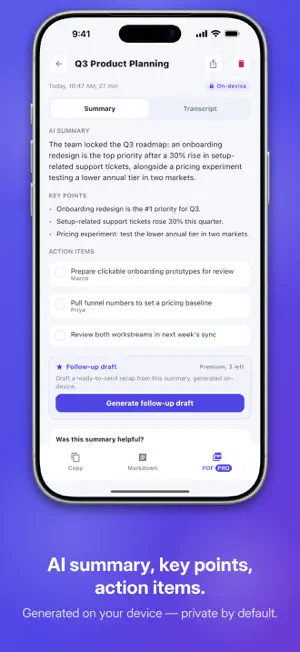
Record any meeting, call, or interview and get a clean transcript plus an AI summary with action items — all on your device. Your audio and transcripts never leave your phone. No bots join your calls, nothing uploads to the cloud. Most transcription apps send your conversations to their servers. Meeting Transcriber does the opposite: the recording, the transcription, and the AI summary all run locally, on your phone. Private by design, and it works on a plane. WHAT IT DOES • Record on the spot. Tap once to capture an in-person meeting, a phone call on speaker, a lecture, or a one-on-one — with a clear recording indicator the whole time. • Transcribe on your device. When you stop, your recording becomes a timestamped transcript. No server round-trip, no waiting on an upload. • AI summary + action items. Get a short summary, the key points, and an extracted to-do list, so you leave every meeting with the follow-ups already written. • Follow-up draft in one tap. Turn the summary into a ready-to-send recap message. • Tap to replay. Tap any line of the transcript and the audio jumps to that moment. • Search your history. Every recording, transcript, and summary stays on your phone and is fully searchable. • Export anywhere. Share as plain text, Markdown, or PDF, or copy to the clipboard. No watermark. PRIVATE BY DESIGN There is no account and no sign-up. Your audio and transcripts are processed entirely on-device and never uploaded — so the people in the room are the only ones who hear the conversation. The only thing that ever downloads is the AI model, once, the first time you use it. After that, recording and transcription work fully offline. WHY PEOPLE CHOOSE IT You run back-to-back meetings and lose the details. You take client calls and need the recap written before the next one starts. You record interviews and refuse to hand sensitive audio to a third party. Meeting Transcriber gives you the notes without the exposure — the phone-native, private alternative to bot-based, cloud-first tools. FREE, WITH PRO WHEN YOU NEED MORE Recording, on-device transcription, a key-points summary, full local history with search, and text or Markdown export are always free and unlimited. The premium AI actions — full summary with action items, the follow-up draft, and PDF export — are free up to a few per day. Need them all day? Pro removes the daily limit, with a monthly or yearly plan. No ads, no watermarks, no surprises. Built for freelancers, consultants, founders, students, researchers, and anyone who wants meeting notes without giving up their privacy. Download Meeting Transcriber and keep every word on your phone. SUBSCRIPTION DETAILS Meeting Transcriber Pro — auto-renewable subscription, billed monthly or yearly. The price is shown in your local currency before you confirm the purchase. Payment is charged to your Apple Account at confirmation of purchase. It renews automatically unless auto-renew is turned off at least 24 hours before the current period ends. Manage or cancel anytime in your Apple Account settings. Terms of Use (EULA): https://www.apple.com/legal/internet-services/itunes/dev/stdeula/ Privacy Policy: https://apps.swtlm.com/meeting-transcriber/privacy/
What’s new
Version 1.2.2 · Updated October 10, 2026
What's new in 1.2.2: Pro prices now show in your local currency, exactly as the App Store charges them, and the yearly plan's saving is worked out from those prices. Your recordings and settings stay as they are. Everything still happens on your device. Nothing uploads to the cloud.
App privacy
The developer, TLM Software Design, Inc., reported these privacy practices to Apple.
Data Not Linked to You
The following data, which may be collected but is not linked to your identity, may be used for the following purposes:
- Usage Data: Product Interaction
- Diagnostics: Crash Data, Performance Data
Used for: Analytics
Alternatives to Meeting Transcriber: AI Notes
Looking for apps like Meeting Transcriber: AI Notes? Here are 6 similar apps on the App Store.
-
 Kiln: AI Meeting Reports
-
 MeetBrief: AI Meeting Notes
-
 YIVIDIA: Live AI Assistant
-
 Je L'Notes
-
 VoiceCap: AI Meeting Recorder
-
 Lucy: Private Meeting Notes
| App | Rating | Price | Last updated | Compare |
|---|---|---|---|---|
| Meeting Transcriber: AI Notes | – | Free | October 10, 2026 | |
| Kiln: AI Meeting Reports | – | Free | Aug 26, 2026 | Compare |
| MeetBrief: AI Meeting Notes | – | Free | Aug 18, 2026 | Compare |
| YIVIDIA: Live AI Assistant | – | Free | Jul 14, 2026 | Compare |
| Je L'Notes | – | Free | May 7, 2026 | Compare |
| VoiceCap: AI Meeting Recorder | – | Free | Sep 14, 2026 | Compare |
| Lucy: Private Meeting Notes | – | Free | Oct 8, 2026 | Compare |