

PDF Fit: Compress PDFs
Octavian Petrescu Productivity iPhoneiPadiPod touch
PDF Fit: Compress PDFs is a free Productivity app for iPhone and iPad by Octavian Petrescu. Requires iOS 16.0. Updated October 16, 2026.
- Price
- Free
- on the App Store
- Size
- 4 MB
- Age 4+
- Updated
- Oct 16
- 2026 · v1.0.3
Screenshots
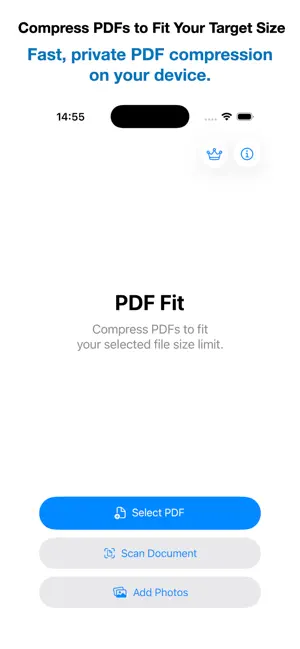
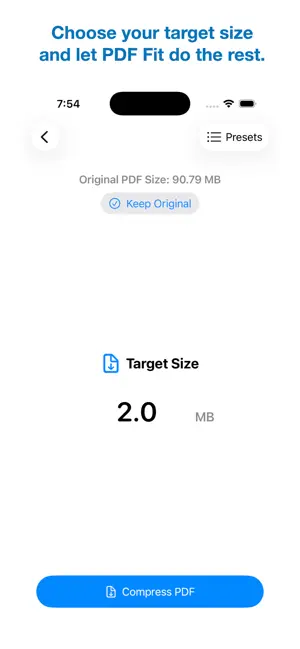

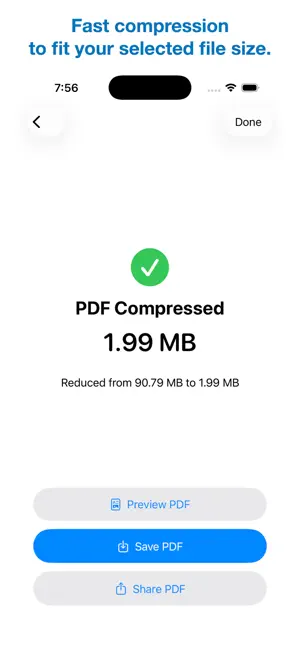
About PDF Fit: Compress PDFs
PDF Fit makes it easy to compress PDFs to fit your selected file size while preserving the best achievable document quality. Simply import or create a PDF, scan a paper document, or add photos, choose your target file size, and let PDF Fit do the rest. Intelligent Compression automatically analyzes each page to optimize compression for text, mixed content, and photos, delivering the best possible balance between quality and file size. Professional Scan automatically detects document boundaries, corrects perspective, optimizes readability, and creates each PDF page in the detected format while preserving content near the edges. Import photos and create clean, professional PDFs with automatic page sizing, preserved proportions, and document-aware optimization. Whether you need to reduce a PDF for online submission, email attachments, or file size limits, PDF Fit makes PDF compression fast, simple, and reliable. Built-in file size presets for email attachments, messaging apps, visa applications, job applications, and more make it easy to choose the right file size in seconds. Features • Compress PDFs to fit your selected file size limit • Intelligent Compression with the best possible document quality • Import or create PDFs • Scan paper documents using your camera • Import photos and create clean, professional PDFs with automatic page sizing • Advanced document detection • Automatic perspective correction • Automatic page format detection • Built-in file size presets • Preview PDFs before saving or sharing • Rename PDFs before saving or sharing • Save PDFs to Files • Share PDFs using the iOS Share Sheet • Fast, private on-device processing • No subscriptions Lifetime Pro Unlock unlimited exports of compressed PDFs, scanned documents, and PDFs created from Photos with a one-time purchase. No subscriptions. Privacy PDF Fit processes all documents entirely on your device. Your PDFs are never uploaded to external servers.
What’s new
Version 1.0.3 · Updated October 16, 2026
Improved app reliability.
App privacy
The developer, Octavian Petrescu, reported these privacy practices to Apple.
Data Not Collected
The developer does not collect any data from this app.
Alternatives to PDF Fit: Compress PDFs
Looking for apps like PDF Fit: Compress PDFs? Here are 6 similar apps on the App Store. The highest rated is PDF Compressor - size compress (5.0/5), and all 6 are free to download.
-
 PDF Compressor - size compress
5.0
PDF Compressor - size compress
5.0
-
 HumanFlow — AI Humanizer
-
 DocMint: PDF Maker & Scanner
-
 PDF Converter: Create PDF File
3.5
PDF Converter: Create PDF File
3.5
-
 PDF Compressor: Compress PDF .
-
 PDF Compressor • Compress PDF
5.0
PDF Compressor • Compress PDF
5.0
| App | Rating | Price | Last updated | Compare |
|---|---|---|---|---|
| PDF Fit: Compress PDFs | – | Free | October 16, 2026 | |
| PDF Compressor - size compress | 5.0 / 5 (1) | Free | Aug 29, 2026 | Compare |
| HumanFlow — AI Humanizer | – | Free | Sep 28, 2026 | Compare |
| DocMint: PDF Maker & Scanner | – | Free | Sep 11, 2026 | Compare |
| PDF Converter: Create PDF File | 3.5 / 5 (2) | Free | Jun 22, 2026 | Compare |
| PDF Compressor: Compress PDF . | – | Free | Dec 9, 2025 | Compare |
| PDF Compressor • Compress PDF | 5.0 / 5 (1) | Free | Jun 30, 2026 | Compare |