

PDF Compressor - size compress
TechCreative Lab LLC Productivity iPhoneiPadiPod touch
PDF Compressor - size compress is a free Productivity app for iPhone and iPad by TechCreative Lab LLC. Rated 5.0/5 from 1 ratings. Requires iOS 18.0.
- Rating
- 5.0
- 1 ratings
- Price
- Free
- on the App Store
- Size
- 26 MB
- Age 4+
- Updated
- Aug 29
- 2026 · v1.1
Screenshots


About PDF Compressor - size compress
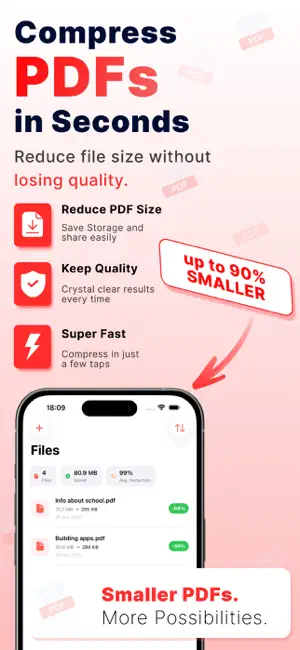
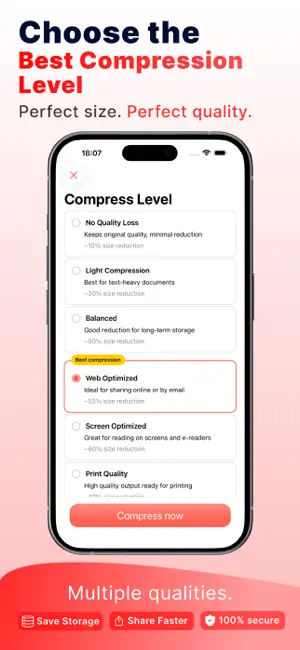
Compress PDF files in seconds — reduce file size by up to 90% without losing quality! PDF Compressor is the fastest and easiest way to compress PDF files right from your iPhone or iPad. Whether you need to email a large document, save storage space, or upload a PDF with a size limit, our powerful compression engine shrinks your files while keeping them crystal clear. WHY CHOOSE PDF COMPRESSOR? SUPER FAST COMPRESSION Compress your PDF files in just a few taps. Import, choose a quality level, and get your compressed PDF in seconds. UP TO 90% SMALLER Dramatically reduce PDF file size. Turn a 30 MB document into just a few hundred KB — perfect for email attachments, messaging apps, and online uploads. 6 COMPRESSION LEVELS Choose the perfect balance between size and quality: • No Quality Loss – keeps original quality (~10% reduction) • Light Compression – best for text-heavy documents (~30%) • Balanced – great for long-term storage (~50%) • Web Optimized – ideal for sharing online or by email (~55%) • Screen Optimized – perfect for reading on screens (~60%) • Print Quality – high-quality output ready for printing (~40%) BATCH COMPRESSION Compress multiple PDF files at the same time and save hours of work. ORGANIZE WITH FOLDERS Create folders to keep your work, school, and personal PDFs perfectly organized. Share an entire folder at once. MANAGE YOUR FILES Open, preview, share, rename, move, or delete your compressed PDFs anytime. Track your total storage saved and average reduction right from the home screen. YOUR PRIVACY MATTERS Your files are processed securely and deleted immediately after compression. We never store or access your documents. BEAUTIFUL DESIGN A clean, modern interface that automatically adapts to light & dark mode, with full support for the latest iOS design. PERFECT FOR: • Students – compress lecture notes, assignments, and study materials • Professionals – email contracts, reports, and presentations without size limits • Everyone – free up storage space on your device and in the cloud HOW IT WORKS: 1. Import your PDF files from Files, or any app 2. Choose your compression level 3. Tap "Compress now" and you're done! Your compressed PDFs are ready to share, save, or organize in seconds. PREMIUM SUBSCRIPTION PDF Compressor offers optional in-app purchases and auto-renewable subscriptions to unlock unlimited compressions and premium features. • Payment will be charged to your Apple ID account at confirmation of purchase. • Subscriptions automatically renew unless canceled at least 24 hours before the end of the current period. • Your account will be charged for renewal within 24 hours prior to the end of the current period. • You can manage and cancel your subscriptions anytime in your App Store account settings after purchase. • Any unused portion of a free trial period will be forfeited when you purchase a subscription. Privacy Policy: https://techcreativelab.com/apps/pdf-compressor/privacy.html Terms of Use: https://techcreativelab.com/apps/pdf-compressor/terms.html Download PDF Compressor now and make your PDFs smaller, faster, and easier to share!
What’s new
Version 1.1 · Updated August 29, 2026
- Fixed important errors and app improvements - Faster PDF compression
App privacy
The developer, TechCreative Lab LLC, reported these privacy practices to Apple.
Data Not Linked to You
The following data, which may be collected but is not linked to your identity, may be used for the following purposes:
- Identifiers: Device ID
- Usage Data: Product Interaction
Used for: Analytics, App Functionality
Alternatives to PDF Compressor - size compress
Looking for apps like PDF Compressor - size compress? Here are 6 similar apps on the App Store. The highest rated is PDF Compression (5.0/5), and all 6 are free to download.
-
 Shrink PDF: Compress PDF Files
-
 PDF Compression
5.0
PDF Compression
5.0
-
 PDF Compressor-Compress PDF
4.7
PDF Compressor-Compress PDF
4.7
-
 PDF Converter.ㅤ
1.0
PDF Converter.ㅤ
1.0
-
 Compress PDF reduce pdf size
4.5
Compress PDF reduce pdf size
4.5
-
 UniPDF: PDF Converter, Scanner
| App | Rating | Price | Last updated | Compare |
|---|---|---|---|---|
| PDF Compressor - size compress | 5.0 / 5 (1 rating) | Free | August 29, 2026 | |
| Shrink PDF: Compress PDF Files | – | Free | Oct 11, 2026 | Compare |
| PDF Compression | 5.0 / 5 (5) | Free | Apr 7, 2026 | Compare |
| PDF Compressor-Compress PDF | 4.7 / 5 (152) | Free | Aug 19, 2026 | Compare |
| PDF Converter.ㅤ | 1.0 / 5 (1) | Free | Jul 30, 2026 | Compare |
| Compress PDF reduce pdf size | 4.5 / 5 (37) | Free | Sep 15, 2025 | Compare |
| UniPDF: PDF Converter, Scanner | – | Free | Oct 20, 2026 | Compare |