

Instant Invoice: Avo
DEDUSHKA DEVELOPMENT - FZCO Finance iPhoneiPadiPod touch
Instant Invoice: Avo is a free Finance app for iPhone and iPad by DEDUSHKA DEVELOPMENT - FZCO. Rated 5.0/5 from 1 ratings. Requires iOS 17.0.
- Rating
- 5.0
- 1 ratings
- Price
- Free
- on the App Store
- Size
- 15 MB
- Age 4+
- Updated
- Nov 1
- 2026 · v1.1
Screenshots


About Instant Invoice: Avo
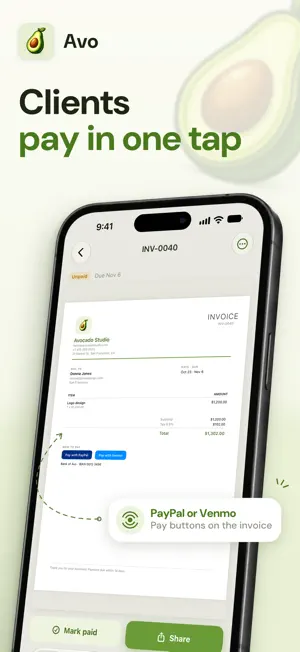
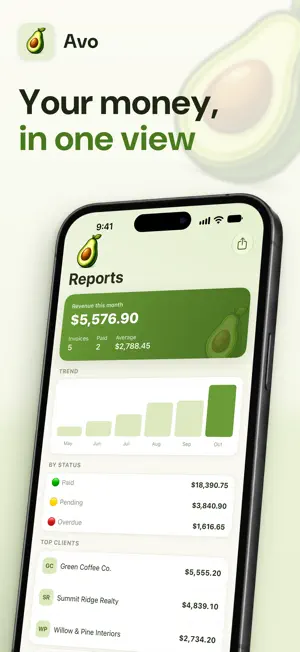
Invoice your customer before you've left the driveway. Avo turns a finished job into a professional PDF invoice in about a minute. No account to create, no card to enter, nothing standing between you and getting paid. It's built for the people who do the work and send the bill themselves — contractors, electricians, plumbers, HVAC techs, cleaners, landscapers, mechanics, photographers, and anyone else running a small business out of their phone. HOW IT WORKS Pick a client. Add what you did. Send. Avo remembers your clients and the things you usually charge for, so the second invoice takes half the time of the first and the tenth takes seconds. Your logo, address, tax rate and payment details are entered once and land on every document after that. WHAT YOU GET • Invoices, estimates and receipts that look like a real business sent them • A template for your trade: HVAC, plumbing, electrical, handyman, contracting, construction, roofing, painting, cleaning, landscaping, lawn care, auto repair, mechanic, photography — the usual line items, terms and deposit already filled in • Deposits: ask for a percentage up front on the estimate, and the invoice shows Deposit received and Balance due • A numbered receipt in one tap once an invoice has been paid • Estimates that turn into invoices in one tap when the client says yes • A proper PDF you can send through Messages, Mail, WhatsApp, or save to Files • Saved clients, saved items, saved prices — no retyping • Your logo and business details on every document • A running view of who owes you, what's overdue, and what's been paid • Tax applied only to the lines you mark taxable, so the totals add up • PayPal and Venmo links your client can tap straight from the PDF • Clients imported from your address book, without handing over your contacts • Text that follows your iPhone's text size, and a side-by-side view on wide screens • English and Spanish, with the language of the document set separately from the language of the app NO SIGN-UP WALL Most invoice apps want an email, a password and a card before they show you anything. Avo doesn't. Open it and invoice. There is no account, because there is nothing to log into. YOUR INVOICES STAY CLEAN Every plan renders a full-quality PDF. We never put a watermark or an advert on the document your client sees — that document is your reputation, not our billboard. Premium buys volume, not dignity. IT STAYS YOURS Your invoices, clients and business details live on your device and sync through your own private iCloud account, so a new phone picks up where the old one left off. We keep no copy of your documents and cannot read them. START WITHOUT A CARD Your first document is on us — enough to send a real invoice to a real client and judge the app properly. After that, Avo Premium lifts the limit. AVO PREMIUM • Unlimited invoices, estimates and receipts • Income reports and CSV export for your accountant • Everything else you were already getting, because we don't take features away Avo Premium is an auto-renewing subscription: • Yearly — $59.99 per year, after a 7-day trial • Monthly — $9.99 per month, after a 3-day trial • Weekly — $3.99 per week Payment is charged to your Apple Account when you confirm the purchase. It renews automatically unless cancelled at least 24 hours before the current period ends. You can manage or cancel it any time in Settings → Apple Account → Subscriptions, or from inside the app. Terms of Use: https://www.apple.com/legal/internet-services/itunes/dev/stdeula/ Privacy Policy: https://avoinvoice.com/privacy.html
What’s new
Version 1.1 · Updated November 1, 2026
Receipts and deposits • Mark an invoice paid, then issue a numbered receipt in one tap — with the amount received, how it was paid and the invoice it belongs to. • Ask for a deposit on an estimate, as a percentage or a fixed amount. The invoice that follows shows Deposit received and Balance due, and the PDF adds up the way the client expects. • A receipt for the deposit alone, when that's what you were paid. A template for your trade • Fifteen trades arrive with the line items, payment terms and deposit the work usually needs: HVAC, plumbing, electrical, handyman, contracting, construction, roofing, painting, cleaning, landscaping, lawn care, auto repair, mechanic, photography, and general service work. • Pick yours during setup or any time in More, and your next document starts half-written. Español • The whole app now speaks Spanish, from onboarding to the paywall. • The language of the document is a separate setting: work in Spanish and still send your client an invoice in English, or the other way round. Your choice applies to every PDF — Factura, Presupuesto, Recibo, Vencimiento, Subtotal, Impuesto, Total, Pagado. Made for every screen • On the inner screen of iPhone Duo, and on larger iPhones held sideways, your documents and the PDF sit side by side. • On the iPhone Duo cover screen, search and buttons stay in reach next to the side bar. • Text throughout the app follows the text size you set on your iPhone. Also in this version • Edits show up in the PDF preview straight away, and the preview is faster. • Converting an estimate opens the new invoice, not the old estimate. • The Paid swipe behaves exactly like Mark paid in the menu. • Sharing that you cancel is no longer counted as sent. • CSV export keeps the columns straight when a client's name has quotes or commas, and opens correctly in Excel. • Share Avo carries a real App Store link, and Rate Avo in More goes straight to the review page. • A purchase that needs approval from a family organiser now says so, instead of looking like an error.
App privacy
The developer, DEDUSHKA DEVELOPMENT - FZCO, reported these privacy practices to Apple.
Data Not Linked to You
The following data, which may be collected but is not linked to your identity, may be used for the following purposes:
- Purchases: Purchase History
- Identifiers: Device ID
- Usage Data: Product Interaction
- Location: Coarse Location
- Diagnostics: Other Diagnostic Data, Crash Data, Performance Data
Used for: Developer’s Advertising or Marketing, Analytics, App Functionality
Alternatives to Instant Invoice: Avo
Looking for apps like Instant Invoice: Avo? Here are 6 similar apps on the App Store. The highest rated is Donation Basket (5.0/5), and all 6 are free to download.
-
 Donation Basket
5.0
-
 Glazd Insurance
4.1
-
 Revenued
3.8
-
 Ejara
4.8
-
 Lydia AI Budgeting Coach
4.9
-
 TFed CU
4.9
| App | Rating | Price | Last updated | Compare |
|---|---|---|---|---|
| Instant Invoice: Avo | 5.0 / 5 (1 rating) | Free | November 1, 2026 | |
| Donation Basket | 5.0 / 5 (3) | Free | Oct 27, 2026 | Compare |
| Glazd Insurance | 4.1 / 5 (9) | Free | Oct 6, 2026 | Compare |
| Revenued | 3.8 / 5 (42) | Free | Mar 30, 2026 | Compare |
| Ejara | 4.8 / 5 (4) | Free | Oct 8, 2026 | Compare |
| Lydia AI Budgeting Coach | 4.9 / 5 (24) | Free | Dec 5, 2025 | Compare |
| TFed CU | 4.9 / 5 (1,591) | Free | Oct 18, 2026 | Compare |