

SnapSelect: Find Camera Photos
Sunabalab Corp. Utilities iPhoneiPadiPod touch
SnapSelect: Find Camera Photos is a free Utilities app for iPhone and iPad by Sunabalab Corp. Requires iOS 17.0. Updated September 8, 2026.
- Price
- Free
- on the App Store
- Size
- 6 MB
- Age 4+
- Updated
- Sep 8
- 2026 · v1.3.0
Screenshots


About SnapSelect: Find Camera Photos
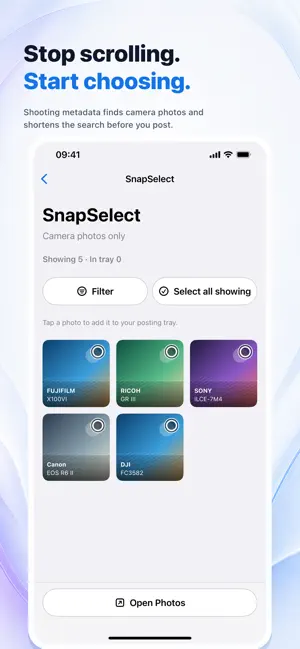
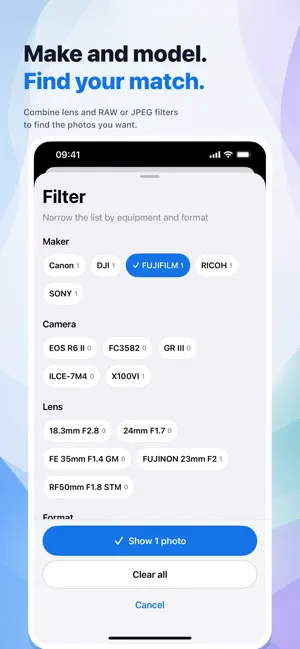
Stop scrolling. Start choosing. Camera shots imported to iPhone can get lost among phone photos and screenshots. SnapSelect checks EXIF and other shooting metadata on your device to find photos from dedicated cameras. BUILD YOUR POSTING TRAY • Filter by maker, camera model, lens, and formats such as RAW / JPEG • Tap a photo to add it to or remove it from the posting tray • Select or deselect all photos currently showing • Review your tray and add only your picks to the SnapSelect album in Photos HOW TO USE 1. Allow photo access and tap “Select now” to scan 2. Open the gallery with “Pick posting candidates” on Home 3. Filter and tap photos, then open the posting tray 4. Add your selected photos to Photos from the tray TRY YOUR LIBRARY FIRST Searching, filtering, picking photos for the tray, correcting classifications, and “Remember this camera” all work without a purchase. ONE PURCHASE FOR ADDING TO PHOTOS The only action requiring purchase is adding your selected photos to the SnapSelect album in Photos. The existing non-consumable purchase unlocks it; there is no subscription. The app displays the current price supplied by the store. Already purchased? Use “Restore purchase” in Settings or on the purchase screen. REMEMBER THIS CAMERA Review and correct photos that could not be classified. When an unknown photo has a maker and model, “Remember this camera” saves that combination as an on-device rule for photos from the same maker and model. Remove saved rules in Settings. CLASSIFIED ON YOUR DEVICE Photos, thumbnails, and EXIF shooting metadata are not sent to external servers for classification. Your tray and remembered-camera rules are stored on device. SnapSelect never deletes, moves, or edits your originals. Adding photos to an album does not duplicate their files. PLEASE NOTE Editing, conversion, compression, transfer, or cloud sync may remove metadata and affect classification. Check photos before publishing or sharing. With limited photo access, SnapSelect processes only the photos you allow in iOS.
What’s new
Version 1.3.0 · Updated September 8, 2026
Gather posting candidates in a tray and take only your selected photos to the next step. Filter by maker, camera model, lens, or RAW / JPEG. For unknown photos, choose “Remember this camera” to classify the same maker and model using an on-device rule. Photos and shooting metadata are still never sent off device for classification.
App privacy
The developer, Sunabalab Corp., reported these privacy practices to Apple.
Data Not Linked to You
The following data, which may be collected but is not linked to your identity, may be used for the following purposes:
- Diagnostics: Crash Data, Performance Data, Other Diagnostic Data
Used for: Analytics, App Functionality
Alternatives to SnapSelect: Find Camera Photos
Looking for apps like SnapSelect: Find Camera Photos? Here are 6 similar apps on the App Store. The highest rated is Pic Prune: AI Photo Cleaner (5.0/5), and all 6 are free to download.
-
 AreaCalc Pro: Sq Ft Calculator
-
 Smelter
-
 Pic Prune: AI Photo Cleaner
5.0
Pic Prune: AI Photo Cleaner
5.0
-
 ClearVoice Text to Speech
-
 ScrapLog
-
 Photo Privacy: GPS Cleaner
| App | Rating | Price | Last updated | Compare |
|---|---|---|---|---|
| SnapSelect: Find Camera Photos | – | Free | September 8, 2026 | |
| AreaCalc Pro: Sq Ft Calculator | – | Free | Oct 17, 2026 | Compare |
| Smelter | – | Free | Oct 12, 2026 | Compare |
| Pic Prune: AI Photo Cleaner | 5.0 / 5 (1) | Free | Sep 14, 2026 | Compare |
| ClearVoice Text to Speech | – | Free | Aug 19, 2026 | Compare |
| ScrapLog | – | Free | Sep 29, 2026 | Compare |
| Photo Privacy: GPS Cleaner | – | Free | Sep 2, 2026 | Compare |