

Tritter – Crypto Piggy Bank
RTDURA LLC Finance iPhoneiPadiPod touch
Tritter – Crypto Piggy Bank is a free Finance app for iPhone and iPad by RTDURA LLC. Requires iOS 17.0. Updated September 12, 2026.
- Price
- Free
- on the App Store
- Size
- 25 MB
- Age 12+
- Updated
- Sep 12
- 2026 · v2.7
Screenshots


About Tritter – Crypto Piggy Bank
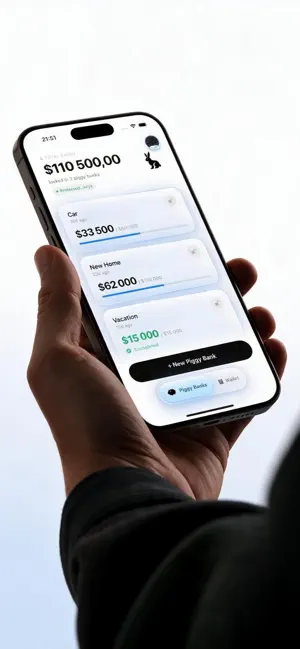
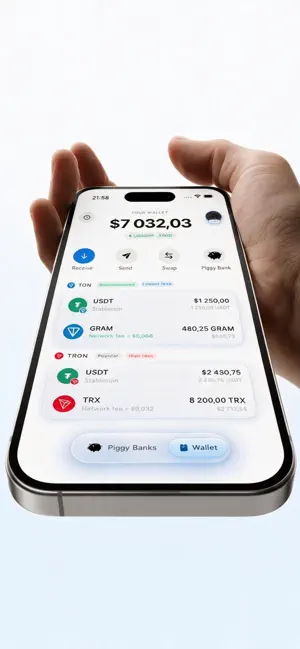
Tritter is a non-custodial crypto savings app — a digital piggy bank for USDT, TON and TRON. Set a savings goal, lock your coins, and let a smart contract keep you from spending them early. SAVE CRYPTO WITH A GOAL, NOT WILLPOWER Choose an amount and a target date, then lock USDT or TON into a piggy bank. From that moment the smart contract — not you, not us — decides when the money can leave. There is no "just this once" button hidden in a menu. To get your savings out early you have to consciously break the lock, and Tritter makes sure that never happens by accident. MULTIPLE SAVINGS GOALS, TRACKED SEPARATELY Create as many piggy banks as you want, each with its own goal, deadline and coin. Saving for a car, a trip, an emergency fund, a house deposit, a wedding — or just trying to stop your paycheck from vanishing into food delivery? Give every goal its own locked piggy bank and watch each one fill up. NON-CUSTODIAL WALLET: YOUR KEYS, YOUR COINS Tritter is a true self-custody crypto wallet. When you set up your wallet you get a 24-word recovery phrase, generated on your device — it never leaves it, and we never see it. Your private keys stay in the device Keychain, protected by Face ID. No account to hack, no custodian to trust, no company standing between you and your money. Write your seed phrase down and keep it safe: it is the only way back into your wallet if you change device. USDT SAVINGS ON TON AND TRON Hold Tether (USDT) savings on the TON blockchain or on TRON (TRC-20) — whichever chain you already use. Same discipline, same self-custody, your choice of network. You can also save in Toncoin itself, so your stablecoin and your coin savings live side by side in one wallet. SAVINGS PROGRESS ON YOUR HOME SCREEN Add a Tritter widget to see how close you are to each goal without opening the app. A small nudge that matters when the target date is still months away. EVERYTHING VERIFIABLE ON-CHAIN Every deposit, withdrawal and contract interaction is tracked in one place, with direct links to a public block explorer so you can check it yourself. Your money's history lives on the blockchain, not only on our servers. OPTIONAL TON STAKING Coin piggy banks can stake through a third-party TON staking provider, so the balance you are not touching anyway can keep working while you wait for your goal date. Staking rates come from the network, change daily and are never guaranteed — Tritter simply gives you the option. SWAP INSIDE THE APP Need to convert GRAM to USDT? Do it right inside Tritter, non-custodially, with the full quote and price impact shown clearly before you sign anything. No separate exchange, no copying wallet addresses into a browser tab. CRYPTO INHERITANCE Name an heir for any piggy bank, recorded directly in the smart contract, so your savings have a plan even if something happens to you. A small feature answering a question most savings apps never ask. SPEAKS YOUR LANGUAGE Tritter is localized into dozens of languages, with proper right-to-left layout for Arabic, Hebrew and Urdu — because a saving habit should not depend on reading a second language fluently. WHO TRITTER IS FOR If you have ever opened a savings account and quietly drained it a month later, if "temporary" withdrawals have become a pattern, or if you simply want to hold USDT or TON toward a goal without the temptation of a one-tap sell button, Tritter is built for exactly that. It is not a trading app, not a yield farm, and not trying to be your everyday wallet. It does one thing deliberately: it makes spending the money you promised yourself to keep the hard part — so saving does not have to be. No ads, no feeds, no price charts begging you to trade. Just your goals, your coins, and a lock you chose yourself. Your keys, your coins, your rules.
What’s new
Version 2.7 · Updated September 12, 2026
You no longer need to already own crypto to start saving. • Buy USD₮ or GRAM with a bank card, right from the piggy bank screen. The purchase goes through Mercuryo, and the coins land in your own wallet. • Creating a piggy bank is now a short step-by-step flow instead of one long form. • The keyboard closes when you tap anywhere outside the field. • Piggy banks in USD₮ on TON need less GRAM on hand for network fees. • Fixed a balance in Wallet that could stay grey until the app was restarted. • Fixed the piggy bank screen that would not stay scrolled.
App privacy
The developer, RTDURA LLC, reported these privacy practices to Apple.
Data Linked to You
The following data, which may be collected and linked to your identity, may be used for the following purposes:
- Financial Info: Other Financial Info
- Contact Info: Name
- User Content: Photos or Videos, Customer Support
- Identifiers: User ID
Used for: App Functionality
Data Not Linked to You
The following data, which may be collected but is not linked to your identity, may be used for the following purposes:
- Usage Data: Product Interaction
Used for: Analytics
Alternatives to Tritter – Crypto Piggy Bank
Looking for apps like Tritter – Crypto Piggy Bank? Here are 6 similar apps on the App Store.
-
 CoinKeep: Crypto Wallet
-
 别买了|冲动消费冷静期
-
 Magnus Pay
-
 Butobe Finance Wallet
-
 République
-
 BudgetBuddy: Money Skills
| App | Rating | Price | Last updated | Compare |
|---|---|---|---|---|
| Tritter – Crypto Piggy Bank | – | Free | September 12, 2026 | |
| CoinKeep: Crypto Wallet | – | Free | Oct 6, 2026 | Compare |
| 别买了|冲动消费冷静期 | – | Free | Sep 2, 2026 | Compare |
| Magnus Pay | – | Free | May 28, 2026 | Compare |
| Butobe Finance Wallet | – | Free | Aug 20, 2026 | Compare |
| République | – | Free | Sep 11, 2024 | Compare |
| BudgetBuddy: Money Skills | – | Free | Oct 8, 2026 | Compare |