

Doodle Fonts
CARLOS FERNANDEZ PLAZA Graphics & Design iPad
Doodle Fonts is a paid Graphics & Design app for iPad by CARLOS FERNANDEZ PLAZA. Rated 5.0/5 from 3 ratings. Requires iOS 17.0. Updated September 7, 2026.
- Rating
- 5.0
- 3 ratings
- Price
- 8.99 USD
- on the App Store
- Size
- 37 MB
- Age 4+
- Updated
- Sep 7
- 2026 · v1.4
Screenshots


About Doodle Fonts
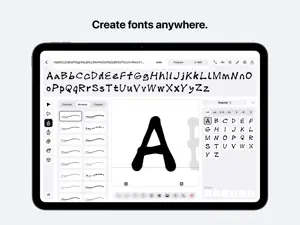
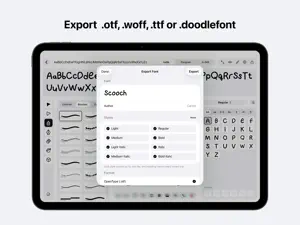
Doodle Fonts turns your handwriting into real, installable fonts. Draw every letter yourself with Apple Pencil, watch your alphabet come to life as you go, and install the finished font right on your iPad — ready to use in any app that supports custom fonts. DRAW - More than 30 brushes: smooth, ink, calligraphy, chalk, spray, sketchy, pixel, rope, chain, bristle, felt tip, crayon, brush pen, arrow, stitch and more - Create your own custom brushes — draw a tip and the app turns it into a stamp brush - Pressure and tilt support, QuickShape snapping, mirror mode, and a vector pen for precise letterforms - Trace over template letters, a photo, or one of the four built-in starter fonts REFINE - Live preview that rewrites itself in your font as you draw - Automatic spacing, adjustable side bearings, kerning pairs, and global letter spacing - Up to six alternate versions per letter, exported as real OpenType alternates - Ligatures and custom characters — add symbols beyond the alphabet WRITE ANY LANGUAGE - 20 character sets, from English and Spanish to Turkish, Vietnamese, Greek and Ukrainian - Korean the way a foundry does it: draw 56 pieces and all 11,172 syllables compose themselves — or draw the blocks by hand, 2,350 of them, most used first - Every character Japanese and Chinese use: 3,336 kanji, 4,220 simplified hanzi, 6,040 traditional, ordered by how often you'll meet them MAKE IT MOVE - Type a word, pick a few of your fonts, and watch the letters swap, wave, breathe, shake, drop, type on, or draw themselves stroke by stroke - Export as video up to 4K, a looping GIF, or a see-through GIF or MOV for laying over anything EXPORT AND INSTALL - Install fonts directly on your iPad with one tap - Export OTF for desktop and print, WOFF for the web, or both at once - Share editable .doodlefont files between iPads or with the web app - Your author name ships inside the font file as its designer - Export a family as a variable font — one file with a weight slider - Arabic, Persian and Urdu with joined letter shapes and vowel marks, written right to left KEEP GOING - A letter of the day and a weekly word challenge keep your streak alive - A map of every day you drew this year, so a streak is something you can see - Earn badges as your library grows - Share alphabet posters and specimen cards of your fonts - Automatic iCloud backup of every font as an editable file The interface is available in English, Spanish, German, Russian, Japanese, Korean and Simplified Chinese. Doodle Fonts collects no data. Your fonts are yours: they live on your iPad and in your iCloud, and they never touch anyone else's server. Made for iPad and Apple Pencil by an independent motion designer. Questions or ideas? Write to [email protected].
What’s new
Version 1.4 · Updated September 7, 2026
- Shape Studio — draw anything once and it becomes a shape tool: drag it out into any box, filled or stroked, like the built-ins - Shapes now live in their own gallery beside the controls, with a live preview as you tune them - Hebrew joins the font character set - Two new brushes: a fine gel pen with real ink weight, and Jitter — a line that never sits still - Korean exports are dramatically faster and lighter — all 11,172 syllables compose smoothly on any iPad - Everything now fits comfortably on iPad mini, and copy/paste share one smart button
App privacy
The developer, CARLOS FERNANDEZ PLAZA, reported these privacy practices to Apple.
Data Not Collected
The developer does not collect any data from this app.
Alternatives to Doodle Fonts
Looking for apps like Doodle Fonts? Here are 6 similar apps on the App Store. The highest rated is Pixquare - Pixel Art Studio (4.8/5), and 4 of the 6 are free to download.
-
 Resprite: pixel art studio
4.7
Resprite: pixel art studio
4.7
-
 Head Model Studio - Art Study
4.6
Head Model Studio - Art Study
4.6
-
 Pixquare - Pixel Art Studio
4.8
Pixquare - Pixel Art Studio
4.8
-
 ToonSquid
4.6
ToonSquid
4.6
-
 Nomad Sculpt
4.8
Nomad Sculpt
4.8
-
 Affinity Designer 2 for iPad
4.7
Affinity Designer 2 for iPad
4.7
| App | Rating | Price | Last updated | Compare |
|---|---|---|---|---|
| Doodle Fonts | 5.0 / 5 (3 ratings) | 8.99 USD | September 7, 2026 | |
| Resprite: pixel art studio | 4.7 / 5 (1,473) | Free | Oct 11, 2026 | Compare |
| Head Model Studio - Art Study | 4.6 / 5 (2,464) | Free | Oct 28, 2026 | Compare |
| Pixquare - Pixel Art Studio | 4.8 / 5 (3,285) | Free | Oct 26, 2026 | Compare |
| ToonSquid | 4.6 / 5 (1,334) | 9.99 USD | Sep 2, 2026 | Compare |
| Nomad Sculpt | 4.8 / 5 (14,521) | 19.99 USD | Oct 23, 2026 | Compare |
| Affinity Designer 2 for iPad | 4.7 / 5 (4,796) | Free | Sep 23, 2025 | Compare |
Compare Doodle Fonts with the top alternatives: ratings, updates, ASO score and keyword gaps →