

OneScan: PDF & ID Scanner
Freedom Dimension (shenzhen) Technology Co., Ltd Productivity iPhoneiPadiPod touch
OneScan: PDF & ID Scanner is a free Productivity app for iPhone and iPad by Freedom Dimension (shenzhen) Technology Co., Ltd. Rated 5.0/5 from 1 ratings.
- Rating
- 5.0
- 1 ratings
- Price
- Free
- on the App Store
- Size
- 33 MB
- Age 4+
- Updated
- Oct 21
- 2026 · v2.3
Screenshots


About OneScan: PDF & ID Scanner
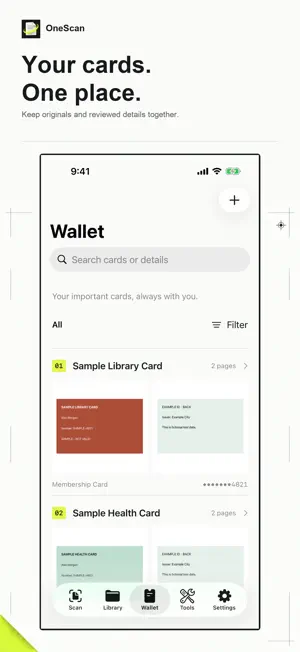
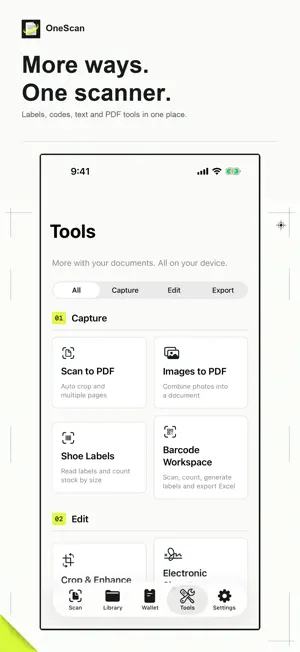
OneScan brings document scanning, a card wallet and practical PDF tools together on iPhone and iPad. Choose from 19 interface languages. SCAN AND ORGANIZE Scan multiple pages, import photos or PDFs, and find documents by name, saved information or recognized text. Select multiple documents to favorite, move to a folder or send to Recently Deleted. Restore deleted documents before permanently removing them. CARDS AND CONTACTS Save IDs, passports, driver's licenses, social security cards, bank cards, receipts and custom records. Start with a photo-import or camera choice, capture each side separately, review suggested details and export A4 copies. Review recognized contact details and export a vCard. Recognition results always need checking against the source. TEXT AND TABLES Automatic on-device OCR makes scans searchable. The selected app language is a recognition hint; available OCR languages depend on iOS. Copy text, create searchable PDFs or export recognized text to Word (DOCX). Word exports text rather than the original page layout. Correct table cells, keep wrapped text in one cell and export formatted Excel (XLSX) with borders, wrapping and an optional header. CSV exports data without styling; original fonts, colors and merged cells are not reproduced. PDF AND IMAGE TOOLS Export PDF, JPEG or PNG, and save page images directly to Photos. Add signatures or text/image watermarks, merge scans, adjust perspective and contrast, organize pages, compress PDFs to a target size and lock the library with Face ID. Standard PDF import creates scanned copies, up to 40 pages or 80 MB. PDF Pages & Passwords works separately with original PDFs: extract selected pages, or export password-protected and unlocked copies after providing a valid password, up to 200 pages or 80 MB. Original files stay unchanged. BOOKS AND RECEIPTS Split book spreads in your chosen reading order, flatten a curved page on device, clean paper backgrounds and reduce fine print or screen patterns. Compare with the original; pattern reduction can soften small text. Review receipt details, keep totals separate by currency and export Excel or CSV. Receipt recognition is a suggestion, not a verified accounting record. LABELS AND BARCODES Review shoe-box style codes, colors, sizes and barcodes, set quantities, view size statistics and export CSV. Scan QR codes and barcodes, count stock, check expected-item lists, import CSV/text and export Excel or CSV. Generate QR and Code 128 labels as printable PDFs or images, and keep local workspace backups. Check recognized labels and counts before saving; unprinted size systems stay unspecified. Scanning, automatic text search, card storage, barcode and shoe-label workspaces, A4 copies and standard exports are free. Pro unlocks advanced document tools. Pro Lifetime is a one-time purchase with no renewal. Existing purchases remain valid; restore them from membership settings. Check the localized Apple price before confirmation. No account, ads, third-party tracking or document upload. Documents remain on device until you delete or export them. Optional first-party analytics uses a random app-scoped identifier and never includes documents, images, recognized text or file names. Turn it off or reset the identifier in Settings. Terms of Use: https://oneapps.studio/terms
What’s new
Version 2.3 · Updated October 21, 2026
OneScan now supports 19 interface languages. • Localized tools, membership explanations, privacy notices and system permission prompts. • Switch languages immediately in Settings; improved right-to-left layout and regional language matching. • OCR prioritizes your chosen language when the installed iOS version supports it. • Select multiple documents to favorite, move or delete; restore items from Recently Deleted. • Save document page images directly to Photos. Your documents and existing purchases remain available.
App privacy
The developer, Freedom Dimension (shenzhen) Technology Co., Ltd, reported these privacy practices to Apple.
Data Linked to You
The following data, which may be collected and linked to your identity, may be used for the following purposes:
- Purchases: Purchase History
- Identifiers: Device ID
- Usage Data: Product Interaction
- Diagnostics: Performance Data, Other Diagnostic Data
- Other Data: Other Data Types
- Location: Coarse Location
Used for: Analytics, App Functionality
Alternatives to OneScan: PDF & ID Scanner
Looking for apps like OneScan: PDF & ID Scanner? Here are 6 similar apps on the App Store. The highest rated is OWrite Pro (5.0/5), and 4 of the 6 are free to download.
-
 EverPass: Expiry Reminder
-
 WorkplaceLog
-
 1Lens
1Lens
-
 ShiftFlow: Rotation Calendar
-
 OWrite Pro
5.0
OWrite Pro
5.0
-
 Fokuso: Focus Timer & Pomodoro
| App | Rating | Price | Last updated | Compare |
|---|---|---|---|---|
| OneScan: PDF & ID Scanner | 5.0 / 5 (1 rating) | Free | October 21, 2026 | |
| EverPass: Expiry Reminder | – | Free | Oct 12, 2026 | Compare |
| WorkplaceLog | – | Free | Oct 13, 2026 | Compare |
| 1Lens | – | 0.99 USD | Oct 19, 2026 | Compare |
| ShiftFlow: Rotation Calendar | – | Free | Oct 18, 2026 | Compare |
| OWrite Pro | 5.0 / 5 (3) | Free | Oct 20, 2026 | Compare |
| Fokuso: Focus Timer & Pomodoro | – | 19.99 USD | Sep 15, 2026 | Compare |