

Transfer Assistant
晖 姚 Productivity iPhoneiPadiPod touch
Transfer Assistant is a free Productivity app for iPhone and iPad by 晖 姚. Rated 5.0/5 from 4 ratings. Requires iOS 15.6. Updated October 17, 2026.
- Rating
- 5.0
- 4 ratings
- Price
- Free
- on the App Store
- Size
- 17 MB
- Age 4+
- Updated
- Oct 17
- 2026 · v1.2
Screenshots



About Transfer Assistant
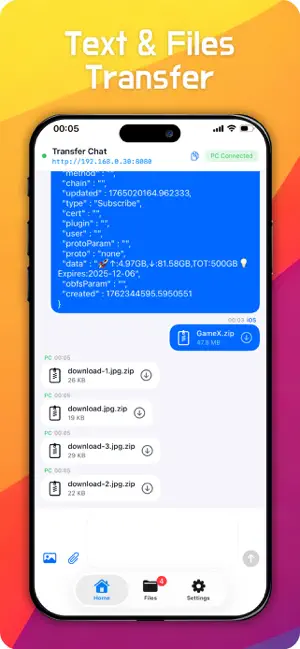
Transfer Assistant|iPhone ↔ PC Wireless File Transfer. Tired of tangled USB cables, slow cloud storage speeds and file size limits of social apps? Designed exclusively for cross-platform transmission between iPhone and PC, Transfer Assistant requires no PC installation. You can transfer documents, photos, 4K videos, archives and texts at high speed simply via a browser, with secure and fast peer-to-peer local network connection. 3 Simple Steps for Instant Connection 1. Install and launch the app on your iPhone to generate a unique access link 2. Open any browser (Chrome, Edge, Firefox) on your PC device, enter the link and connect in 1 second 3. Share files, images and texts like instant messaging. All files from PC will be automatically saved to the exclusive folder without manual operation Core Features No PC Software Required: Works perfectly with only a browser, even on restricted office computers without administrator privileges No File Size/Quantity Limits: Transfer large files such as 1GB HD videos and oversized archives without restrictions Private Local Network Transfer: Peer-to-peer local transmission without third-party cloud servers. Encrypted sessions fully protect your data privacy Chat-Style Interaction: Drag-and-drop files, paste screenshots and send texts in real time with zero learning curve Automatic File Archiving: All transferred files are automatically categorized in a dedicated folder for one-click preview, sharing and export Full Format Compatibility: Supports all mainstream formats including PDF, Word, Excel, images, 4K videos and ZIP archives Ultra-Fast LAN Speed: Transfer speed up to 20–80MB/s. A 1GB video can be transferred in tens of seconds, far faster than Bluetooth, cloud storage and social apps Application Scenarios Office Workers: Transmit reports, whiteboard photos and documents cross-device for convenient on-the-go office work Students: Realize two-way transmission of papers and handwritten notes, completely replacing U-disks Content Creators: Transfer original iPhone HD footage to PC for lossless editing, and preview works on mobile quickly Daily Family Use: Batch back up photos without iCloud paid subscriptions, support one-click download for family computers Advantages Over Traditional Tools Compared with USB cables, Bluetooth, social apps and cloud storage, our tool requires no PC installation, has no file limits, supports automatic archiving and two-way text transmission, and adopts local encryption to balance convenience, speed and security. FAQ Is no PC software really required? Yes. Only a mainstream browser is needed, compatible with restricted office devices without administrator rights. Do iPhone and PC need the same WiFi? The same WiFi ensures optimal transmission speed. You can also enable your phone hotspot for connection if no shared network is available. Where are the transferred files saved? All files are automatically stored in the exclusive Transfer Assistant folder for preview and sharing at any time. Is the transmission secure? All transmissions are peer-to-peer without cloud uploads. Each session is independently encrypted and invalidated after closing, avoiding data leakage. Privacy Policy: https://transfer.mxcode.com/privacy.html Terms and Conditions: https://www.apple.com/legal/internet-services/itunes/dev/stdeula/
What’s new
Version 1.2 · Updated October 17, 2026
- Adjusted feedback logic - Fixed several known issues
App privacy
The developer, 晖 姚, reported these privacy practices to Apple.
Data Not Linked to You
The following data, which may be collected but is not linked to your identity, may be used for the following purposes:
- Identifiers: Device ID
- Usage Data: Product Interaction, Other Usage Data
- Diagnostics: Crash Data, Other Diagnostic Data
Used for: Analytics, App Functionality
Alternatives to Transfer Assistant
Looking for apps like Transfer Assistant? Here are 6 similar apps on the App Store. The highest rated is EasyAccess 2.0 (4.3/5), and all 6 are free to download.
-
 SendCat
-
 Crompt AI - Multimodel Chatbot
3.0
-
 ShortcutStudio - AI Shortcuts
4.1
-
 Portable Hotspot : Mobile Wifi
1.8
-
 EasyAccess 2.0
4.3
-
 Image Converter • JPG to PDF
3.9
| App | Rating | Price | Last updated | Compare |
|---|---|---|---|---|
| Transfer Assistant | 5.0 / 5 (4 ratings) | Free | October 17, 2026 | |
| SendCat | – | Free | Oct 27, 2026 | Compare |
| Crompt AI - Multimodel Chatbot | 3.0 / 5 (1) | Free | Sep 22, 2026 | Compare |
| ShortcutStudio - AI Shortcuts | 4.1 / 5 (23) | Free | Jun 5, 2026 | Compare |
| Portable Hotspot : Mobile Wifi | 1.8 / 5 (10) | Free | Oct 5, 2026 | Compare |
| EasyAccess 2.0 | 4.3 / 5 (6) | Free | Aug 18, 2026 | Compare |
| Image Converter • JPG to PDF | 3.9 / 5 (14) | Free | Jul 27, 2026 | Compare |
Compare Transfer Assistant with the top alternatives: ratings, updates, ASO score and keyword gaps →