

Lugoffice
LUGJI LIMITED Productivity iPhoneiPadiPod touch
Lugoffice is a free Productivity app for iPhone and iPad by LUGJI LIMITED. Requires iOS 18.0. Updated November 4, 2026.
- Price
- Free
- on the App Store
- Size
- 2 MB
- Age 4+
- Updated
- Nov 4
- 2026 · v1.3.1
Screenshots
Save to Pinterest


About Lugoffice
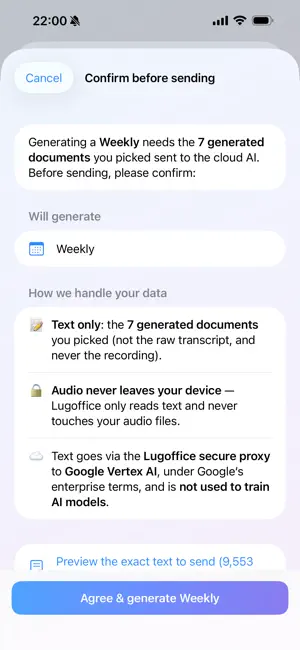
The hard part of a meeting isn't the meeting — it's the paperwork after. Lugoffice turns a spoken Cantonese meeting into polished written documents you can hand in right away. Lugji captures what was said; Lugoffice gets it done. Seven document types from one conversation · Meeting Minutes — summary, discussion, decisions, action items · Announcement — title, audience, body, sign-off · Formal Email — subject, greeting, body, courteous tone · Report — a structured report with summary and sections · Decision Notes — only the decisions actually made, with rationale and owners · Polish — proofread, tighten or expand your own draft (wording only, nothing invented) · Weekly Report — combine a week of meetings and notes into one review Cantonese-first Built for spoken Cantonese → written Chinese; also handles Mandarin and mixed Chinese/English. You choose what's sent, and only the text Lugoffice only handles text and never sends your recordings. Before anything is sent to cloud AI — to generate or to translate — you see exactly what will be sent and confirm first. Text is processed by enterprise Google Vertex AI and is not used to train AI models. Documents are saved automatically to your own iCloud Drive (or on this device if iCloud is off), with optional Obsidian sync. Lugbox for organizations (license required) Organizations running a Lugbox can send the documents you mark over their internal network to their own Lugbox, for local AI search and an organization shared library. Enquiries: [email protected] Works best with Lugji (Cantonese meeting recording + transcripts) — it reads your Lugji meetings directly. No Lugji needed either: paste any text and still get documents. iPhone and iPad · iOS 18.
What’s new
Version 1.3.1 · Updated November 4, 2026
1.3.1 — Clearer document titles • New documents without a title now get one from their content: weekly reports show their period, emails use their subject. Documents from the same day no longer share a name • Clearer wording before you send: Lugoffice only handles text and never sends your recordings — only the text you choose is sent • Lugbox organizations: the first time you connect to your organization's Lugbox, the app explains why it needs Local Network access • Minor improvements
App privacy
The developer, LUGJI LIMITED, reported these privacy practices to Apple.
Data Not Linked to You
The following data, which may be collected but is not linked to your identity, may be used for the following purposes:
- User Content: Other User Content
Used for: App Functionality
Alternatives to Lugoffice
Looking for apps like Lugoffice? Here are 6 similar apps on the App Store. The highest rated is DayLift - Habit Tracker (5.0/5), and all 6 are free to download.
-
 SmaVoi: AI Voice Recorder
-
 DayLift - Habit Tracker
5.0
-
 MicBridge
-
 CaptionNow 廣東話即時字幕・語音轉文字
-
 Omucloud: Business Email
-
 IntentNote: AI Notes
| App | Rating | Price | Last updated | Compare |
|---|---|---|---|---|
| Lugoffice | – | Free | November 4, 2026 | |
| SmaVoi: AI Voice Recorder | – | Free | Oct 28, 2026 | Compare |
| DayLift - Habit Tracker | 5.0 / 5 (1) | Free | Jul 20, 2026 | Compare |
| MicBridge | – | Free | Jul 9, 2026 | Compare |
| CaptionNow 廣東話即時字幕・語音轉文字 | – | Free | Sep 24, 2026 | Compare |
| Omucloud: Business Email | – | Free | Oct 27, 2026 | Compare |
| IntentNote: AI Notes | – | Free | Oct 16, 2026 | Compare |
Compare Lugoffice with the top alternatives: ratings, updates, ASO score and keyword gaps →