

Ordrett: transcribe Norwegian
Borge Labs Productivity iPhoneiPadiPod touch
Ordrett: transcribe Norwegian is a free Productivity app for iPhone and iPad by Borge Labs. Requires iOS 16.4. Updated October 12, 2026.
- Price
- Free
- on the App Store
- Size
- 52 MB
- Age 4+
- Updated
- Oct 12
- 2026 · v1.4.0
Screenshots


About Ordrett: transcribe Norwegian
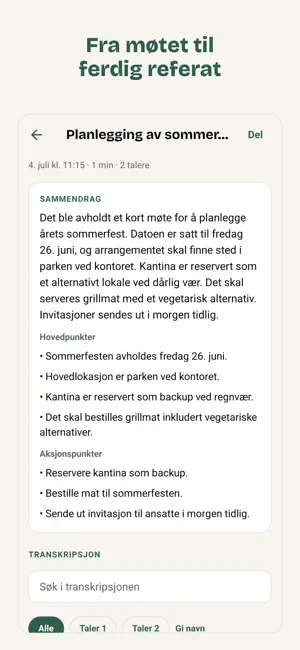
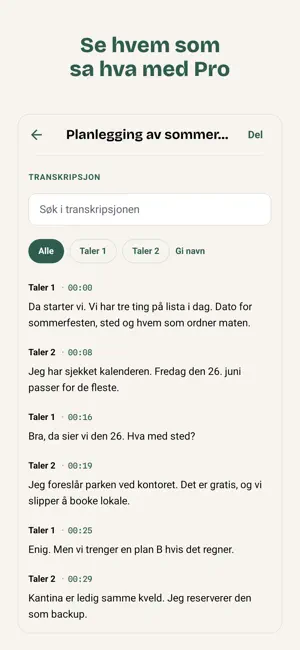
Ordrett turns audio into Norwegian text. Record directly in the app, or import audio, video and voice messages you already have. You get a tidy transcript with timestamps, uncertainty marks and a short summary. With Pro or Pro+ you also see who said what. The app is built for Norwegian speech, and the app itself is in Norwegian. It suits interviews, meetings, lectures, notes, podcast recordings and any other audio you would rather read than listen through again. Ordrett is tested on Norwegian conversations and parliamentary debates. With Pro or Pro+ and the «Flere talere» (several speakers) option, the app separates the voices and shows Taler 1, Taler 2 and so on. You can name them. Check important statements against the recording, especially when people talk at the same time. If the audio is difficult, the app marks uncertain passages so you can see what to verify. What you can do: - Keep recording when the screen locks, once the required permissions are granted - Import audio, video and voice messages, for example from WhatsApp - Tap timestamps to jump in the audio, and let the text follow the audio during playback - Search the transcript and copy the whole text - Choose «Én taler» (one speaker) or «Flere talere» (several speakers) after the recording. If you forget, transcription starts on its own - Name the speakers and the recordings in the app - See which passages should be checked against the recording - Read a summary with key points and any action items - Share the full transcript, also as board minutes - Export the text as a text file, and with Pro and Pro+ as subtitles (.srt) or a Word document (.rtf) Privacy: - Audio is processed briefly in Europe - Results are stored locally in the app - No account is needed to get started Price: You can try Ordrett for free. Pro costs 99 kr per month or 990 kr per year and gives 8 hours per month. Pro+ costs 149 kr per month and gives 15 hours per month. Speaker recognition is part of Pro and Pro+. The subscription renews automatically until you cancel, and can be cancelled at any time. Terms of Use (EULA): https://www.apple.com/legal/internet-services/itunes/dev/stdeula/ Privacy: https://ordrett.app/personvern
What’s new
Version 1.4.0 · Updated October 12, 2026
New in 1.4: - Use Ordrett on PC and Mac. Open app.ordrett.app on the computer, tap «Bruk Ordrett på PC eller Mac» on the app's home screen, and type the code or scan the QR code with the camera. - The computer uses your subscription and monthly quota. Recordings stay on the device that made them. You can see and remove linked computers in the app, and link up to three. - Improved transcription: parts of a recording without speech no longer turn into text, and numbers are handled better. - The summary and the transcript are on one page, without tabs, with the player at the bottom. The title and «Del» (share) are at the top. - The transcript shows as paragraphs per speaker, and you can copy a quote with the name and time. - Everything you can share and export is in one «Del» (share) menu. «Del referat» sends only the summary, with the date. - Search starts at the first hit and shows where you are. - While recording, the stop button stays where you tapped, and only the time and level are shown. - The free plan's 30-minute limit is shown before a recording is sent. - «Priser» (prices) is shorter. Pro can be chosen monthly or yearly in the same card. - «Personvern og hjelp» (privacy and help) opens from the home screen.
App privacy
The developer, Borge Labs, reported these privacy practices to Apple.
Data Not Linked to You
The following data, which may be collected but is not linked to your identity, may be used for the following purposes:
- Purchases: Purchase History
- User Content: Photos or Videos, Audio Data
- Identifiers: User ID
Used for: App Functionality
Alternatives to Ordrett: transcribe Norwegian
Looking for apps like Ordrett: transcribe Norwegian? Here are 6 similar apps on the App Store. The highest rated is Speech To Text Voice Typing. (4.0/5), and all 6 are free to download.
-
 Sayable
-
 Audio to Text Transcription
-
 Referat: AI Meeting Notes
-
 Kvam Kraftverk
-
 Speech To Text Voice Typing.
4.0
Speech To Text Voice Typing.
4.0
-
 Transcribe: Audio to Text AI
| App | Rating | Price | Last updated | Compare |
|---|---|---|---|---|
| Ordrett: transcribe Norwegian | – | Free | October 12, 2026 | |
| Sayable | – | Free | Oct 12, 2026 | Compare |
| Audio to Text Transcription | – | Free | Aug 9, 2026 | Compare |
| Referat: AI Meeting Notes | – | Free | Oct 19, 2026 | Compare |
| Kvam Kraftverk | – | Free | Jan 9, 2026 | Compare |
| Speech To Text Voice Typing. | 4.0 / 5 (3) | Free | Sep 23, 2026 | Compare |
| Transcribe: Audio to Text AI | – | Free | Oct 9, 2026 | Compare |