

Tuck - Sinking Funds
Yasin Halit Karayagiz Finance iPhoneiPadiPod touch
Tuck - Sinking Funds is a free Finance app for iPhone and iPad by Yasin Halit Karayagiz. Requires iOS 26.5. Updated July 21, 2026.
- Price
- Free
- on the App Store
- Size
- 1 MB
- Age 4+
- Updated
- Jul 21
- 2026 · v1.1
Screenshots

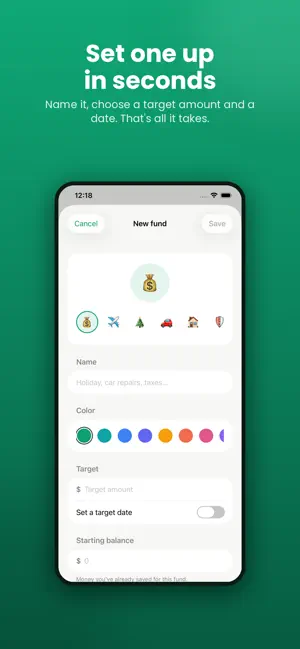

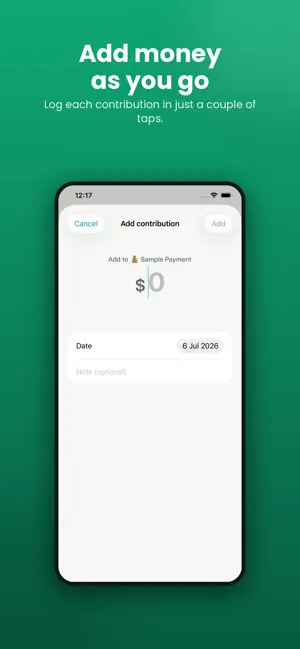
About Tuck - Sinking Funds
Tuck helps you save for the expenses you already know are coming — insurance, holidays, car repairs, taxes, the December gifts — before they catch you off guard. It's built around one simple idea: sinking funds. Instead of scrambling when a big bill lands, you set a little aside each month so the money is already there when you need it. Most budgeting apps bury this in a hundred other features. Tuck does one thing, beautifully. HOW IT WORKS - Create a fund for anything you're saving toward - Set a target amount and a date - Tuck tells you exactly how much to set aside each month - Log contributions as you go and watch each fund fill up - See your total monthly plan across every fund at a glance KNOW YOUR NUMBER The home screen shows the one number that matters: how much to set aside this month across all your funds. No spreadsheets, no guesswork. STAY ON TRACK - Visual progress for every fund - Projected finish dates based on your pace - Monthly reminders so you never forget to fund your pots PRIVATE BY DESIGN Your data stays on your device and in your own iCloud. No accounts. No bank connections. No ads. No tracking. We can't see your information, and we never collect it. TUCK PREMIUM Upgrade to unlock unlimited funds, insights and projections, monthly reminders, and export. Tuck Premium is an auto-renewable subscription, available as: - Yearly - Monthly - Weekly Prices are shown in the app and may vary by region. Payment is charged to your Apple ID at confirmation of purchase. Your subscription renews automatically unless it is cancelled at least 24 hours before the end of the current period. Your account is charged for renewal within 24 hours before the end of the current period. You can manage or cancel your subscription in your App Store account settings at any time after purchase. Tuck is a personal tracking tool to help you plan your savings. It does not provide financial, investment, or tax advice. Terms of Use (EULA): https://www.apple.com/legal/internet-services/itunes/dev/stdeula/ Privacy Policy: https://www.keremkarayagiz.com.tr/tuck/privacy.php
What’s new
Version 1.1 · Updated July 21, 2026
- New App Store screenshots and visual polish - Minor improvements and fixes Thanks for using Tuck!
App privacy
The developer, Yasin Halit Karayagiz, reported these privacy practices to Apple.
Data Not Collected
The developer does not collect any data from this app.
Alternatives to Tuck - Sinking Funds
Looking for apps like Tuck - Sinking Funds? Here are 6 similar apps on the App Store. The highest rated is Tuck: Receipt Expense Tracker (5.0/5), and all 6 are free to download.
-
 SinkFund
-
 Tuck: Receipt Expense Tracker
5.0
Tuck: Receipt Expense Tracker
5.0
-
 Balances.ai
-
 Shall I Retire
-
 SetAside: Sinking Funds App
1.0
SetAside: Sinking Funds App
1.0
-
 Retirify
5.0
Retirify
5.0
| App | Rating | Price | Last updated | Compare |
|---|---|---|---|---|
| Tuck - Sinking Funds | – | Free | July 21, 2026 | |
| SinkFund | – | Free | Apr 12, 2026 | Compare |
| Tuck: Receipt Expense Tracker | 5.0 / 5 (3) | Free | Jul 14, 2026 | Compare |
| Balances.ai | – | Free | Sep 13, 2026 | Compare |
| Shall I Retire | – | Free | Nov 12, 2025 | Compare |
| SetAside: Sinking Funds App | 1.0 / 5 (1) | Free | Jul 8, 2026 | Compare |
| Retirify | 5.0 / 5 (7) | Free | Nov 17, 2025 | Compare |