

USBridge: Remote Desktop
Amir Fatkulin Business iPhoneiPadiPod touch
USBridge: Remote Desktop is a free Business app for iPhone and iPad by Amir Fatkulin. Requires iOS 16.0. Updated October 23, 2026.
- Price
- Free
- on the App Store
- Size
- 58 MB
- Age 4+
- Updated
- Oct 23
- 2026 · v3.1.26
Screenshots
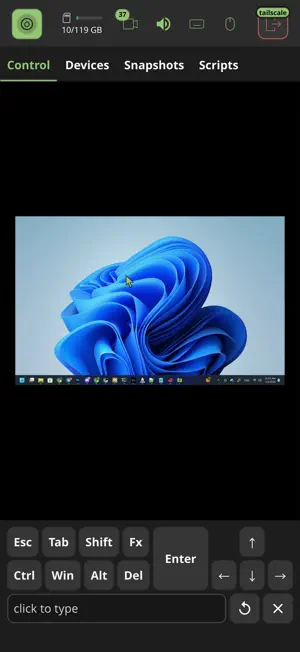


About USBridge: Remote Desktop
High-speed, open-source remote access software. Whether you are administering a server in the next rack, working in IT support, or simply connecting to your home PC from across the globe, the USBridge hybrid client offers the perfect solution. It is a fast, secure, and seamless tool that allows you to control remote devices at any level without lag. USBridge is a fully open-source project. It contains no ads, trackers, or hidden telemetry. You can explore the source code and join the development community on our GitHub repository (USBridge-Technologies). The app offers a variety of advanced management features, such as: • Built-in Tailscale integration • Ultra-low latency powered by Moonlight and Sunshine protocols • AI Vision and MCP protocol integration • Shared clipboard and multi-monitor support • Hardware KVM-over-IP connectivity • Fast file transfer • Virtual display support • Gamepad support • USB passthrough • Graphics tablet and pen pressure support • 4:4:4 color reproduction • Native and smooth performance in Wayland environments (Linux) The hybrid architecture of USBridge combines classic remote desktop control and access to infrastructure components within a single interface, ensuring a high level of security. Depending on your needs, various scenarios are supported: • System administration: stable access to terminals, servers, and consoles • Gaming and heavy workloads: access to remote rendering and online gaming with high FPS, thanks to Moonlight/Sunshine support • 3D modeling and design: comfortable work with heavy graphics, CAD systems, and video editors due to accurate color reproduction and instant interface response To explore all features, check out the documentation at usbridge.io Why choose USBridge? • Fully open-source • Compatible with any OS and device (including full Wayland support) • High frame rates and ultra-low latency • Built-in Tailscale support • A single hybrid client for all tasks USBridge is a true cross-platform solution available for all major operating systems. Quick Start Guide: 1. Install and launch the USBridge client on your device 2. Install the agent application on the remote PC 3. Enter the address or select the desired host/KVM from the connection list 4. Complete secure authorization on the remote device 5. Done! You can now fully control the device
What’s new
Version 3.1.26 · Updated October 23, 2026
Video • New "Screen" Selector: Added a Screen picker in the video settings (alongside resolution and frame rate). Options include Auto (matches your desktop's shape with no black bars), full frame, display shape presets, or a custom size/area. • FEC Control: Added a FEC slider (Auto or 10–50%). In Auto mode, error correction adjusts based on packet loss without exceeding the session bitrate. • Jitter Buffer Slider: Introduced a 5-step slider (Off, Low, Balanced, Smooth, Smoothest) that saves between launches and automatically adjusts to network conditions. • Aspect Ratio Fix: Native renderers (Vulkan/OpenGL) now display video preserving the source's original aspect ratio. Audio • Capped Playback Delay: Playback delay is now capped to prevent audio drift caused by Wi-Fi bursts or capture cards over time. • Enhanced Audio Buffer: The audio buffer now aligns with the Jitter Buffer. Smoother modes buffer audio ahead to avoid crackling and stutter during Wi-Fi stalls. Interface & Fixes • UI Updates: Moved AI Vision to the "AI & Scripts" tab as a debugging view. • Unified Design: Applied a consistent design across all dialogs, and enabled scrolling for video settings on smaller screens. • Usability Improvements: Removed star icons from 4:4:4 and HDR options, and updated delete buttons to a red trash icon. Video settings dropdowns on mobile now respond on the first tap. • Bug Fixes: Resolved screen size and aspect ratio persistence when switching between agents, fixing squeezed visuals and offset pointers. Sync passphrase validation now runs before saving. Security • Privacy Enhancement: The master key is no longer printed in application logs.
App privacy
The developer, Amir Fatkulin, reported these privacy practices to Apple.
Data Linked to You
The following data, which may be collected and linked to your identity, may be used for the following purposes:
- Identifiers: Device ID
- Contact Info: Email Address, Name
Used for: Analytics, App Functionality
Data Not Linked to You
The following data, which may be collected but is not linked to your identity, may be used for the following purposes:
- Diagnostics: Crash Data
Used for: App Functionality
Alternatives to USBridge: Remote Desktop
Looking for apps like USBridge: Remote Desktop? Here are 6 similar apps on the App Store. The highest rated is AweSun Remote Desktop Control (4.2/5), and all 6 are free to download.
-
 Connect My Computer
3.5
-
 NoMachine
3.0
-
 iRemoteDesktop Lite
3.8
-
 UTM Remote Virtual Machines
3.7
-
 AweSun Remote Desktop Control
4.2
-
 Remote Desktop - RDP Lite
2.9
| App | Rating | Price | Last updated | Compare |
|---|---|---|---|---|
| USBridge: Remote Desktop | – | Free | October 23, 2026 | |
| Connect My Computer | 3.5 / 5 (101) | Free | Mar 21, 2025 | Compare |
| NoMachine | 3.0 / 5 (126) | Free | Aug 3, 2026 | Compare |
| iRemoteDesktop Lite | 3.8 / 5 (75) | Free | Sep 9, 2026 | Compare |
| UTM Remote Virtual Machines | 3.7 / 5 (52) | Free | Oct 22, 2026 | Compare |
| AweSun Remote Desktop Control | 4.2 / 5 (53) | Free | Jun 22, 2026 | Compare |
| Remote Desktop - RDP Lite | 2.9 / 5 (151) | Free | Aug 10, 2025 | Compare |