

Connect My Computer
Hana Mobile Productivity iPhoneiPadiPod touch
Connect My Computer is a free Productivity app for iPhone and iPad by Hana Mobile. Rated 3.5/5 from 102 ratings. Requires iOS 12.0. Updated March 21, 2025.
- Rating
- 3.5
- 102 ratings
- Price
- Free
- on the App Store
- Size
- 7 MB
- Age 4+
- Updated
- Mar 21
- 2025 · v1.4.1
Screenshots
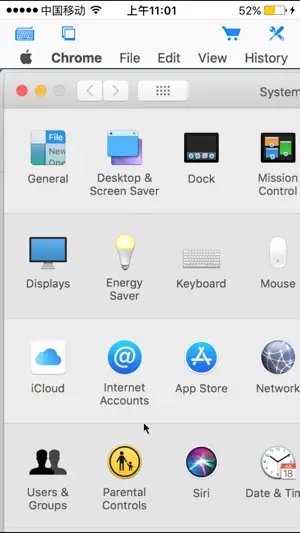


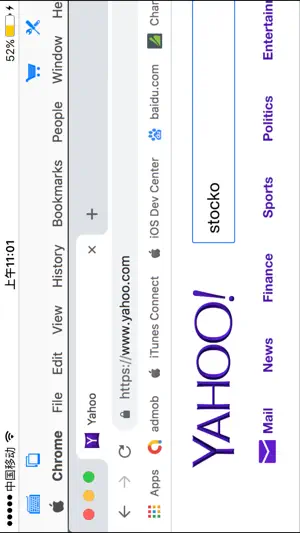
About Connect My Computer
Connect to your Mac computers from iPad/iPhone/iPod Touch at anytime! Great functionalities and It's FREE! Support Retina display for the new iPad and iPhone XS Max! Compared with this free version, the Pro version has more features: - Multiple connections - Trackpad to move mouse cursor (also support click) and do mouse wheel scroll - Mouse right click, hover and mouse drag - Modifier keypad including Shift, Ctrl and Alt which enables you to press almost any key combinations. - A cool functional keyboard: Cut, copy & paste and other shortcuts keypad, including HOME, END, PAGE UP, PAGE DOWN, Arrow keys, etc. - Virtual left button and right mouse button - Easy dragging and resizing using virtual mousepad - Support video output (need iPad or iOS4 and output connector) Features: - Specifically designed for both iPad and iPhone - Support Retina display for the new iPad and iPhone 4/4S - Take advantage of iPad's big screen - Portrait and landscape mode - Support various resolutions and colors - Tap to do click, double tap to double click, and all easy to use features - Pinch to zoom in and out. Choose the zoom scale you like - International keyboard support for many languages, including French, German, Italian, Korean, Russian, Swedish, Spanish, Portuguese etc. - Mac OS X Login - Easy to use design Supported Platform: - Mac OS X Mountain Lion - Mac OS X Lion - Mac OS X Snow Leopard - Mac OS X Leopard - Mac OS X Tiger - Windows with VNC server installed Note: This is also a full VNC client. Thus you can also use it to connect to Windows with VNC server installed. Brief install instructions (Use it if you do not need step-by-step instructions): How to configure my Mac? - Mac OS Tiger: http://www.macminicolo.net/Mac_VNC_tutor.html - Leopard or Snow Leopard: http://reviews.cnet.com/8301-13727_7-10329122-263.html For detailed setup instructions and more information, see http://www.hanajobs.com/mobile/forums/show/13.page Send your comments/suggestions to [email protected] or visit our website.
Ratings & reviews
3.5
102 ratings
What’s new
Version 1.4.1 · Updated March 21, 2025
- Bug fixes
App privacy
The developer, Hana Mobile, reported these privacy practices to Apple.
Data Not Collected
The developer does not collect any data from this app.
Alternatives to Connect My Computer
Looking for apps like Connect My Computer? Here are 6 similar apps on the App Store. The highest rated is Mouse · Keyboard (4.7/5), and all 6 are free to download.
-
 Duet Air - Remote Desktop
4.3
Duet Air - Remote Desktop
4.3
-
 UTM Remote Virtual Machines
3.7
UTM Remote Virtual Machines
3.7
-
 NoMachine
3.0
NoMachine
3.0
-
 RemotePC Remote Desktop
4.6
RemotePC Remote Desktop
4.6
-
 Mouse · Keyboard
4.7
Mouse · Keyboard
4.7
-
 VMouse - VNC Remote Mouse
4.2
VMouse - VNC Remote Mouse
4.2
| App | Rating | Price | Last updated | Compare |
|---|---|---|---|---|
| Connect My Computer | 3.5 / 5 (102 ratings) | Free | March 21, 2025 | |
| Duet Air - Remote Desktop | 4.3 / 5 (1,875) | Free | May 5, 2026 | Compare |
| UTM Remote Virtual Machines | 3.7 / 5 (52) | Free | Oct 22, 2026 | Compare |
| NoMachine | 3.0 / 5 (126) | Free | Aug 3, 2026 | Compare |
| RemotePC Remote Desktop | 4.6 / 5 (3,564) | Free | Nov 3, 2026 | Compare |
| Mouse · Keyboard | 4.7 / 5 (2,498) | Free | Oct 15, 2026 | Compare |
| VMouse - VNC Remote Mouse | 4.2 / 5 (39) | Free | Oct 22, 2026 | Compare |