

Luma: Earn Your Screen Time
YASIN ERTEKIN Productivity iPhoneiPadiPod touch
Luma: Earn Your Screen Time is a free Productivity app for iPhone and iPad by YASIN ERTEKIN. Requires iOS 18.2. Updated September 28, 2026.
- Price
- Free
- on the App Store
- Size
- 126 MB
- Age 12+
- Updated
- Sep 28
- 2026 · v1.8
Screenshots
About Luma: Earn Your Screen Time
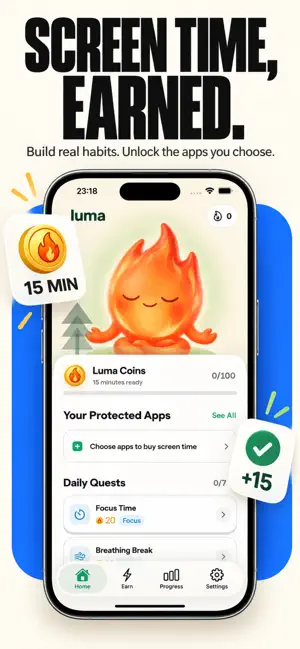
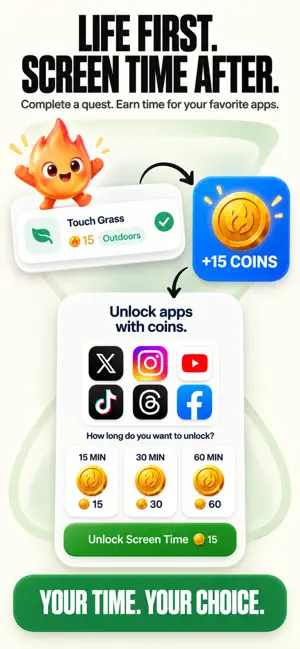
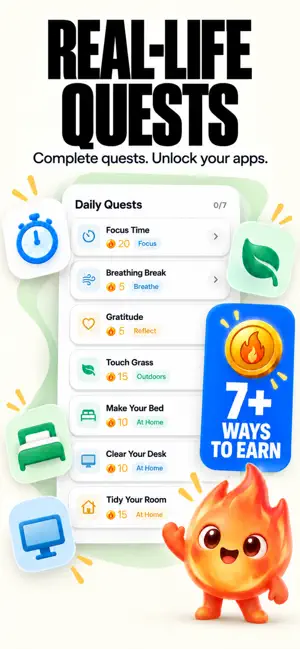
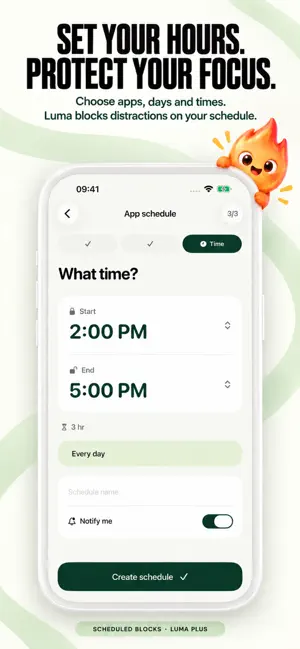
Do real life before you scroll. Tired of losing 4+ hours every day to doomscrolling? Willpower alone is no match for social media algorithms. Luma flips the script: screen time is no longer a default—it’s a reward you earn through real-life action. Protect your focus on a schedule With Scheduled Blocks in Luma Plus, choose the apps, days, and start and end times for your focus routine. Create a daily plan, repeat it on selected weekdays, or choose a specific date. Luma automatically blocks your selected apps during that window. Make separate plans for study, work, or winding down. Edit the hours, pause a plan when you need to, and optionally receive notifications when a scheduled block starts and ends. Requires Screen Time access. How Luma works: 1. Choose Distracting Apps: Pick the social, video, and gaming apps you want to protect. 2. Complete Real-Life Quests: Do push-ups, stretch, read, study, or finish a focus session. 3. Earn Screen Time Credits: Your camera or timer verifies your effort and awards time credits. 4. Unlock & Enjoy: Spend your earned minutes guilt-free. When time runs out, Luma locks them automatically. What makes Luma different: • Camera and Pose Tracking: Real-time tracking counts your push-ups and guides your stretching sessions. No cheating—earn your screen time through real movement! • Interactive Daily Quests: Express gratitude in a 3-point journal, take a 3-minute rhythm dance break, or take a photo touching grass outside. • Focus Timer & Pomodoro: Need deep work or study time? Start a focus block and stack minutes for later. • 1-Minute Unlock Warning: Never get cut off mid-scroll without notice. • Streak Freeze & Star Quests: Build daily momentum without fear of losing your streak on busy days. Block distractions, not your life: • Native Screen Time Integration: Built strictly on Apple’s Screen Time controls. • 100% Private: Luma never reads your messages, browsing history, or personal data. Everything stays on your device. • Friction That Works: Break impulsive phone pickups with intentional pause and physical action. Built for: • Students aiming to study before opening social media • Professionals looking to eliminate workday distractions • Anyone struggling with doomscrolling, attention, or phone habits • People who want to replace passive screen time with real-world habits Your phone does not have to be the enemy. Do real life. Earn your scroll. Luma Plus: Luma Plus unlocks full access through flexible auto-renewable subscriptions. Pricing may vary by territory and is clearly displayed before confirmation. Eligible plans may feature free trials or introductory offers as detailed on the paywall. Payment will be charged to your Apple ID account upon purchase confirmation. Subscriptions renew automatically unless canceled at least 24 hours prior to the end of the current billing cycle. Manage or cancel anytime in your App Store Account Settings. Privacy Policy: https://luma-yasinertekin.web.app/privacy Terms of Use: https://luma-yasinertekin.web.app/terms
What’s new
Version 1.8 · Updated September 28, 2026
New in 1.8: Scheduled Blocks • Choose apps, days, and start and end times for automatic blocking. • Repeat daily, on selected weekdays, or choose a specific date. • Edit or pause plans anytime, with optional start and end notifications. Included with Luma Plus. Requires Screen Time access.
App privacy
The developer, YASIN ERTEKIN, reported these privacy practices to Apple.
Data Linked to You
The following data, which may be collected and linked to your identity, may be used for the following purposes:
- Purchases: Purchase History
- Location: Coarse Location
- Identifiers: User ID, Device ID
- Usage Data: Product Interaction, Other Usage Data
- Contact Info: Name, Email Address
- Health & Fitness: Health, Fitness
- User Content: Photos or Videos, Other User Content
- Diagnostics: Crash Data, Other Diagnostic Data
- Surroundings: Environment Scanning
Used for: Analytics, Product Personalization, App Functionality
Alternatives to Luma: Earn Your Screen Time
Looking for apps like Luma: Earn Your Screen Time? Here are 6 similar apps on the App Store. The highest rated is Couples Screen Time: Burn (4.7/5), and all 6 are free to download.
-
 Earned - Screen Time
-
 Couples Screen Time: Burn
4.7
Couples Screen Time: Burn
4.7
-
 Pactly: Earn Screen Time
1.0
Pactly: Earn Screen Time
1.0
-
 Earn Screen Time — Unlock
-
 Skrid: Walk & Earn Screen Time
-
 Frogoo: Screen Time & Focus
| App | Rating | Price | Last updated | Compare |
|---|---|---|---|---|
| Luma: Earn Your Screen Time | – | Free | September 28, 2026 | |
| Earned - Screen Time | – | Free | Jun 23, 2026 | Compare |
| Couples Screen Time: Burn | 4.7 / 5 (7) | Free | Oct 29, 2026 | Compare |
| Pactly: Earn Screen Time | 1.0 / 5 (2) | Free | Jul 8, 2026 | Compare |
| Earn Screen Time — Unlock | – | Free | Oct 28, 2026 | Compare |
| Skrid: Walk & Earn Screen Time | – | Free | Jul 6, 2026 | Compare |
| Frogoo: Screen Time & Focus | – | Free | Aug 1, 2026 | Compare |