

Skrid: Walk & Earn Screen Time
Johannes Gebert Productivity iPhoneiPadiPod touch
Skrid: Walk & Earn Screen Time is a free Productivity app for iPhone and iPad by Johannes Gebert. Requires iOS 26.0. Updated July 6, 2026.
- Price
- Free
- on the App Store
- Size
- 33 MB
- Age 4+
- Updated
- Jul 6
- 2026 · v1.6.0
Screenshots



About Skrid: Walk & Earn Screen Time
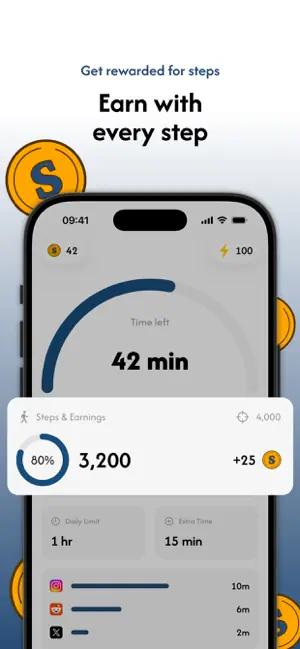
Block distracting apps and walk to unlock them. Skrid turns your steps into screen time. If you want more minutes to scroll, you have to go earn them on foot. It's for anyone who keeps ending up on their phone way past midnight and wishes they had a reason to put it down. If you've tried other blockers or habit trackers and none of them stuck, the difference here is that Skrid doesn't just nag you to use your phone less. You earn your time back by walking. Here's the basic idea. You set a daily screen time limit and pick the apps you want blocked. Every step you take earns coins. Once you hit your limit, Skrid blocks those apps, and when you want more time, you go for a walk and spend the coins you earned. HOW IT WORKS - Set your daily screen time limit - Choose which apps and categories to block - Walk to earn coins - Spend coins on extra screen time - Keep an eye on your steps and progress in the stats THE ENERGY SYSTEM The energy system rewards you for showing up every day instead of cramming it all into the weekend. You start at 100 energy. Hit your step goal and it stays full. Miss a day and it drops, which means the same number of steps earns you fewer coins until you get back on track. So one long Sunday walk won't make up for a week you skipped. STATISTICS You can see your steps, screen time, coins, and unlocked minutes over time, along with how often you're actually hitting your goals. It's an easy way to notice your phone habits changing without having to think too hard about it. STRICT OR FLEXIBLE Some days you want a hard limit. Other days you need a bit more room. You can change your screen time limit and step goal whenever you want, so Skrid works either way. PRIVACY Skrid uses Apple's built-in Screen Time to do the blocking, and nothing gets blocked until you set it up yourself. You choose which apps and categories it manages, and you can change that anytime. If your screen time has gotten away from you lately, give it a shot. Worst case, you walk a bit more than usual. Privacy Policy: https://www.skrid.app/privacy Terms of Service: https://www.skrid.app/tos
What’s new
Version 1.6.0 · Updated July 6, 2026
This update focuses on polish: we improved performance, smoothed out a few rough edges, and fixed some bugs along the way. Keep walking, keep earning. Every step counts.
App privacy
The developer, Johannes Gebert, reported these privacy practices to Apple.
Data Linked to You
The following data, which may be collected and linked to your identity, may be used for the following purposes:
- Purchases: Purchase History
- Identifiers: User ID
- Usage Data: Product Interaction
- Diagnostics: Crash Data
- Health & Fitness: Fitness
- Contact Info: Email Address, Name
Used for: Analytics, App Functionality
Alternatives to Skrid: Walk & Earn Screen Time
Looking for apps like Skrid: Walk & Earn Screen Time? Here are 6 similar apps on the App Store. The highest rated is Terrible Focus (5.0/5), and all 6 are free to download.
-
 Gemify: Focus Timer & Block
-
 Offscroll: Screen Time Control
-
 Haserupt: Screen Time
-
 Terrible Focus
5.0
Terrible Focus
5.0
-
 ProductPulse 360
-
 Luma: Earn Your Screen Time
| App | Rating | Price | Last updated | Compare |
|---|---|---|---|---|
| Skrid: Walk & Earn Screen Time | – | Free | July 6, 2026 | |
| Gemify: Focus Timer & Block | – | Free | Jul 10, 2026 | Compare |
| Offscroll: Screen Time Control | – | Free | Aug 1, 2026 | Compare |
| Haserupt: Screen Time | – | Free | Oct 6, 2026 | Compare |
| Terrible Focus | 5.0 / 5 (1) | Free | Oct 19, 2026 | Compare |
| ProductPulse 360 | – | Free | Sep 12, 2024 | Compare |
| Luma: Earn Your Screen Time | – | Free | Sep 28, 2026 | Compare |