

SnapFrame - Screenshot Frames
雷雷 张 Graphics & Design iPhoneiPadiPod touch
SnapFrame - Screenshot Frames is a free Graphics & Design app for iPhone and iPad by 雷雷 张. Requires iOS 18.0. Updated October 28, 2026.
- Price
- Free
- on the App Store
- Size
- 14 MB
- Age 4+
- Updated
- Oct 28
- 2026 · v1.5.2
Screenshots


About SnapFrame - Screenshot Frames
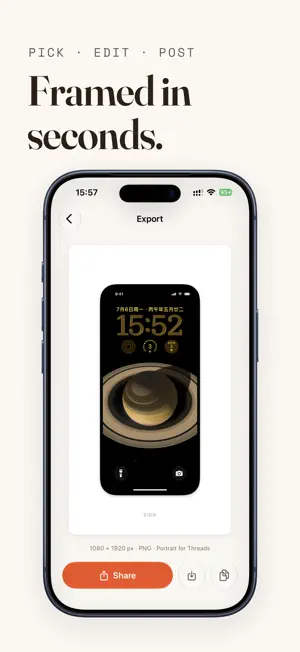
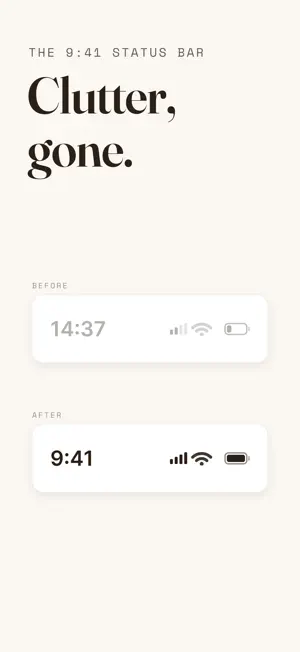
Turn any screenshot or screen recording into a polished, social-ready post — in seconds. SnapFrame wraps your screenshots in a clean iPhone frame, replaces the messy status bar with the classic 9:41 look, and places everything on a beautiful background optimized for any social feed. WHY SNAPFRAME Focused by design SnapFrame is built for one job: presenting your product screenshots and screen recordings. No stickers, no filters, no flashy effects — just a clean device frame and quiet backgrounds that stay out of the way, so your UI stays the hero. Real device frame Your screenshot gets a precise iPhone bezel with Dynamic Island — it looks like a polished product shot, not a raw screen grab. Choose from multiple device styles including iPhone 18 Pro, iPhone 17 Pro, and iPhone Air. Clean 9:41 status bar Low battery, no signal, 47 notifications? Gone. SnapFrame seamlessly replaces your status bar with the classic, pristine 9:41 look you see in product launch imagery. Smart platform sizing Pick where you’re posting and SnapFrame sets the canvas for you — 4:5 (1080 × 1350) for feed posts, 3:4 (1080 × 1440) for taller feed layouts, or 9:16 (1080 × 1920) for full-screen stories and short videos. No more cropped frames in the timeline. Videos too Screen recordings get the same treatment — device frame, clean status bar, styled background — exported as a ready-to-post video. Batch export Select up to 9 screenshots at once and finish them in one go. The whole batch shares one look — device frame, background, canvas size, and signature — so every image comes out consistent. Preview each one, export them all with a single tap, and they’re saved straight to Photos. Batch export is for images; screen recordings are exported one at a time. 18 curated backgrounds From warm cream to bold gradients, every background is hand-picked to make your screenshot stand out in the feed. Transparent background Just need the device? Choose a transparent background and export a PNG with only your screenshot and the phone frame — fully transparent around it, no shadow — ready to drop into slides, websites, or your own layouts. Transparent export is for images; videos use a styled background. Adjustable frame size Scale the device down to add breathing room, so your full frame stays visible even in cropped feed previews. Custom signature Free exports carry a small “Made By SnapFrame” signature. Unlock the full version to write your own (your app name, handle, or brand) — or remove it entirely. Tidy workflow After a successful export, SnapFrame offers to delete the original screenshot — your photo library stays clean. PRIVATE BY DESIGN Everything happens on your device. No accounts, no uploads, no tracking. Your screenshots never leave your iPhone. FAIR PRICING Try SnapFrame free — export as much as you like. Free exports carry a small “Made By SnapFrame” signature. A single one-time purchase lets you customize or remove it forever — no subscription, ever. Privacy Policy: https://app.notion.com/p/leilei0091/SnapFrame-Privacy-Policy-3945e372803f81248d7ff4cd5401ba68 Terms of Service: https://app.notion.com/p/leilei0091/SnapFrame-Terms-of-Service-3945e372803f811a9dd6d494fe681974 Make every screenshot look intentional. Download SnapFrame and post something beautiful today.
What’s new
Version 1.5.2 · Updated October 28, 2026
What's New in 1.5.2 • Short-video default template — one tap for native vertical posts • Transparent background support
App privacy
The developer, 雷雷 张, reported these privacy practices to Apple.
Data Not Collected
The developer does not collect any data from this app.
Alternatives to SnapFrame - Screenshot Frames
Looking for apps like SnapFrame - Screenshot Frames? Here are 6 similar apps on the App Store. The highest rated is Metabind (5.0/5), and all 6 are free to download.
-
 Skimra: Screenshot Studio
-
 FrameShotPro
-
 Metabind
5.0
Metabind
5.0
-
 Bezelbub
5.0
Bezelbub
5.0
-
 Amazing App Mockups - Mockhero
5.0
Amazing App Mockups - Mockhero
5.0
-
 Screenshot App Mockups
| App | Rating | Price | Last updated | Compare |
|---|---|---|---|---|
| SnapFrame - Screenshot Frames | – | Free | October 28, 2026 | |
| Skimra: Screenshot Studio | – | Free | Sep 2, 2026 | Compare |
| FrameShotPro | – | Free | Jul 29, 2026 | Compare |
| Metabind | 5.0 / 5 (3) | Free | Apr 4, 2026 | Compare |
| Bezelbub | 5.0 / 5 (1) | Free | Oct 19, 2026 | Compare |
| Amazing App Mockups - Mockhero | 5.0 / 5 (1) | Free | Feb 4, 2026 | Compare |
| Screenshot App Mockups | – | Free | Jan 26, 2026 | Compare |