

Bezelbub
DGR Labs Graphics & Design iPhoneiPadiPod touchMac
Bezelbub is a free Graphics & Design app for iPhone and iPad by DGR Labs. Rated 5.0/5 from 1 ratings. Requires iOS 17.0. Updated October 19, 2026.
- Rating
- 5.0
- 1 ratings
- Price
- Free
- on the App Store
- Size
- 386 MB
- Age 4+
- Updated
- Oct 19
- 2026 · v3.5.0
Screenshots

About Bezelbub
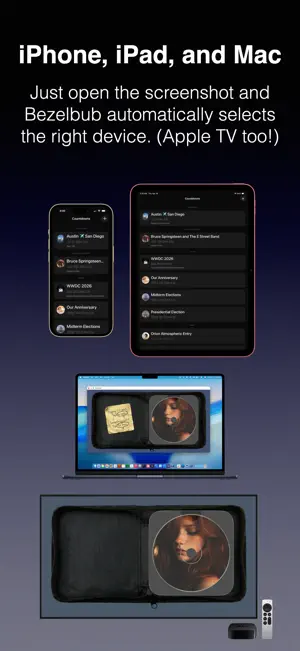
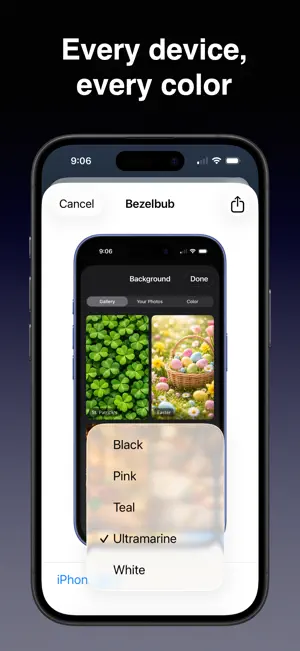
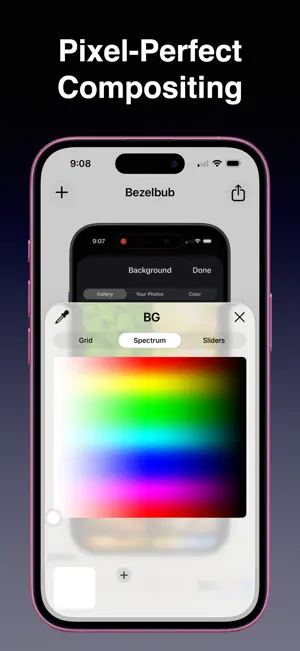
Bezelbub wraps your screenshots and screen recordings in real device bezels, matched automatically to whatever you drop in. Built for developers, designers, product managers, indie makers, and anyone who needs to show their work framed in a real device. AUTOMATIC DEVICE MATCHING Drop in a screenshot or screen recording and Bezelbub detects the resolution, picks the right device model, and selects portrait or landscape. No picker, no calibration, no guesswork. 38+ DEVICE MODELS, EVERY COLOR Complete coverage of modern Apple hardware — iPhone 14 through iPhone 17, iPhone Air, iPad, iPad (A16), iPad mini, iPad mini (A17 Pro), iPad Air M2/M4 in 11" and 13", iPad Pro M4/M5 in 11" and 13", MacBook Air, MacBook Pro, MacBook Neo, iMac 24", and Apple TV 4K — each in every color Apple ships. VIDEO FRAMING, NOT JUST STILLS Wrap full screen recordings in device art. MOV, MP4, and M4V. Audio preserved. Rotation, background color selection, and custom export sizing built in. On iOS, a resolution picker with a quality indicator lets you choose the right size for Slack, Twitter/X, or a marketing site. FRAME FROM ANY APP ON iOS The Share Extension means you can frame a screenshot straight from Photos, Safari, Mail, or any app that can share an image. The bezel lands on your clipboard, ready to paste into Slack, Notion, Keynote, or email. PIXEL-PERFECT OUT OF THE BOX A custom screen-region detection pipeline analyzes every bezel image and builds anti-aliased masks at build time. No visible seams at the rounded corners, no halos, no manual tweaking. NATIVE ON EVERY PLATFORM Built with SwiftUI and AVFoundation. Native on Mac, iPhone, and iPad — no wrappers, no web views. Drag-and-drop on Mac, PhotosPicker on iOS, and platform-appropriate share, copy, and export flows on each. ACCESSIBILITY VoiceOver labels across the editor, export controls, and Share Extension. PRIVACY-RESPECTING Everything runs on-device. No accounts, no uploads, no telemetry, no tracking. Universal Purchase — use on Mac, iPhone, and iPad.
What’s new
Version 3.5.0 · Updated October 19, 2026
• You can add padding around the device now. Pick 5%, 10%, 15%, 20%, or 25% from the new Padding menu, and Bezelbub will remember your choice next time. • Screenshots get the same Background color picker and Transparent switch that videos already had. Pick a color and it fills the padding too. • With a transparent background and padding turned on, the preview shows a checkerboard so you can see where the image ends.
App privacy
The developer, DGR Labs, reported these privacy practices to Apple.
Data Not Collected
The developer does not collect any data from this app.
Alternatives to Bezelbub
Looking for apps like Bezelbub? Here are 6 similar apps on the App Store. The highest rated is App Mockup Studio: Bezel (5.0/5), and all 6 are free to download.
-
 DrawSlice - Sketch Studio
-
 Kesef: Mockups & Screenshots
-
 Majik - Generate Image & Video
-
 App Mockup Studio: Bezel
5.0
App Mockup Studio: Bezel
5.0
-
 HandyComfy
3.7
HandyComfy
3.7
-
 CanvasPrism - Whiteboard
5.0
CanvasPrism - Whiteboard
5.0
| App | Rating | Price | Last updated | Compare |
|---|---|---|---|---|
| Bezelbub | 5.0 / 5 (1 rating) | Free | October 19, 2026 | |
| DrawSlice - Sketch Studio | – | Free | Aug 13, 2026 | Compare |
| Kesef: Mockups & Screenshots | – | Free | Sep 11, 2026 | Compare |
| Majik - Generate Image & Video | – | Free | May 12, 2026 | Compare |
| App Mockup Studio: Bezel | 5.0 / 5 (2) | Free | Oct 10, 2026 | Compare |
| HandyComfy | 3.7 / 5 (3) | Free | Oct 12, 2026 | Compare |
| CanvasPrism - Whiteboard | 5.0 / 5 (6) | Free | Jul 7, 2026 | Compare |
Compare Bezelbub with the top alternatives: ratings, updates, ASO score and keyword gaps →