

GEO Calc : Coordinates
Lior Zukman Navigation iPhoneiPadiPod touch
GEO Calc : Coordinates is a free Navigation app for iPhone and iPad by Lior Zukman. Requires iOS 15.0. Updated October 2, 2026.
- Price
- Free
- on the App Store
- Size
- 33 MB
- Age 4+
- Updated
- Oct 2
- 2026 · v1.0.6
Screenshots

About GEO Calc : Coordinates
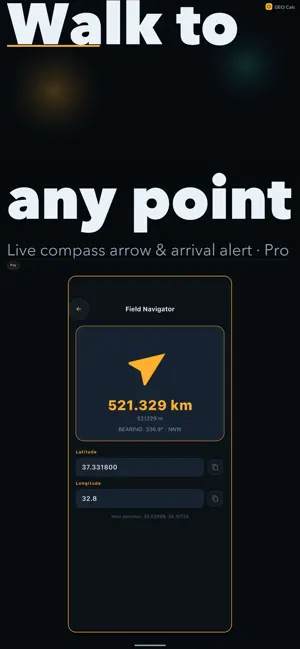
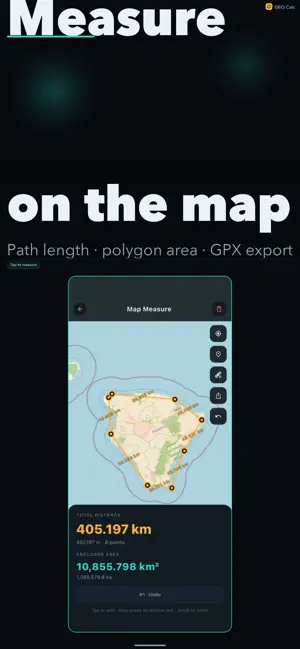
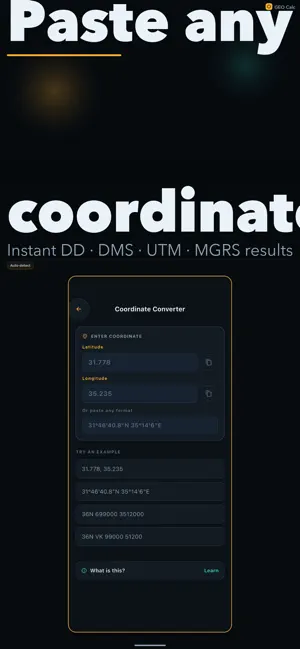
GEO Calc : Coordinates is a WGS84 field calculator for surveyors, engineers, and outdoor professionals. Convert coordinates, compute geodesic distance and bearing, measure on a map, and manage waypoints—on iPhone and iPad. COORDINATE CONVERTER Convert Decimal Degrees, DDM, DMS, UTM, MGRS, USNG, and Plus Codes. Auto-detect format. Copy results in one tap. DISTANCE & BEARING Vincenty geodesic distance and forward azimuth on the WGS84 ellipsoid—not flat-map shortcuts. Direct geodesic calculator (Pro). MAP & MEASURE OpenStreetMap tiles with path and polygon measure on the ellipsoid. Optional satellite layer (Pro). Go-to coordinate. Live GPS (Pro). FIELD NAVIGATOR (PRO) Walk to a coordinate with a live compass arrow and arrival alert. WAYPOINTS & GPX Save waypoints on your device. Export GPX 1.1. Import GPX waypoints (Pro). Free tier: up to 20 waypoints. UNITS & LANGUAGES Metric, imperial, or nautical. Twelve languages. Dark theme for outdoor readability. IN-APP PURCHASES Free to download with ads. GEO Calc Pro is a one-time, non-consumable in-app purchase—no subscription. Pro unlocks direct geodesic calculator, live GPS, field navigator, satellite map layer, GPX import, and unlimited waypoints. Restore purchases anytime from Settings or the Pro screen. INTERNET & LOCATION Map tiles load over the internet from OpenStreetMap. Live GPS and field navigation use device location when you allow it. Not for certified legal surveying. Verify critical measurements with professional methods.
What’s new
Version 1.0.6 · Updated October 2, 2026
North reference, an Active Point, and new Pro field tools. • True, magnetic, or grid north. Bearings and the Field Navigator arrow use the reference you select. • Active Point sends one coordinate to Distance & Bearing, Direct Geodesic, or Field Navigator. • Pro: Bearing Intersection — a fix from two stations and two azimuths. • Pro: UTM grid label on Map Measure. • Pro: import waypoints from KML, GeoJSON, and CSV, as well as GPX. One invalid point no longer blocks the rest of a GeoJSON file. • Pro: Field Navigator shows XTE and can reverse the course. Pulling the screen no longer shakes it. • GEO Calc Pro can be restored from Settings. • Live GPS does not require Pro.
App privacy
The developer, Lior Zukman, reported these privacy practices to Apple.
Data Used to Track You
The following data may be used to track you across apps and websites owned by other companies:
- Identifiers: Device ID
Data Not Linked to You
The following data, which may be collected but is not linked to your identity, may be used for the following purposes:
- Location: Precise Location
- Identifiers: Device ID
- Usage Data: Advertising Data, Product Interaction
- Diagnostics: Crash Data, Performance Data
Used for: Third-Party Advertising, Analytics, App Functionality
Alternatives to GEO Calc : Coordinates
Looking for apps like GEO Calc : Coordinates? Here are 6 similar apps on the App Store. The highest rated is Map Parser: Route Export (5.0/5), and all 6 are free to download.
-
 Circulus Maximus WGS84
-
 Explore Cambodia
-
 Map Parser: Route Export
5.0
Map Parser: Route Export
5.0
-
 Visit Sihanoukville
-
 hittamin GPS: Coordinates
-
 Land Area Measure – TerraTrace
| App | Rating | Price | Last updated | Compare |
|---|---|---|---|---|
| GEO Calc : Coordinates | – | Free | October 2, 2026 | |
| Circulus Maximus WGS84 | – | Free | Aug 22, 2026 | Compare |
| Explore Cambodia | – | Free | Feb 20, 2026 | Compare |
| Map Parser: Route Export | 5.0 / 5 (2) | Free | Sep 28, 2026 | Compare |
| Visit Sihanoukville | – | Free | Aug 16, 2026 | Compare |
| hittamin GPS: Coordinates | – | Free | Oct 5, 2026 | Compare |
| Land Area Measure – TerraTrace | – | Free | Sep 20, 2026 | Compare |