

Map Parser: Route Export
Changzhi Ai Travel iPhoneiPadiPod touch
Map Parser: Route Export is a free Travel app for iPhone and iPad by Changzhi Ai. Rated 5.0/5 from 2 ratings. Requires iOS 15.6. Updated September 28, 2026.
- Rating
- 5.0
- 2 ratings
- Price
- Free
- on the App Store
- Size
- 14 MB
- Age 4+
- Updated
- Sep 28
- 2026 · v1.0.4
Screenshots


About Map Parser: Route Export
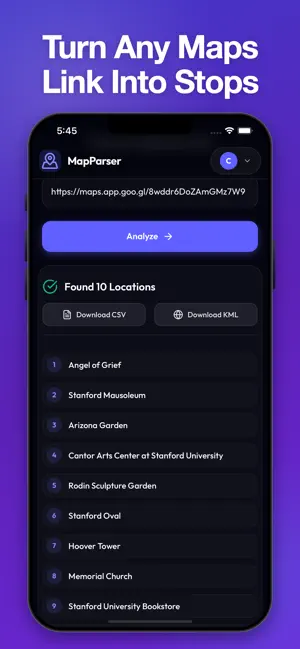
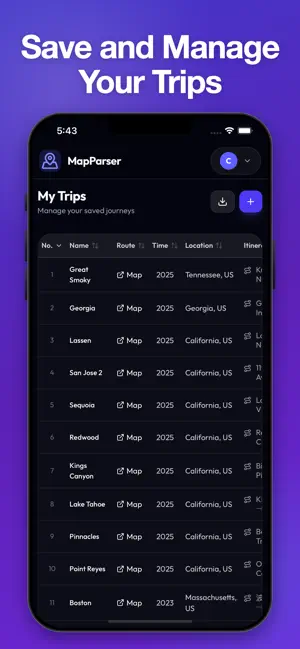
Effortlessly parse Google Maps directions into CSV and KML files. Save your trips, visualize routes on OpenStreetMap or Google Maps, and organize your travel itineraries. Perfect for digital nomads, travel planners, and explorers who need their data everywhere. Stop struggling with manual data entry from Google Maps. MapParser is the most efficient way to extract location data from Google Maps directions and turn it into actionable files for your favorite travel tools. STUNNING FEATURES: - Instant Parsing: Copy and paste your Google Maps directions link, full or short (maps.app.goo.gl), and let MapParser extract every stop, coordinate, and detail instantly. - Export to CSV & KML: Perfect for importing into Excel, Google Sheets, or advanced GIS software. - Google My Maps Ready: The CSV is formatted for Google My Maps, with step-by-step import instructions built into the app. KML opens in Google Earth and other mapping apps. - Visualizer: See your routes come to life on OpenStreetMap or Google Maps directly within the app, with every stop labelled A, B, C. - One-Tap Copy: Copy the full route as text, or the full route link to share it anywhere. - Trip History: Save and organize your past parsed routes, with a name and notes, for quick access later. - Cloud Syncing: Securely log in with Apple, Google, or email to keep your travel itineraries synced across all your devices and the web. WHO IS IT FOR? Digital Nomads: Organize complex overland trips. Travel Agents: Build structured itineraries for clients. Road Trippers: Keep a clean record of every stop along the way. Data Enthusiasts: Cleanly export location data for mapping projects. Free and open source, with no limits on routes or stops. Simplify your travel planning today with MapParser. Learn more at mapparser.travel-tracker.org.
What’s new
Version 1.0.4 · Updated September 28, 2026
Version 1.0.4 makes it easier to take your route with you. COPY YOUR ROUTE - The Route Preview now shows the full route as text, with a copy button. - The full route link is shown underneath, also with a copy button, so you can paste it straight into a browser or a message. FIXES - Open on Google Maps now works when you paste only the short link code. - Sign-in and your profile now open as full pages instead of pop-ups, so they are easier to use on small screens. Thank you for using MapParser. Questions or ideas? Visit mapparser.travel-tracker.org.
App privacy
The developer, Changzhi Ai, reported these privacy practices to Apple.
Data Not Linked to You
The following data, which may be collected but is not linked to your identity, may be used for the following purposes:
- Contact Info: Email Address, Name
Used for: App Functionality
Alternatives to Map Parser: Route Export
Looking for apps like Map Parser: Route Export? Here are 6 similar apps on the App Store. The highest rated is RoadTrippin App (5.0/5), and all 6 are free to download.
-
 RoadTrippin App
5.0
RoadTrippin App
5.0
-
 Zeno Driver: Drive & Earn
-
 GEO Calc : Coordinates
-
 Topo Lock Maps
5.0
Topo Lock Maps
5.0
-
 Map Switch: Map Link Converter
-
 GoMyWayVA® - NoVA Commuter App
4.5
GoMyWayVA® - NoVA Commuter App
4.5
| App | Rating | Price | Last updated | Compare |
|---|---|---|---|---|
| Map Parser: Route Export | 5.0 / 5 (2 ratings) | Free | September 28, 2026 | |
| RoadTrippin App | 5.0 / 5 (2) | Free | Sep 11, 2026 | Compare |
| Zeno Driver: Drive & Earn | – | Free | Sep 26, 2026 | Compare |
| GEO Calc : Coordinates | – | Free | Oct 2, 2026 | Compare |
| Topo Lock Maps | 5.0 / 5 (6) | Free | Jun 8, 2026 | Compare |
| Map Switch: Map Link Converter | – | Free | Aug 31, 2026 | Compare |
| GoMyWayVA® - NoVA Commuter App | 4.5 / 5 (62) | Free | Sep 17, 2026 | Compare |