

SpeakText: Voice Transcriber
文进 封 Productivity iPhoneiPadiPod touch
SpeakText: Voice Transcriber is a free Productivity app for iPhone and iPad by 文进 封. Requires iOS 16.0. Updated September 29, 2026.
- Price
- Free
- on the App Store
- Size
- 962 MB
- Age 4+
- Updated
- Sep 29
- 2026 · v1.0.12
Screenshots



About SpeakText: Voice Transcriber
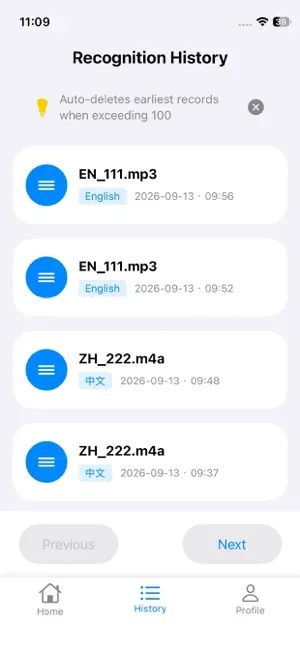
Turn your audio & video files into text and SRT subtitles — 100% offline SpeakText is an offline transcription app for anyone who needs fast, private speech-to-text: meeting recordings, lectures, interviews, voice memos, podcasts and more. Recognition runs entirely on your device — your audio never leaves it. WHY OFFLINE MATTERS • Private by design: audio and text are processed on-device only • No uploads, no waiting — works even in airplane mode • Stable speed even for long recordings KEY FEATURES • 35 recognition languages: Chinese, English, Spanish, French, German, Portuguese, Russian, Japanese, Korean, Arabic and more • Automatic speech segmentation with punctuation for readable transcripts • Word-level timestamps — export standard SRT subtitles for your videos • Import m4a, mp4, mp3 and wav files • Edit transcripts with synced playback (text follows the audio) • Export as TXT or SRT, with optional line-length control • Built-in history with one-tap replay, edit and export HOW IT WORKS 1. Import an audio or video file 2. Pick the spoken language 3. Tap Start — segments appear in real time 4. Edit, play, and export TXT or SRT MODELS Chinese and 24 European languages ship with the app. Japanese, Korean, Arabic and several other Asian languages download an offline model once (150–200 MB) — after that, transcription works offline forever. SUBSCRIPTION & FREE TRIAL Enjoy a 3-day free trial. After the trial, a monthly subscription unlocks unlimited recognition. Payment is charged to your Apple ID at confirmation of purchase. The subscription auto-renews unless cancelled at least 24 hours before the end of the current period. Manage or cancel anytime in your App Store account settings. PRIVACY Sign in with Apple, no ads, no tracking — your recordings stay yours. Terms of Service: https://zihiai.com/api/html/speaktext_service_terms_en_ios_v1 Privacy Policy: https://zihiai.com/api/html/speaktext_privacy_policy_en_ios_v1
App privacy
The developer, 文进 封, reported these privacy practices to Apple.
Data Not Linked to You
The following data, which may be collected but is not linked to your identity, may be used for the following purposes:
- Identifiers: Device ID
Used for: App Functionality
Alternatives to SpeakText: Voice Transcriber
Looking for apps like SpeakText: Voice Transcriber? Here are 6 similar apps on the App Store. The highest rated is AI Note Taker Voice Recorder. (4.4/5), and all 6 are free to download.
-
 AHA harvest site recorder
-
 Transcriber for Voice Notes
-
 Audio to Text Transcription
-
 eScan MDM
-
 AI Note Taker Voice Recorder.
4.4
AI Note Taker Voice Recorder.
4.4
-
 Widget Memo - Simple Note -
4.3
Widget Memo - Simple Note -
4.3
| App | Rating | Price | Last updated | Compare |
|---|---|---|---|---|
| SpeakText: Voice Transcriber | – | Free | September 29, 2026 | |
| AHA harvest site recorder | – | Free | Sep 2, 2026 | Compare |
| Transcriber for Voice Notes | – | Free | Oct 12, 2026 | Compare |
| Audio to Text Transcription | – | Free | Aug 9, 2026 | Compare |
| eScan MDM | – | Free | Oct 8, 2024 | Compare |
| AI Note Taker Voice Recorder. | 4.4 / 5 (19) | Free | Oct 2, 2026 | Compare |
| Widget Memo - Simple Note - | 4.3 / 5 (23) | Free | Nov 21, 2025 | Compare |