

ThumbType: Typing Speed Test
家宝 戴 Education iPhoneiPadiPod touch
ThumbType: Typing Speed Test is a free Education app for iPhone and iPad by 家宝 戴. Rated 5.0/5 from 4 ratings. Requires iOS 17.6. Updated September 29, 2026.
- Rating
- 5.0
- 4 ratings
- Price
- Free
- on the App Store
- Size
- 2 MB
- Age 4+
- Updated
- Sep 29
- 2026 · v1.0.2
Screenshots


About ThumbType: Typing Speed Test
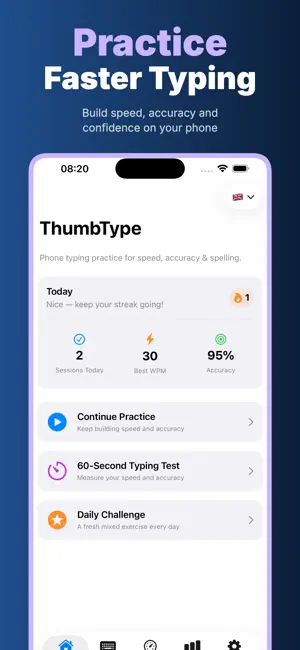
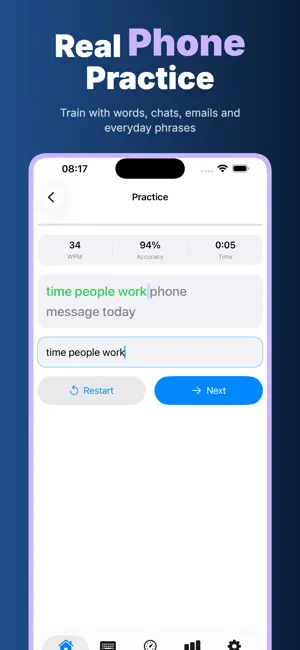
ThumbType is a focused phone typing trainer for anyone who wants faster, cleaner, more confident typing on a touchscreen keyboard. It is built for the moments that actually matter on a phone: short messages, quick replies, school notes, work emails, addresses, codes, numbers, symbols and everyday phrases. Open the app, choose a practice language, type the prompt, and see how your speed, accuracy and spelling improve over time. Privacy is part of the product, not an extra setting: Offline / No Login / Privacy First / On Device / No Cloud Upload. ThumbType works fully offline after installation. There is no account to create, no social feed, no cloud workspace and no sync process. Your typed practice text, WPM results, accuracy, streaks, settings and progress history stay on this device. The app is made for people who want to train without sending their habits, mistakes or learning history to a server. Practice is organized around real phone use. Start with common words to build basic speed, move into sentences for smoother rhythm, then train daily chat phrases that feel like real messages. Email practice helps with school and work replies. Numbers & Symbols builds comfort with things that slow people down on a phone keyboard: email addresses, dates, prices, order numbers, passwords, punctuation and short codes. Address Practice is for streets, cities and zip codes. Pinyin Practice helps you type initials, finals and pinyin phrases with better flow. ThumbType currently includes practice content for English, Portuguese, Spanish and Pinyin Chinese. You can switch the practice language from the Home or Practice screen, and the app UI can follow the iOS per-app language setting. The lessons are stored inside the app, so you can keep practicing on a commute, in a classroom, on a flight, in a library, or anywhere with weak signal. For quick training, use Continue Practice or the Daily Challenge. The daily challenge picks a fresh mixed exercise so a short session still feels varied. For measurement, the Test tab offers 30-Second Sprint, 60-Second Standard and 3-Minute Challenge modes. Type as much as you can before the timer ends, then ThumbType measures WPM and accuracy so you can compare sessions without guessing. Progress is simple and readable. The Home screen shows today’s sessions, best WPM, accuracy and streak. The Progress tab tracks practice time, lessons done, best WPM, average accuracy, day streak, total sessions, recent results and language progress. Instead of a noisy dashboard, ThumbType gives you the numbers that help you decide what to practice next. The app also includes settings that make practice easier to stick with: text size controls, sound effects, haptics, Senior Mode for larger text and gentler pacing, and Kids Mode for shorter lessons with simpler words. Reset progress whenever you want; all saved results are local to the device. ThumbType is intentionally calm. No login wall. No cloud upload. No internet requirement. No complicated course map. Just short, repeatable typing practice for speed, accuracy and spelling, with private on-device progress you can trust. Use ThumbType as a daily warm-up before writing a long message, preparing for class, replying to work, learning a new language, or helping a family member get more comfortable with the phone keyboard. The best sessions are short and regular: a few minutes of focused practice, a quick speed test, then a look at the results. Because everything is offline and on device, you can build the habit anywhere. ThumbType Pro unlocks unlimited practice, all lessons and tests, detailed speed and accuracy trends, every practice language, and Senior and Kids modes. Privacy Policy https://woodcuttool.com/legal/ThumbType/privacy/ Terms of Use https://www.apple.com/legal/internet-services/itunes/dev/stdeula/
What’s new
Version 1.0.2 · Updated September 29, 2026
Performance optimizations and bug fixes for typing practice, speed tests, progress tracking and offline reliability.
App privacy
The developer, 家宝 戴, reported these privacy practices to Apple.
Data Not Collected
The developer does not collect any data from this app.
Alternatives to ThumbType: Typing Speed Test
Looking for apps like ThumbType: Typing Speed Test? Here are 6 similar apps on the App Store. The highest rated is Typing games - OneType (5.0/5), and all 6 are free to download.
-
 Typeleaf
-
 Typing Tutor: Learn to Type
-
 Typing Trainer: by NS Apps
-
 Typer - Fast & Mindful Typing
1.0
-
 KeyRush: Typing Speed Test
-
 Typing games - OneType
5.0
| App | Rating | Price | Last updated | Compare |
|---|---|---|---|---|
| ThumbType: Typing Speed Test | 5.0 / 5 (4 ratings) | Free | September 29, 2026 | |
| Typeleaf | – | Free | Oct 17, 2026 | Compare |
| Typing Tutor: Learn to Type | – | Free | Aug 17, 2026 | Compare |
| Typing Trainer: by NS Apps | – | Free | Jul 15, 2026 | Compare |
| Typer - Fast & Mindful Typing | 1.0 / 5 (1) | Free | Sep 25, 2026 | Compare |
| KeyRush: Typing Speed Test | – | Free | Jul 30, 2026 | Compare |
| Typing games - OneType | 5.0 / 5 (1) | Free | Sep 7, 2026 | Compare |