

KeyRush: Typing Speed Test
Andrii Matiushev Education iPhoneiPadiPod touch
KeyRush: Typing Speed Test is a free Education app for iPhone and iPad by Andrii Matiushev. Requires iOS 17.0. Updated July 30, 2026.
- Price
- Free
- on the App Store
- Size
- 13 MB
- Age 4+
- Updated
- Jul 30
- 2026 · v1.0.1
Screenshots


About KeyRush: Typing Speed Test
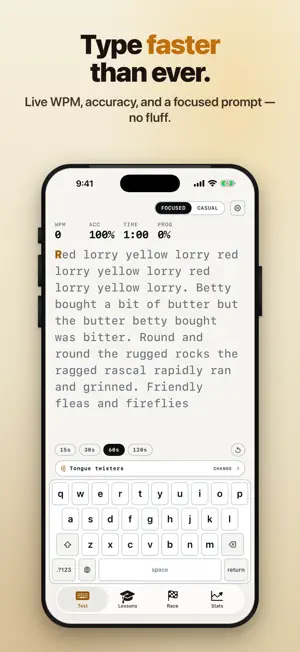
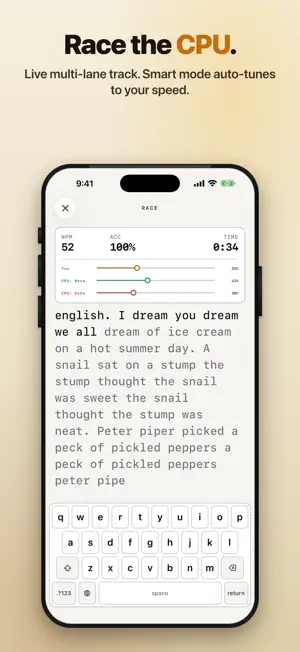
Welcome to KeyRush — the typing trainer that doesn't feel like one. Whether you're chasing a 100 WPM personal best, learning touch typing from scratch, or racing your phone for a quick win, KeyRush is built around one idea: typing practice should feel like a game you actually want to come back to. WHY KEYRUSH • Two vibes, one app. Flip between Pro mode (clean, distraction-free) and Arcade mode (effects, sounds, confetti) — match the experience to your mood. • Made for iOS. Spring animations, haptics, symbol effects, Swift Charts — it feels native because it is. • On-device by design. No account to sign up for. Your stats, sessions, and custom texts stay on this device. SPEED TEST • Pick 15-, 30-, 60-, or 120-second runs. • Live WPM, accuracy, and consistency tracked in real time. • Color-coded per-character feedback as you type. • Beautiful results sheet: WPM ring, error breakdown, trouble-bigram chart. • A live WPM sparkline shows your rhythm mid-run. • 12 text packs — random words, famous quotes, fun facts, tongue twisters, pangrams, poetry, code wisdom, science, nature, philosophy, proverbs, and Surprise Me. LESSONS • 10 stages, color-coded by finger family — pink for pinkies, mint for middles, purple for indexes. • Pinkies-first pedagogy — break the hunt-and-peck habit before it locks in. • Five sub-lessons per stage with 1- to 3-star ratings. • Hit 90% accuracy and 20 WPM to unlock the next stage. • Optional finger-guide overlay highlights the right finger as you go. RACE VS CPU • Line up against 1–3 simulated opponents. • Difficulty from 30 WPM all the way to Extreme. • Smart mode auto-tunes opponents to your recent sessions. • 60-second sprints or first-to-finish on a 250-character track. • Animated runners, finish-line celebration, instant replay. STATS & CHARTS • Best WPM, current streak, total tests, level — at a glance. • WPM trend and accuracy trend over 7 / 30 / 90 days or all-time. • Per-key error heatmap on a real keyboard grid. • Top mistyped bigrams and trigrams so you know what to drill next. • Calendar heatmap of your practice days. • 50 XP-driven levels. 40+ ACHIEVEMENTS • Speed milestones from 20 WPM all the way to 160. • Accuracy badges: 90%, 95%, 98%, perfect 100%. • Endurance: 3-, 7-, 14-, 30-, and 100-day streaks. • Win races, complete every lesson stage, take a test at 3 AM — Night Owl awaits. DAILY CHALLENGE • A fresh seeded text every day — the same prompt for every player worldwide. • Bonus XP if you finish today's run. 6 THEMES, 4 KEY SOUNDS • Themes: System, Light, Dark, Ink, Paper, and Midnight (pure black for OLED). • Sounds: Silent, Mechanical, Typewriter, Soft. BUILT FOR YOUR KEYBOARD • A themed touch keyboard with finger-colored keys, or pair your hardware keyboard. • Hand-guide overlay highlights which finger should press next. • Adjustable prompt font size. ACCESSIBILITY • Full VoiceOver labels, Dynamic Type up to AX5, Reduce Motion respected. • Bold and underline cues for correct and incorrect characters, so color is never the only signal. 40 LANGUAGES, 9 KEYBOARD LAYOUTS • Train in Latin QWERTY, Cyrillic ЙЦУКЕН, Greek, Hebrew, Arabic, Devanagari, Thai, Korean Hangul, or Zhuyin. WIDGETS & SHORTCUTS • Home Screen widgets: best WPM today, streak, level. • Siri Shortcuts: "Start a typing test" and "What's my typing speed?" PRIVACY • Your typing sessions, stats, and custom texts live on this device. No sign-in required. REQUIREMENTS • iPhone or iPad running iOS 17.0 or later. Train, race, level up. Top your last best. — Privacy Policy: https://zydeno.com/keyrush/privacy.html Terms of Use: https://zydeno.com/keyrush/terms.html
What’s new
Version 1.0.1 · Updated July 30, 2026
Introducing KeyRush Pro — take your typing further with the full 10-stage course, custom text and weak-key drills, deep stats and your personal typing certificate, tougher races and a 5-minute endurance run, plus every theme, sound, and text pack. This update also adds a home-screen widget and delivers dozens of reliability, accuracy, and polish improvements across the whole app. Thank you for typing with KeyRush!
Play today's Inkspill puzzle
Spread your ink until the whole board is one color, within the move limit. A free daily puzzle from Fiplay, same board for everyone. It plays right here, no download.
App privacy
The developer, Andrii Matiushev, reported these privacy practices to Apple.
Data Not Collected
The developer does not collect any data from this app.
Alternatives to KeyRush: Typing Speed Test
Looking for apps like KeyRush: Typing Speed Test? Here are 6 similar apps on the App Store. The highest rated is ThumbType: Typing Speed Test (5.0/5), and all 6 are free to download.
-
 Typing Tutor: Learn to Type
-
 Typing Practice: TypeMania
1.0
-
 ThumbType: Typing Speed Test
5.0
-
 Typing Speed Test - WPM
-
 Typing Practice: English News
4.6
-
 Mecanografía: Curso Español
| App | Rating | Price | Last updated | Compare |
|---|---|---|---|---|
| KeyRush: Typing Speed Test | – | Free | July 30, 2026 | |
| Typing Tutor: Learn to Type | – | Free | Aug 17, 2026 | Compare |
| Typing Practice: TypeMania | 1.0 / 5 (1) | Free | Oct 21, 2026 | Compare |
| ThumbType: Typing Speed Test | 5.0 / 5 (4) | Free | Sep 29, 2026 | Compare |
| Typing Speed Test - WPM | – | Free | Jul 15, 2026 | Compare |
| Typing Practice: English News | 4.6 / 5 (18) | Free | Aug 31, 2026 | Compare |
| Mecanografía: Curso Español | – | Free | Jul 14, 2026 | Compare |