

Daybreak: Screen Time Control
Ryan Setiawan Productivity iPhoneiPadiPod touch
Daybreak: Screen Time Control is a free Productivity app for iPhone and iPad by Ryan Setiawan. Rated 5.0/5 from 4 ratings. Requires iOS 26.4.
- Rating
- 5.0
- 4 ratings
- Price
- Free
- on the App Store
- Size
- 21 MB
- Age 4+
- Updated
- Aug 18
- 2026 · v1.1
Screenshots


About Daybreak: Screen Time Control
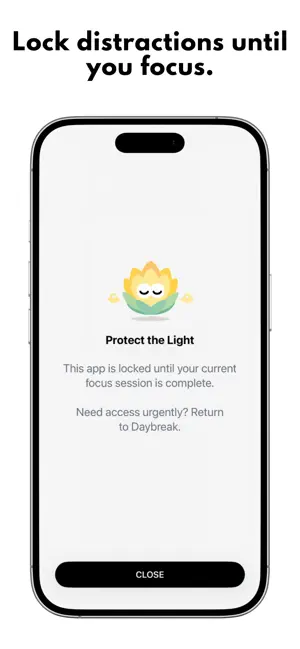
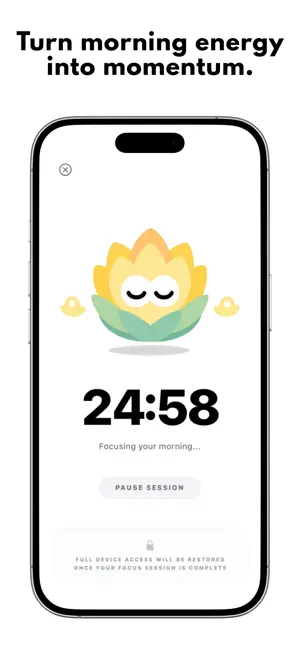
Your phone should not be the first thing that takes your attention each morning. Daybreak automatically blocks the distracting apps you choose overnight and keeps them blocked after you wake. Dedicate time in the morning to complete a focus session before those apps become available for the day. HOW DAYBREAK WORKS 1. Choose your distractions Select the social media, video, news, games, or other apps that tend to cloud your mornings. 2. Set your schedule Choose when your apps lock for the night and when your morning focus period becomes available. Daybreak applies the schedule automatically, without requiring you to remember to turn it on. 3. Focus before distractions When you wake up, your selected apps remain blocked until you complete your chosen focus session. After completing it, your apps become available for the rest of the day. BUILT FOR PROTECTED MORNINGS • Automatic overnight and morning app blocking • A clear morning streak • Emergency access for unexpected situations • Live Activities and Dynamic Island support • A simple schedule that runs automatically • Screen Time controls powered by Apple’s Family Controls framework FRICTION WITH A PURPOSE Daybreak does not try to compete with distracting apps for your attention. It creates a clear boundary before the morning begins: focus first, then regain access. Emergency access remains available, but it includes deliberate limits so that it stays an exception rather than becoming the default. PRIVATE BY DESIGN Your schedule, selected apps, and focus history are stored on your device. Daybreak does not upload your selected-app information to a remote database. An account is optional. Daybreak can be used without signing in. EARLY ACCESS Every part of Daybreak is available free during its launch while the app is refined with early users. Optional one-time early-support purchases grant lifetime access to Daybreak’s current and future features. There is no recurring subscription during this early-access release. Daybreak requires Screen Time permission to block the apps you select. Permission can be removed from your device settings.
What’s new
Version 1.1 · Updated August 18, 2026
The schedule screen has been redesigned — setting your lock and unlock times is faster and much clearer. Focus duration is now a slider, so you can dial in exactly the session length that works for you. Emergency Unlock is more reliable, and the button has moved somewhere easier to reach when you actually need it. Also fixed: the countdown timer animation, a few rough edges in setup, and a clearer message when you try to sign in without an account.
App privacy
The developer, Ryan Setiawan, reported these privacy practices to Apple.
Data Linked to You
The following data, which may be collected and linked to your identity, may be used for the following purposes:
- Purchases: Purchase History
- Identifiers: User ID, Device ID
- Usage Data: Product Interaction
- Contact Info: Email Address, Name
Used for: Analytics, App Functionality
Alternatives to Daybreak: Screen Time Control
Looking for apps like Daybreak: Screen Time Control? Here are 6 similar apps on the App Store. The highest rated is Scrollar - Screen Time Control (5.0/5), and all 6 are free to download.
-
 Merit.
-
 Scrollar - Screen Time Control
5.0
Scrollar - Screen Time Control
5.0
-
 Promise: Screen Time Control
5.0
Promise: Screen Time Control
5.0
-
 Rotcut: Screen Time Control
5.0
Rotcut: Screen Time Control
5.0
-
 Fried: Screen Time Control
5.0
Fried: Screen Time Control
5.0
-
 Couples Screen Time: Burn
4.7
Couples Screen Time: Burn
4.7
| App | Rating | Price | Last updated | Compare |
|---|---|---|---|---|
| Daybreak: Screen Time Control | 5.0 / 5 (4 ratings) | Free | August 18, 2026 | |
| Merit. | – | Free | Apr 7, 2026 | Compare |
| Scrollar - Screen Time Control | 5.0 / 5 (1) | Free | May 18, 2026 | Compare |
| Promise: Screen Time Control | 5.0 / 5 (4) | Free | Jun 16, 2026 | Compare |
| Rotcut: Screen Time Control | 5.0 / 5 (2) | Free | Jun 10, 2026 | Compare |
| Fried: Screen Time Control | 5.0 / 5 (4) | Free | Jul 18, 2026 | Compare |
| Couples Screen Time: Burn | 4.7 / 5 (7) | Free | Oct 13, 2026 | Compare |