

Scrollar - Screen Time Control
Nguyen Thao Uyen Productivity iPhoneiPadiPod touch
Scrollar - Screen Time Control is a free Productivity app for iPhone and iPad by Nguyen Thao Uyen. Rated 5.0/5 from 1 ratings. Requires iOS 16.0.
- Rating
- 5.0
- 1 ratings
- Price
- Free
- on the App Store
- Size
- 111 MB
- Age 4+
- Updated
- May 18
- 2026 · v1.0.4
Screenshots

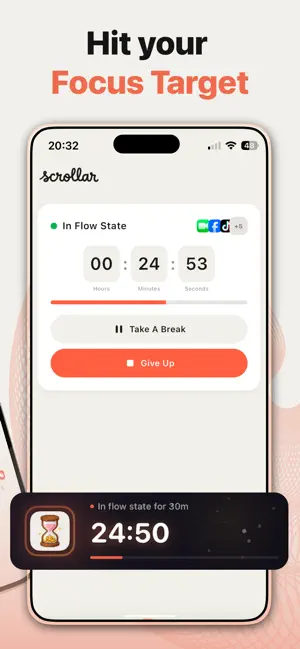


About Scrollar - Screen Time Control
We’ve all been there: You pick up your phone to check one thing… and suddenly an hour is gone. You tell yourself “I’ll cut back tomorrow.” But tomorrow never comes. SCROLLAR WORKS - BECAUSE IT DOESN’T SHAME YOU No guilt trips. No scary warnings. Just a simple idea: give your attention a daily budget — like money. Spend it how you want, just a little more intentionally. YOUR DAILY SCREEN TIME GOAL Start by setting a daily limit based on how you actually use your phone — not some unrealistic target. Every minute you save helps your Pixel Pig grow, evolving through 25 levels from a tiny piglet to a golden bank. CREATE YOUR APP GROUPS, YOUR WAY Organize apps in a way that makes sense to you — social, streaming, gaming, or anything else. Each group gets its own shared daily budget, so you can be strict where it matters and flexible where it doesn’t. THREE WAYS TO BLOCK DISTRACTIONS 1. Limit Blocking Go over a group’s limit? Those apps lock until tomorrow. You set the rules — Scrollar enforces them. 2. Scheduled Blocking Create boundaries that fit your life. No social media during work. No scrolling before bed. Set it once and forget it. 3. CEO Mode Need to focus right now? Start a session that blocks all your tracked apps until you’re done. No shortcuts. GENTLE NUDGES, NOT GUILT TRIPS Get a heads-up right before you hit your limit. No pressure. No shame. Just a moment to decide if you want to keep going. SEE WHERE YOUR TIME GOES Clear, simple insights show your daily and weekly habits. Spot what’s taking your time, track your streaks, and watch your progress build. 100% PRIVATE No accounts. No cloud. No tracking. Everything stays on your device — exactly where it belongs. Scrollar doesn’t judge you. It doesn’t try to control you. It just helps you notice — and makes it easier to put your phone down. Built for people who’ve tried Screen Time and gave up. Built for people who want to scroll less, but don’t know how to start. Built for you. Terms of Use: https://ntudevelop.github.io/Scrollar/ Privacy Policy: https://ntudevelop.github.io/Scrollar/
What’s new
Version 1.0.4 · Updated May 18, 2026
Bug fixes and UI Improvements
App privacy
The developer, Nguyen Thao Uyen, reported these privacy practices to Apple.
Data Not Collected
The developer does not collect any data from this app.
Alternatives to Scrollar - Screen Time Control
Looking for apps like Scrollar - Screen Time Control? Here are 6 similar apps on the App Store. The highest rated is Daybreak: Screen Time Control (5.0/5), and all 6 are free to download.
-
 Daybreak: Screen Time Control
5.0
-
 Screen Time Control: ScrollCat
-
 Key - Screen Time App Blocker
-
 Tunda
-
 AppBlocker: Block Apps & Focus
-
 Promise: Screen Time Control
5.0
| App | Rating | Price | Last updated | Compare |
|---|---|---|---|---|
| Scrollar - Screen Time Control | 5.0 / 5 (1 rating) | Free | May 18, 2026 | |
| Daybreak: Screen Time Control | 5.0 / 5 (4) | Free | Aug 18, 2026 | Compare |
| Screen Time Control: ScrollCat | – | Free | Aug 31, 2026 | Compare |
| Key - Screen Time App Blocker | – | Free | Aug 17, 2026 | Compare |
| Tunda | – | Free | Sep 26, 2025 | Compare |
| AppBlocker: Block Apps & Focus | – | Free | Oct 21, 2026 | Compare |
| Promise: Screen Time Control | 5.0 / 5 (4) | Free | Jun 16, 2026 | Compare |