

GenTimer: AI Timer & Stopwatch
Maxime Gheysen Utilities iPhoneiPadiPod touchApple Watch
GenTimer: AI Timer & Stopwatch is a free Utilities app for iPhone and iPad by Maxime Gheysen. Requires iOS 16.4. Updated October 16, 2026.
- Price
- Free
- on the App Store
- Size
- 64 MB
- Age 4+
- Updated
- Oct 16
- 2026 · v1.1.0
Screenshots


About GenTimer: AI Timer & Stopwatch
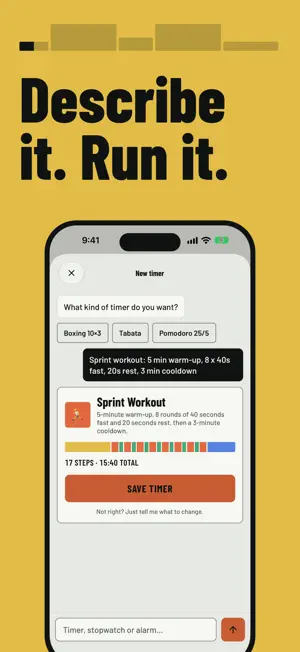
Describe it. Time it. Say "boxing, 10 rounds of 3 minutes with a 1 minute break" and Gen Timer builds the whole session: rounds, rests and cues. No pickers, no nested menus, no counting rounds yourself. TELL IT WHAT YOU NEED Type your routine the way you would say it to a training partner. If something is missing, like a warm-up, a rest length or a round count, it asks the one question that matters and then builds the sequence. Try: - "20 minute HIIT, 40 seconds work, 20 seconds rest" - "Four 25 minute focus blocks with 5 minute breaks" - "EMOM for 10 minutes" - "Steep the tea for 3 minutes" BUILT FOR THE MOMENT YOU ARE MID-SET Everything past the first tap is made to be heard and glanced at, not read. Phase-end sounds, 3-2-1 countdown pips and haptics carry over your music, even with the screen locked. The running timer sits on your lock screen and in the Dynamic Island, so checking the round is a glance. WHAT PEOPLE TIME WITH IT - HIIT, Tabata, EMOM and circuit training - Boxing and martial arts rounds - Pomodoro focus blocks, study and deep work - Stretching, mobility and yoga - Box breathing and CO2 tables - Planks, sprints and the 7 minute workout - Cooking, baking and brewing tea MORE THAN A COUNTDOWN A plain timer handles one countdown well. Gen Timer is for sessions with stages, repeats and rules: warm-ups, work and rest pairs, ladders, cooldowns. You get a fully custom interval timer without the setup that usually comes with one. STOPWATCH WITH LAPS When the work has no fixed length, switch to a stopwatch with a lap button and a full per-lap history. Good for swim sets, sprints and anything you measure after the fact. SAVE, REUSE, SHARE Keep the sessions you run most. Send one as a link and a teammate opens the exact same timer. Or start from a template and change it by asking. MAKE IT YOURS Six color themes, a set of alarm sounds, and generated artwork for every session you create. Stop building timers. Start running them. This app follows the standard Apple Terms of Use (EULA): https://www.apple.com/legal/internet-services/itunes/dev/stdeula/
What’s new
Version 1.1.0 · Updated October 16, 2026
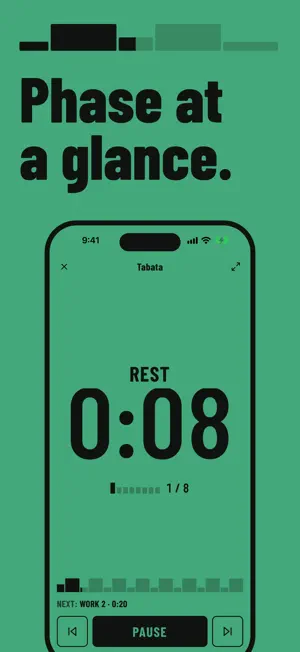
A new look and a new icon: flat color, big numerals, and a strip that shows every phase of your timer at a glance. The run screen takes the color of the current phase, so you can read it from across the room. Your watch and lock screen get the new look too. The AI builds more accurate timers from your description.
App privacy
The developer, Maxime Gheysen, reported these privacy practices to Apple.
Data Not Linked to You
The following data, which may be collected but is not linked to your identity, may be used for the following purposes:
- Identifiers: Device ID
- Usage Data: Product Interaction
- Diagnostics: Crash Data, Performance Data, Other Diagnostic Data
Used for: Analytics
Alternatives to GenTimer: AI Timer & Stopwatch
Looking for apps like GenTimer: AI Timer & Stopwatch? Here are 6 similar apps on the App Store. The highest rated is AmberDate - Date Calculator (5.0/5), and all 6 are free to download.
-
 AmberCount - Tally Counter
-
 AmberDate - Date Calculator
5.0
AmberDate - Date Calculator
5.0
-
 Tally - Count Anything
-
 Calculator: Simple Calculator
-
 WristRec
-
 Re:Count - Tally Counter
| App | Rating | Price | Last updated | Compare |
|---|---|---|---|---|
| GenTimer: AI Timer & Stopwatch | – | Free | October 16, 2026 | |
| AmberCount - Tally Counter | – | Free | Jan 6, 2026 | Compare |
| AmberDate - Date Calculator | 5.0 / 5 (2) | Free | Dec 22, 2025 | Compare |
| Tally - Count Anything | – | Free | Mar 23, 2026 | Compare |
| Calculator: Simple Calculator | – | Free | Jun 15, 2026 | Compare |
| WristRec | – | Free | Oct 2, 2026 | Compare |
| Re:Count - Tally Counter | – | Free | Oct 7, 2026 | Compare |