

WristRec
麦提图尔荪 麦麦提江· Utilities iPhoneiPadiPod touchApple Watch
WristRec is a free Utilities app for iPhone and iPad by 麦提图尔荪 麦麦提江·. Requires iOS 17.0. Updated October 2, 2026.
- Price
- Free
- on the App Store
- Size
- 20 MB
- Age 4+
- Updated
- Oct 2
- 2026 · v1.0.10
Screenshots
About WristRec
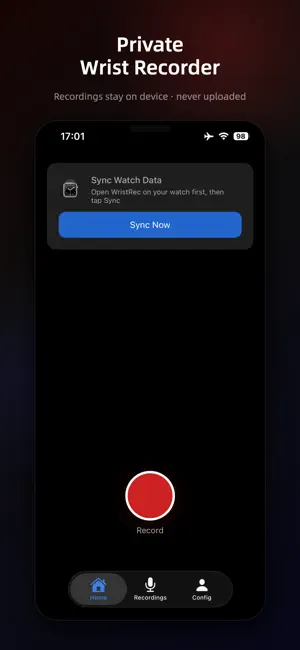
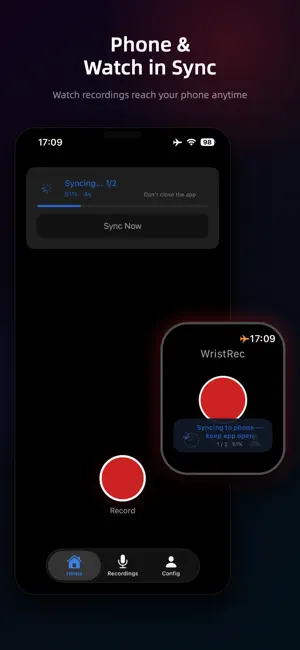
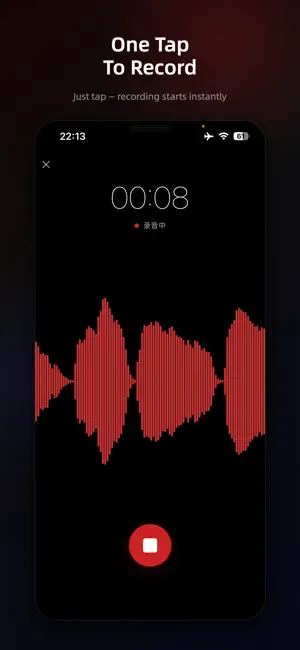
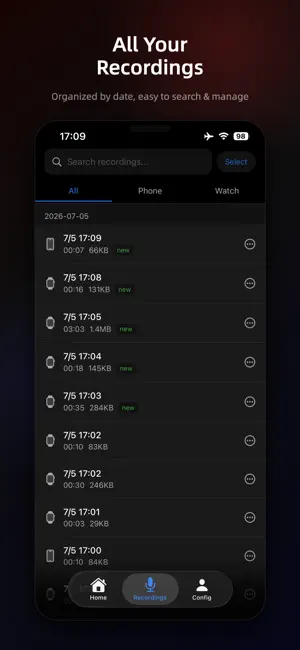
WristRec is a private voice recorder for your smartwatch and phone. Tap once on your watch and you're recording — no cloud, no account, and your audio never leaves your device. Built for fast, private capture: meetings, interviews, lectures, and quick memos. Why WristRec • Private by design — recordings live only on your device and sync directly to your own phone. No cloud servers, no account, nothing uploaded. • Record from your wrist — start recording on your watch without reaching for your phone. • Background Audio Recording — Seamlessly continue recording audio even when using other apps or when the screen is locked. • Sync to your phone — transfer watch recordings over a direct device-to-device connection, on demand or when you open the app. • Waveform playback — scrub the full waveform, change speed, skip silence, jump ±10s. • Biometric lock — protect recordings with Touch ID, Face ID, or Passcode. • Share anywhere — export a single file or batch-zip up to 30 recordings via the system share sheet. • 21 languages, right-to-left supported. Free, with an optional upgrade WristRec is free and supported by ads. Recording, playback, and managing your files are always free and never limited. Unlimited sync is free for 24 hours; after that, watch a short video to extend it, or make a one-time purchase to unlock unlimited sync forever. (The purchase unlocks unlimited sync only.) Your privacy No cloud backend. No account. Recordings stay in your device's storage and sync directly to your own phone — we never see them. The app makes no network requests for your audio. Data Synchronization & Storage: This app uses a "local secure archive" architecture. Recordings sync one way only, from the watch to the phone (the phone does not sync them back to the watch). According to the app settings, after audio sync completes, some older files that have already been synced are cleaned up automatically, freeing space on the watch. Deleting an already-synced recording on the watch only clears local watch storage; the phone keeps that copy, so important data is not lost by mistake. Device Compatibility: Apple Watch syncs with iPhone. HUAWEI full smartwatches (such as WATCH 5/6 and WATCH Ultimate 2, not GT, FIT, or bands) can also sync with iPhone — choose HUAWEI Watch under Settings → Watch Type. Note: On Apple Watch Ultra, bind the Action button to start recording with a single press. On other Apple Watch models, add the WristRec complication to your watch face and tap it to jump straight into recording. Due to watchOS limits, recording may not move to the background automatically — start with one tap and keep the app open, or send it to the background yourself.
What’s new
Version 1.0.10 · Updated October 2, 2026
Added support for HUAWEI full smartwatches (HUAWEI WATCH 5/6 and WATCH Ultimate 2; not GT, FIT, or bands). Choose HUAWEI Watch in Settings → Watch Type.
App privacy
The developer, 麦提图尔荪 麦麦提江·, reported these privacy practices to Apple.
Data Used to Track You
The following data may be used to track you across apps and websites owned by other companies:
- Identifiers: Device ID
- Usage Data: Advertising Data
Data Not Linked to You
The following data, which may be collected but is not linked to your identity, may be used for the following purposes:
- Identifiers: Device ID
- Usage Data: Advertising Data
- Diagnostics: Crash Data, Performance Data
Used for: Third-Party Advertising
Alternatives to WristRec
Looking for apps like WristRec? Here are 6 similar apps on the App Store. The highest rated is OmniBrief: AI Note Taker (5.0/5), and 5 of the 6 are free to download.


| App | Rating | Price | Last updated | Compare |
|---|---|---|---|---|
| WristRec | – | Free | October 2, 2026 | |
| ReceiptVault | – | Free | Mar 12, 2026 | Compare |
| ePdfUB | – | 3.99 USD | Oct 17, 2026 | Compare |
| OmniBrief: AI Note Taker | 5.0 / 5 (1) | Free | Aug 15, 2026 | Compare |
| DuraX | – | Free | Nov 12, 2025 | Compare |
| Cool Counter | 5.0 / 5 (1) | Free | Apr 7, 2026 | Compare |
| GRIT Calendar | – | Free | Feb 27, 2026 | Compare |
Compare WristRec with the top alternatives: ratings, updates, ASO score and keyword gaps →