

PDF Tools - Split, Merge, Comp
少泽 梁 Productivity iPhoneiPadiPod touch
PDF Tools - Split, Merge, Comp is a free Productivity app for iPhone and iPad by 少泽 梁. Requires iOS 16.6. Updated September 5, 2026.
- Price
- Free
- on the App Store
- Size
- 46 MB
- Age 4+
- Updated
- Sep 5
- 2026 · v1.6.0
Screenshots



About PDF Tools - Split, Merge, Comp
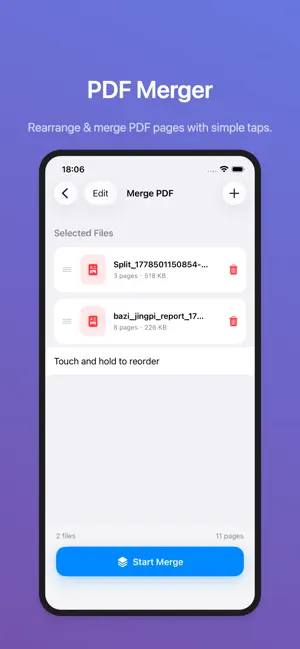
PDF Tools helps you organize sensitive documents faster with on-device PDF workflows built for privacy and efficiency. Merge, edit, split, compress, sign, and convert images to PDF on your iPhone without uploading files to a server. It is designed for real tasks such as combining contracts before sending, compressing reports for sharing, organizing study materials, or signing documents while away from a desk. The workflow stays focused, fast, and easy to understand. If you want a PDF tool that balances privacy, daily usefulness, and a clean native iOS experience, this app gives you practical document actions together with a built-in local library for follow-up access and export. Key features: - Merge multiple PDF files in your preferred order - Edit pages with reorder, delete, and split actions - Compress PDFs for easier sharing and storage - Add text watermarks for document ownership and archive control - Insert handwritten signatures for common approval and signing workflows - Convert multiple images into one PDF document - Manage processed files locally with preview, rename, delete, and export Best-fit use cases: - Office work: contracts, invoices, reports, and meeting materials - School work: lecture notes, handouts, assignments, and revision packs - Privacy-focused users: local processing for documents that should not leave the device Why it converts better: - Private by design with on-device processing - Covers a full document workflow instead of a single task - Reduces friction with focused actions and native iPhone interaction - Keeps processed files accessible in a local library for ongoing use Notes: - Premium benefits, pricing, and trial availability must match the actual StoreKit configuration - Future metadata updates should prioritize conversion and search term performance [Protocol Description] End User Software Usage Terms https://www.apple.com/legal/internet-services/itunes/dev/stdeula/ Terms of Use https://www.sharezer.com/app/agreement/TermsofUse.html Privacy Policy https://www.sharezer.com/app/agreement/PrivacyPolicy.html
What’s new
Version 1.6.0 · Updated September 5, 2026
Update APP icon
App privacy
The developer, 少泽 梁, reported these privacy practices to Apple.
Data Used to Track You
The following data may be used to track you across apps and websites owned by other companies:
- Usage Data: Advertising Data
Data Not Linked to You
The following data, which may be collected but is not linked to your identity, may be used for the following purposes:
- Usage Data: Advertising Data
Used for: Third-Party Advertising
Alternatives to PDF Tools - Split, Merge, Comp
Looking for apps like PDF Tools - Split, Merge, Comp? Here are 6 similar apps on the App Store. The highest rated is PDF Editor: Fill, Sign & Scan (4.0/5), and all 6 are free to download.
-
 PDF合并拆分助手-PDF工具
-
 PDF Editor: Fill, Sign & Scan
4.0
-
 pdf转换器--手机文档快速转换
-
 PDF Editor & Sign PDF: DocHero
-
 WorldClock - 世界时钟,世界时间转换器
-
 Scanner: PDF OCR Document Scan
| App | Rating | Price | Last updated | Compare |
|---|---|---|---|---|
| PDF Tools - Split, Merge, Comp | – | Free | September 5, 2026 | |
| PDF合并拆分助手-PDF工具 | – | Free | Jun 30, 2026 | Compare |
| PDF Editor: Fill, Sign & Scan | 4.0 / 5 (2) | Free | Oct 19, 2026 | Compare |
| pdf转换器--手机文档快速转换 | – | Free | Mar 25, 2024 | Compare |
| PDF Editor & Sign PDF: DocHero | – | Free | Oct 2, 2026 | Compare |
| WorldClock - 世界时钟,世界时间转换器 | – | Free | May 13, 2026 | Compare |
| Scanner: PDF OCR Document Scan | – | Free | Sep 30, 2026 | Compare |