
PDF Editor: Fill, Sign & Scan
军 夏 Productivity iPhoneiPadiPod touch
PDF Editor: Fill, Sign & Scan is a free Productivity app for iPhone and iPad by 军 夏. Rated 4.0/5 from 2 ratings. Requires iOS 15.0.
- Rating
- 4.0
- 2 ratings
- Price
- Free
- on the App Store
- Size
- 30 MB
- Age 4+
- Updated
- Sep 30
- 2026 · v1.1.0
Screenshots



About PDF Editor: Fill, Sign & Scan
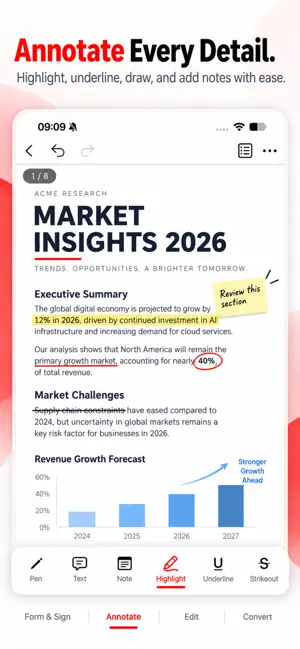
PDF Fill & Sign Pro - Sign, Fill, Edit & Convert PDFs Your all-in-one PDF toolkit for iPhone. Sign contracts, fill forms, edit text, annotate and convert documents - fast, simple and private. SIGN DOCUMENTS IN SECONDS - Draw signatures with your finger or Apple Pencil - Save multiple signatures for quick reuse - Add date stamps in custom formats - Position and resize with precision FILL & EDIT PDFS - Add text anywhere with multiple fonts, colors and styles - Edit text and images in your PDFs - Insert checkmarks, X marks, shapes and lines - Perfect for contracts, applications and official forms ANNOTATE & MARKUP - Highlight, underline and strikethrough text - Add notes and comments, all in one annotation list - Freehand drawing with the pen tool - Bookmarks for quick navigation CONVERT & ORGANIZE - PDF to Word, Image to PDF and PDF to Image - Compress, merge and split PDFs - Protect PDFs with a password - Open Word, Excel, PowerPoint, image and TXT files - Use the tools right from the share sheet in other apps PRIVATE & SECURE - No account needed - just open and start - Your documents are processed right on your device - PDF to Word runs on our secure server, and your file is deleted immediately after conversion BEAUTIFUL & FAST - Clean, modern design with dark mode - Documents open instantly - Home screen quick actions for your favorite tools PERFECT FOR - Signing contracts and agreements - Filling tax forms and applications - Reviewing and annotating business documents - Managing personal paperwork Download now and get your documents done in seconds! Privacy Policy: https://pdf-fill-sign-f7de4.web.app/privacy Terms of Use: https://www.apple.com/legal/internet-services/itunes/dev/stdeula/
What’s new
Version 1.1.0 · Updated September 30, 2026
• Brand-new design for Home, Files and Tools, with dark mode • New tools: PDF to Word, Compress, Merge, Split, Image to PDF, PDF to Image and Password Protect • Edit PDF text with more fonts and styles; edit images with filters, crop and rotate • Bookmarks and annotation list for faster navigation • Convert, compress or merge files right from the share sheet in other apps • Home screen quick actions; open Word, Excel, PowerPoint, image and TXT files • Faster document opening, better stability and bug fixes
App privacy
The developer, 军 夏, reported these privacy practices to Apple.
Data Used to Track You
The following data may be used to track you across apps and websites owned by other companies:
- Location: Coarse Location
- Identifiers: Device ID
- Usage Data: Product Interaction, Advertising Data
Data Not Linked to You
The following data, which may be collected but is not linked to your identity, may be used for the following purposes:
- Location: Coarse Location
- Identifiers: Device ID
- Usage Data: Product Interaction, Advertising Data
Used for: Third-Party Advertising, Analytics
Alternatives to PDF Editor: Fill, Sign & Scan
Looking for apps like PDF Editor: Fill, Sign & Scan? Here are 6 similar apps on the App Store. The highest rated is NANOASCAN (3.0/5), and all 6 are free to download.
-
 Ai Scan Lite - PDF Scanner
-
 NANOASCAN
3.0
-
 BulkHead
3.0
-
 super copy: smart keyboard
-
 Glazr PPTX File Editor
-
 Contact Archive : Clear Guide
| App | Rating | Price | Last updated | Compare |
|---|---|---|---|---|
| PDF Editor: Fill, Sign & Scan | 4.0 / 5 (2 ratings) | Free | September 30, 2026 | |
| Ai Scan Lite - PDF Scanner | – | Free | Jul 16, 2026 | Compare |
| NANOASCAN | 3.0 / 5 (1) | Free | Jun 18, 2026 | Compare |
| BulkHead | 3.0 / 5 (2) | Free | Jun 14, 2026 | Compare |
| super copy: smart keyboard | – | Free | Mar 4, 2026 | Compare |
| Glazr PPTX File Editor | – | Free | Mar 12, 2026 | Compare |
| Contact Archive : Clear Guide | – | Free | Oct 8, 2026 | Compare |