

Outliner by codediary
jeong kyu lee Productivity iPhoneiPadiPod touchMac
Outliner by codediary is a free Productivity app for iPhone and iPad by jeong kyu lee. Requires iOS 18.6. Updated October 8, 2026.
- Price
- Free
- on the App Store
- Size
- 7 MB
- Age 4+
- Updated
- Oct 8
- 2026 · v1.3
Screenshots

About Outliner by codediary
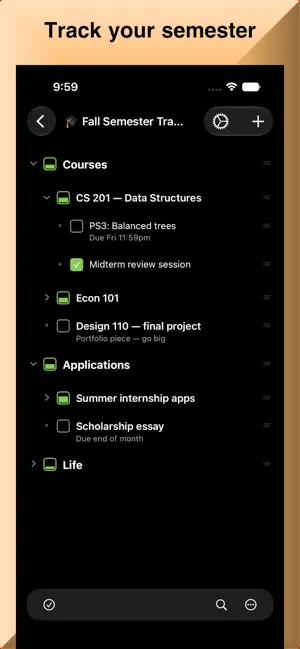
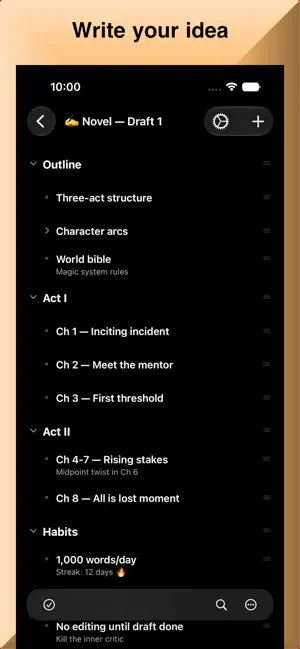
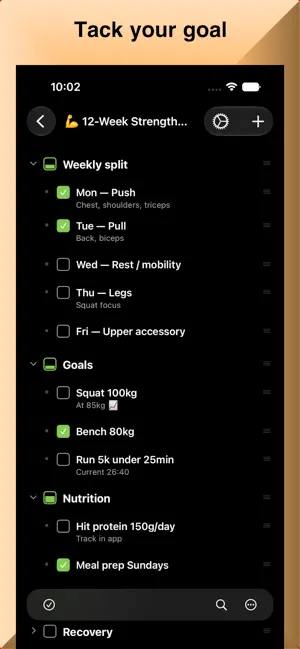
Think in outlines. Get things done. Outliner by codediary is a fast, flexible outliner for capturing ideas, planning projects, and tracking tasks — all in clean, collapsible hierarchies that sync instantly across your iPhone, iPad and Mac Whether you're writing a plan, building a checklist, or managing a project, it keeps everything structured, searchable, and in sync. OUTLINE ANYTHING • Build unlimited nested outlines with drag-and-drop reordering • Indent, outdent, expand, and collapse branches with a tap or keyboard shortcut • Automatic heading styles (H1–H5) give every level clear visual hierarchy • Multi-select to copy, cut, and paste items and entire subtrees • Handwriting - draw and annotate right inside your outlines TRACK TASKS WITH SMART CHECKLISTS • Tri-state checkboxes: done, not done, or partially complete • Parent items roll up automatically as you complete their children • Check or clear an entire subtree with a long press • Hide completed items to focus on what's left ADD CONTEXT • Attach notes to any item • Add images from your photo library, or camera • Zoom, swipe through, and organize inline image attachments • Highlight items with colors and custom styles FIND IT FAST • Live in-outline search with highlighting and match navigation • Global search across every outline at once • Organize outlines with tags, including nested categories SYNC & SHARE • Automatic iCloud sync — no manual saving, always up to date • Share outlines with others to view or edit together in real time • Shared outlines and their images stay in sync for everyone BACKUP & PRINT • Export a full backup of everything, or a single outline, to a file • Restore with smart deduplication — no duplicates • Print or save as PDF with your indentation, checkboxes, notes, and colors intact BUILT FOR APPLE PLATFORMS • Native on iPhone, iPad, and Mac • Full keyboard support: Return, Tab/Shift-Tab, undo/redo, and more • Mac menu commands for font size, undo, search, and printing • Shake to undo on iPhone BOOST YOUR PRODUCTIVITY • Focus Mode — zoom into a single outline and hide the rest. • Better note editing on iOS — full-screen editor for distraction-free writing MORE THAN ONE WAY TO SEE YOUR WORK • Progress bar showing overall completion Start with a single line. Grow it into anything.
What’s new
Version 1.3 · Updated October 8, 2026
What's New — v1.3 • Link your outlines together — type [[ to connect related notes, with autocomplete and a backlinks view showing what points to each outline. • Create Shortcuts and ask Siri: search your outlines, open one by name, add items, or check progress on your goals, all hands-free. • Tabs have come to iPhone and iPad, so you can keep multiple outlines open just like on Mac. • Notes now have a clean Viewer mode for reading, separate from editing. • Shortcut interface - Control Outliner from Shortcut and Siri Plus: faster launch, snappier sync, smoother editing, and a handful of bug fixes (sidebar checkboxes, tab titles, Apple Pencil selection, and more).
App privacy
The developer, jeong kyu lee, reported these privacy practices to Apple.
Data Not Collected
The developer does not collect any data from this app.
Alternatives to Outliner by codediary
Looking for apps like Outliner by codediary? Here are 6 similar apps on the App Store.
-
 OTN - One Time Note
-
 Bulletlist: Outliner
-
 DeepList
-
 PageVault: Offline Reader
-
 Bullet: Outliner
-
 Sheet Notes
| App | Rating | Price | Last updated | Compare |
|---|---|---|---|---|
| Outliner by codediary | – | Free | October 8, 2026 | |
| OTN - One Time Note | – | Free | Aug 8, 2026 | Compare |
| Bulletlist: Outliner | – | Free | Aug 29, 2026 | Compare |
| DeepList | – | Free | Aug 6, 2026 | Compare |
| PageVault: Offline Reader | – | Free | Oct 10, 2026 | Compare |
| Bullet: Outliner | – | Free | Jul 6, 2026 | Compare |
| Sheet Notes | – | Free | May 30, 2026 | Compare |