

Autopen: Transcripts & Notes
QUIET EYE ADVISORS LLC Productivity iPhoneiPadiPod touchApple Watch
Autopen: Transcripts & Notes is a free Productivity app for iPhone and iPad by QUIET EYE ADVISORS LLC. Rated 5.0/5 from 2 ratings. Requires iOS 26.0.
- Rating
- 5.0
- 2 ratings
- Price
- Free
- on the App Store
- Size
- 37 MB
- Age 4+
- Updated
- Oct 24
- 2026 · v2.1.0
Screenshots

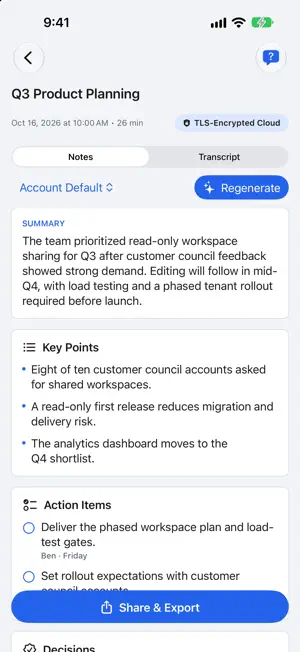
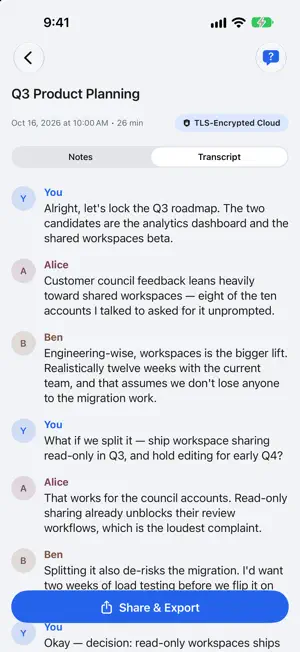

About Autopen: Transcripts & Notes
Autopen turns meetings you are permitted to record into a working record: a speaker-attributed transcript, clear notes, decisions, and action items you can review and edit. RECORD WITH CONFIDENCE Start a recording explicitly and follow the visible recording indicator and live transcript. Autopen never starts recording merely because another app is open. You are responsible for notifying participants and obtaining any consent required where you are. KEEP THE SOURCE AND THE TAKEAWAYS TOGETHER Move between editable notes and the underlying transcript, correct wording, rename speakers, flag important meetings, and organize work with folders and search. NOTES THAT FIT THE MEETING Choose a professional note style for leadership updates, interviews, discovery calls, and other workflows. Create reusable custom styles and choose an account default. KEEP YOUR WORK IN SYNC Your Autopen account keeps supported meetings, transcripts, notes, folders, vocabulary, preferences, and note styles synchronized across your signed-in iPhones and iPads. CLOUD PROCESSING, EXPLAINED PLAINLY Audio is encrypted in transit and processed by cloud services for transcription. Autopen requests deletion of the provider transcript artifact after the final result is retrieved. Transcript and note content remains in your Autopen account until you delete it or an applicable retention policy removes it. Read the current details at getautopen.com/privacy. SIGN IN YOUR WAY Use Sign in with Apple, Continue with Google, an Autopen email and password, or an organization sign-in when your employer has configured one. PRIVACY CONTROLS Delete meetings, empty Trash, erase all meetings, or permanently delete a personal account from Settings. Organization-managed accounts follow the organization's administered lifecycle and retention policy. PLANS Autopen includes 2 hours of transcription a month for free. Starter adds 5 hours a month and Pro about 60 hours a month (fair use). Subscriptions renew automatically each month unless cancelled at least 24 hours before the end of the period. Payment is charged to your Apple Account. Manage or cancel anytime in the Settings app: tap your name, then Subscriptions. Terms of Use: https://getautopen.com/terms Privacy Policy: https://getautopen.com/privacy
What’s new
Version 2.1.0 · Updated October 24, 2026
Autopen now works on Apple Watch. - Record a meeting from your wrist: start and stop on the watch, or from the Autopen complication on your watch face. - Watch recordings move to your iPhone automatically and become notes, just like iPhone recordings. Your account stays on your iPhone, and the watch keeps the audio only until your iPhone has it. Also in this update: - Starting a recording from a shortcut now shows a three-second countdown you can cancel. - The Live Activity now ends properly when an upload fails or a recording is discarded, and shows when an upload has stalled. - Stalled uploads are detected and retried automatically, with a clear message if retries are paused. - The recovery card no longer overlaps the meetings list. - Clearer wording on the session and recording buttons.
App privacy
The developer, QUIET EYE ADVISORS LLC, reported these privacy practices to Apple.
Data Linked to You
The following data, which may be collected and linked to your identity, may be used for the following purposes:
- Usage Data: Product Interaction
- Diagnostics: Other Diagnostic Data
- Purchases: Purchase History
- Contact Info: Email Address, Name
- User Content: Audio Data, Other User Content
- Identifiers: User ID, Device ID
Used for: Analytics, App Functionality
Data Not Linked to You
The following data, which may be collected but is not linked to your identity, may be used for the following purposes:
- Diagnostics: Crash Data
Used for: App Functionality
Alternatives to Autopen: Transcripts & Notes
Looking for apps like Autopen: Transcripts & Notes? Here are 6 similar apps on the App Store. The highest rated is ScribblePad: Notes & PDF (5.0/5), and all 6 are free to download.
-
 ErieSubmit
2.2
ErieSubmit
2.2
-
 HandyNote: canvas, transcribe
-
 Movius for BlackBerry
1.4
Movius for BlackBerry
1.4
-
 ScribblePad: Notes & PDF
5.0
ScribblePad: Notes & PDF
5.0
-
 Desktop Note - Notes & Photos
4.3
Desktop Note - Notes & Photos
4.3
-
 MySA : My Smart AI Assistant
4.5
MySA : My Smart AI Assistant
4.5
| App | Rating | Price | Last updated | Compare |
|---|---|---|---|---|
| Autopen: Transcripts & Notes | 5.0 / 5 (2 ratings) | Free | October 24, 2026 | |
| ErieSubmit | 2.3 / 5 (8) | Free | May 21, 2026 | Compare |
| HandyNote: canvas, transcribe | – | Free | Oct 25, 2026 | Compare |
| Movius for BlackBerry | 1.4 / 5 (59) | Free | Sep 10, 2024 | Compare |
| ScribblePad: Notes & PDF | 5.0 / 5 (3) | Free | Sep 7, 2026 | Compare |
| Desktop Note - Notes & Photos | 4.3 / 5 (11) | Free | Oct 24, 2026 | Compare |
| MySA : My Smart AI Assistant | 4.5 / 5 (2) | Free | Oct 16, 2026 | Compare |