

PC Microphone: Mic for PC
Purple Night Inc Utilities iPhoneiPadiPod touch
PC Microphone: Mic for PC is a paid Utilities app for iPhone and iPad by Purple Night Inc. Requires iOS 16.0. Updated August 8, 2026.
- Price
- 3.99 USD
- on the App Store
- Size
- 2 MB
- Age 4+
- Updated
- Aug 8
- 2026 · v1.1
Screenshots


About PC Microphone: Mic for PC
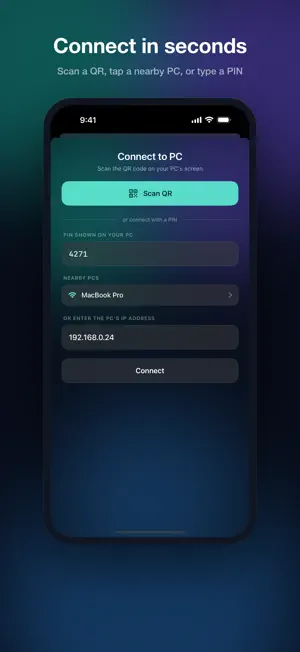
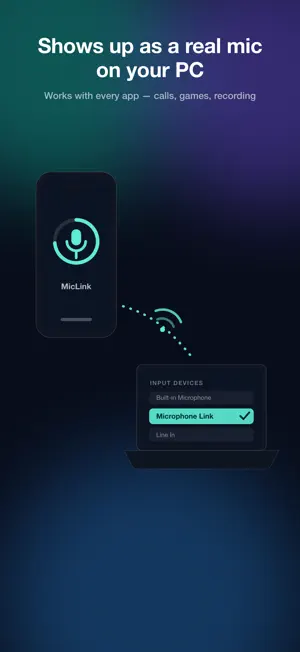
Turn your iPhone into a wireless microphone for your computer. Microphone Link streams your iPhone's mic to your Mac over Wi-Fi and registers it as a real system microphone — so it appears in the input list of every app: video calls, streaming, screen recording, voice memos, anything that uses a mic. HOW IT WORKS 1. Install the free companion app on your Mac (https://miclink.eggmango.com) 2. Scan the QR code shown on your Mac's screen 3. Select "Microphone Link" as the microphone in any app — done WHY YOU'LL LIKE IT • One-scan pairing — scan the QR on your PC and you're connected. No IP addresses, no account, no setup. • Real microphone device — not a browser trick. Your computer sees a native input device that works everywhere. • Clear voice — 48 kHz stereo audio over the efficient Opus codec. • Three latency modes — Low latency (~50 ms) for real-time use, Balanced (~100 ms) for calls, High quality for recording. • Private by design — audio travels only over your local network and never touches the internet. Pairing is protected by a PIN shown on your computer's screen; the wrong PIN gets no audio. • Auto-discovery — your iPhone finds nearby computers on the same Wi-Fi and lists them. Can't see the screen? Type the PIN instead. • Live level meter and mute — see your input level at a glance and mute instantly. • Keeps streaming in the background while you use other apps. WHAT YOU NEED • iPhone with iOS 16 or later • Mac with macOS 13 or later, Window PC and the free Microphone Link desktop app • Both devices on the same Wi-Fi network Visit https://miclink.eggmango.com/
What’s new
Version 1.1 · Updated August 8, 2026
What’s New: • Improved local network connection stability. • General performance enhancements and stability improvements. • Minor bug fixes.
App privacy
The developer, Purple Night Inc, reported these privacy practices to Apple.
Data Not Collected
The developer does not collect any data from this app.
Alternatives to PC Microphone: Mic for PC
Looking for apps like PC Microphone: Mic for PC? Here are 6 similar apps on the App Store. The highest rated is Punktfunk (5.0/5), and 4 of the 6 are free to download.
-
 Punktfunk
5.0
-
 OCR Text Scanner Image Reader
-
 PhoneMic: Wireless Mic for PC
-
 Mobile Mouse - iPad Edition
2.2
-
 Micstream: Microphone for PC
4.4
-
 Water My Yard
3.2
| App | Rating | Price | Last updated | Compare |
|---|---|---|---|---|
| PC Microphone: Mic for PC | – | 3.99 USD | August 8, 2026 | |
| Punktfunk | 5.0 / 5 (1) | 2.99 USD | Oct 25, 2026 | Compare |
| OCR Text Scanner Image Reader | – | Free | Jul 21, 2026 | Compare |
| PhoneMic: Wireless Mic for PC | – | Free | Oct 23, 2026 | Compare |
| Mobile Mouse - iPad Edition | 2.2 / 5 (5) | 2.99 USD | Oct 13, 2025 | Compare |
| Micstream: Microphone for PC | 4.4 / 5 (11) | Free | Oct 24, 2026 | Compare |
| Water My Yard | 3.3 / 5 (16) | Free | Apr 3, 2026 | Compare |