

PhoneMic: Wireless Mic for PC
Serdar Oztetik Utilities iPhoneiPadiPod touch
PhoneMic: Wireless Mic for PC is a free Utilities app for iPhone and iPad by Serdar Oztetik. Requires iOS 17.0. Updated October 13, 2026.
- Price
- Free
- on the App Store
- Size
- 2 MB
- Age 4+
- Updated
- Oct 13
- 2026 · v1.3.6
Screenshots


About PhoneMic: Wireless Mic for PC
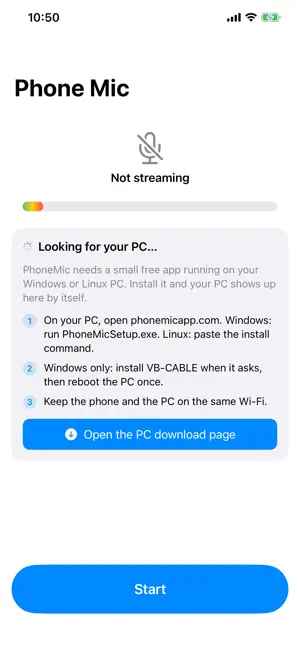
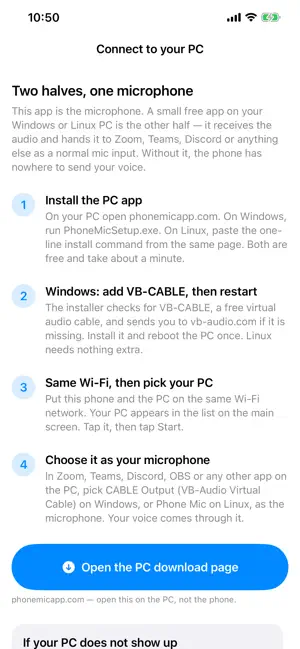
PhoneMic turns your phone into a wireless microphone for your Windows or Linux PC. BEFORE YOU START: PhoneMic comes in two halves. This app is the microphone; a small free app on your PC is the other half. Install it first - download it at phonemicapp.com - or the phone has nowhere to send your voice. SETUP ON WINDOWS 1. On your PC, open phonemicapp.com and run PhoneMicSetup.exe. It is free. 2. Install VB-CABLE when the installer asks, then reboot the PC once. 3. Put the phone and the PC on the same Wi-Fi. Your PC appears in PhoneMic by itself - tap it, then tap Start. Then in Zoom, Teams, Discord, OBS or any other app on the PC, choose CABLE Output as the microphone. SETUP ON LINUX 1. On your PC, open phonemicapp.com and paste the one-line install command into a terminal. No driver and no VB-CABLE. 2. Put the phone and the PC on the same Wi-Fi, pick the PC in PhoneMic, then tap Start. 3. In Zoom, Meet, Discord, OBS or any other app, choose Phone Mic as the microphone. The app also has a full step-by-step guide built in, under the question mark in the top left. FEATURES - Low latency - uncompressed 48 kHz audio over your Wi-Fi, delay of a few dozen milliseconds - Works everywhere - shows up as a standard microphone on Windows and Linux - Keep streaming with the phone locked or the app in the background - Mute straight from the Lock Screen or Dynamic Island - Live level meter so you can see your voice coming through - Private by design - audio never leaves your local network REQUIREMENTS - A Windows 10 or 11 PC, or a Linux PC with a PipeWire desktop (Fedora 36+, Ubuntu 22.10+, Debian 12+, Arch), with the free PhoneMic receiver installed - Phone and PC on the same Wi-Fi network SUBSCRIPTIONS PhoneMic requires an active subscription to use the microphone and PC connection features. Choose $4.99 per week, with a 3-day free trial for eligible subscribers, or $24.99 per year, charged when you subscribe. Prices are in US dollars; local prices are shown in the app. Existing monthly subscribers keep their current plan. Payment is charged to your Apple Account at confirmation of purchase, or after the free trial ends if eligible. Subscriptions renew automatically unless cancelled at least 24 hours before the current period ends. Manage or cancel your subscription in Settings. Restore Purchases is available in the app. Terms of Use: https://www.apple.com/legal/internet-services/itunes/dev/stdeula/ Privacy Policy: https://phonemicapp.com/iphone-mic-pc/privacy/
What’s new
Version 1.3.6 · Updated October 13, 2026
On larger screens, a second page now sits beside the main screen: the path from your phone to your PC, a live voice meter and a big mute button while you stream, and help when your PC does not show up.
App privacy
The developer, Serdar Oztetik, reported these privacy practices to Apple.
Data Not Linked to You
The following data, which may be collected but is not linked to your identity, may be used for the following purposes:
- Purchases: Purchase History
- Location: Coarse Location
- Usage Data: Product Interaction
Used for: Analytics
Alternatives to PhoneMic: Wireless Mic for PC
Looking for apps like PhoneMic: Wireless Mic for PC? Here are 6 similar apps on the App Store. The highest rated is Bluetooth Mic: Live Speaker (4.3/5), and all 6 are free to download.
-
 Mic: Phone as Microphone
4.0
Mic: Phone as Microphone
4.0
-
 Micstream: Microphone for PC
4.2
Micstream: Microphone for PC
4.2
-
 MicFlow: Wifi Audio Stream
-
 Bluetooth Mic: Live Speaker
4.3
Bluetooth Mic: Live Speaker
4.3
-
 Pro Microphone
-
 Phone Mic - Bluetooth Speaker
| App | Rating | Price | Last updated | Compare |
|---|---|---|---|---|
| PhoneMic: Wireless Mic for PC | – | Free | October 13, 2026 | |
| Mic: Phone as Microphone | 4.0 / 5 (10) | Free | Sep 2, 2026 | Compare |
| Micstream: Microphone for PC | 4.2 / 5 (9) | Free | Oct 20, 2026 | Compare |
| MicFlow: Wifi Audio Stream | – | Free | Sep 8, 2026 | Compare |
| Bluetooth Mic: Live Speaker | 4.3 / 5 (6) | Free | Sep 8, 2026 | Compare |
| Pro Microphone | – | Free | May 1, 2026 | Compare |
| Phone Mic - Bluetooth Speaker | – | Free | Oct 18, 2026 | Compare |