

Reverse Image Search: Lens
Kiran Gajjar Graphics & Design iPhoneiPadiPod touch
Reverse Image Search: Lens is a free Graphics & Design app for iPhone and iPad by Kiran Gajjar. Rated 5.0/5 from 1 ratings. Requires iOS 17.0.
- Rating
- 5.0
- 1 ratings
- Price
- Free
- on the App Store
- Size
- 6 MB
- Age 17+
- Updated
- Oct 28
- 2026 · v1.2
Screenshots


About Reverse Image Search: Lens
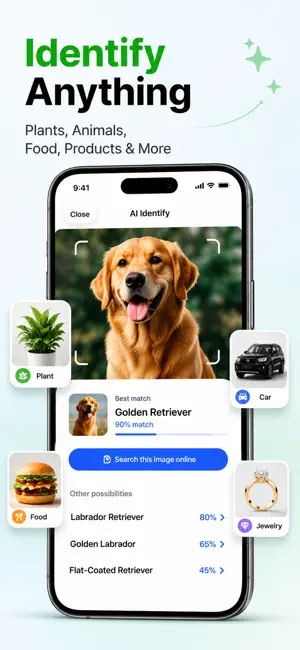
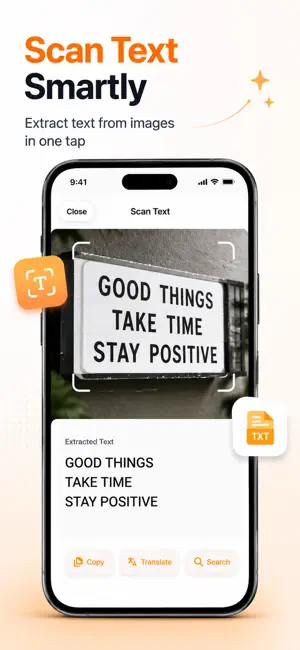
Search the web with a picture. Lens turns your camera into a powerful visual search engine — point at anything, snap a photo, or pick one from your library, and instantly find where it appears online, what it is, or what it says. No typing. No guessing. Just point, scan, and discover. ► REVERSE IMAGE SEARCH Find where any photo appears across the web. Search a picture to discover the original source, similar images, related products, websites, and more. Perfect for spotting fakes, finding higher-resolution versions, verifying a photo, or tracking down a product. ► IDENTIFY ANYTHING (ON-DEVICE) Point at a plant, pet, object, food, or landmark and let on-device AI tell you what it is — fast and private, right on your iPhone. ► SCAN & COPY TEXT (OCR) Pull text out of any photo, sign, document, receipt, or screenshot. Touch the words to select exactly the part you need, then copy, search, or translate it — or export a clean PDF of your scan. ► TRANSLATE Translate text from any image into 30+ languages with a clean, built-in translator. Auto-detects the language, lets you listen to the pronunciation, and copies the result instantly. ► CREATIVE PHOTO TOOLS Lift a subject onto a new background, auto-enhance colors, blur or redact faces and private details, pull a color palette from any photo, and generate QR codes — all on-device. ► QR & BARCODE SCANNER Scan any QR code or barcode to open links or look up product and nutrition info — fast and on-device. ► CROP TO FOCUS Zoom, rotate, and crop to the exact detail that matters, then search just that part of the image for sharper, more relevant results. ► PRIVATE BY DESIGN No account. No sign-up. No ads. Identify, text scan, editing, and QR scanning run entirely on your device. Photos you search are only used to run that search — we don't keep them. WHO IT'S FOR - Shoppers finding a product from a photo - Travelers translating menus, signs, and labels - Students and researchers pulling text from images - Anyone verifying a photo or finding its source - Plant, pet, food, and landmark lovers ► LENS PRO Unlock unlimited searches and all Pro tools with Lens Pro. Start with a free trial and cancel anytime. Download Lens and search the world with your camera — reverse image search, visual lookup, photo identifier, text scanner, translator, background remover, and QR scanner, all in one simple app. — SUBSCRIPTION — Lens Pro is an auto-renewable subscription, available weekly, monthly, or yearly. Payment is charged to your Apple ID at confirmation of purchase. Your subscription automatically renews unless auto-renew is turned off at least 24 hours before the end of the current period. Your account is charged for renewal within 24 hours before the period ends. Manage or cancel anytime in your App Store account settings. Any unused portion of a free trial is forfeited when you buy a subscription. Privacy Policy: https://sites.google.com/view/lens-imagesearch/home/privacy Terms of Use: https://sites.google.com/view/lens-imagesearch/home/terms
What’s new
Version 1.2 · Updated October 28, 2026
• Now available on iPad, with a full-screen layout. • Ready for iOS 27. • Faster image search. • Translate can work offline for languages downloaded on your device. • New "Search with Lens" shortcut for Siri and Spotlight. • Improved accessibility and layout on smaller iPhones. • Bug fixes and performance improvements.
App privacy
The developer, Kiran Gajjar, reported these privacy practices to Apple.
Data Not Linked to You
The following data, which may be collected but is not linked to your identity, may be used for the following purposes:
- Location: Coarse Location
- Identifiers: Device ID
- Usage Data: Product Interaction
- Diagnostics: Crash Data, Performance Data, Other Diagnostic Data
- User Content: Photos or Videos
Used for: Analytics, App Functionality
Alternatives to Reverse Image Search: Lens
Looking for apps like Reverse Image Search: Lens? Here are 6 similar apps on the App Store. The highest rated is PQ+ AI Photo Enhancer (4.5/5), and all 6 are free to download.
-
 Hairstyle Changer Hair Try On
4.3
Hairstyle Changer Hair Try On
4.3
-
 3D AR Draw Learn Steps by Step
-
 Max Video AI: H3 Video Maker
-
 Background Erase.r - bg Remove
4.1
Background Erase.r - bg Remove
4.1
-
 PQ+ AI Photo Enhancer
4.5
PQ+ AI Photo Enhancer
4.5
-
 Drawio sketch AI easy draw art
4.5
Drawio sketch AI easy draw art
4.5
| App | Rating | Price | Last updated | Compare |
|---|---|---|---|---|
| Reverse Image Search: Lens | 5.0 / 5 (1 rating) | Free | October 28, 2026 | |
| Hairstyle Changer Hair Try On | 4.3 / 5 (3) | Free | Jun 23, 2026 | Compare |
| 3D AR Draw Learn Steps by Step | – | Free | Aug 27, 2024 | Compare |
| Max Video AI: H3 Video Maker | – | Free | Oct 12, 2026 | Compare |
| Background Erase.r - bg Remove | 4.1 / 5 (95) | Free | Oct 1, 2025 | Compare |
| PQ+ AI Photo Enhancer | 4.5 / 5 (24) | Free | Sep 29, 2026 | Compare |
| Drawio sketch AI easy draw art | 4.5 / 5 (33) | Free | Feb 19, 2026 | Compare |