

Max Video AI: H3 Video Maker
6677tech Graphics & Design iPhoneiPadiPod touch
Max Video AI: H3 Video Maker is a free Graphics & Design app for iPhone and iPad by 6677tech. Requires iOS 15.0. Updated October 12, 2026.
- Price
- Free
- on the App Store
- Size
- 45 MB
- Age 12+
- Updated
- Oct 12
- 2026 · v3.0.3
Screenshots



About Max Video AI: H3 Video Maker
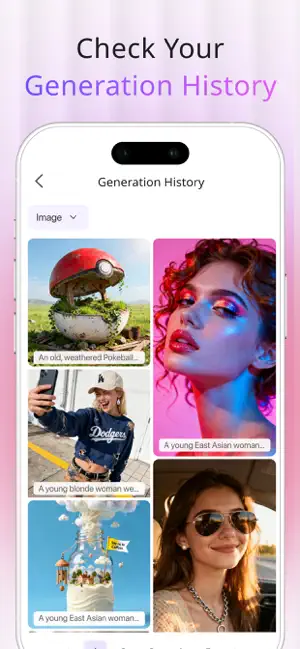
Turn an idea, photo, or reference media into your next video. Max Video is an AI workspace for video, images, and virtual try-on. Animate photos, explore concepts, keep subjects consistent, or build scenes from text and references. CREATE AI VIDEOS IN MULTIPLE WAYS Text to Video Describe the subject, action, camera movement, lighting, mood, and visual style you want. Turn written ideas into dynamic scenes, with aspect ratio, resolution, and duration options based on the selected model. Image to Video Upload one or more images and add motion, camera movement, atmosphere, and storytelling. Animate portraits, products, landscapes, illustrations, fashion concepts, and creative artwork. Reference to Video Combine images, videos, and audio as creative references. Use them to guide characters, subjects, movement, sound, composition, and visual style. Mention uploaded media in your prompt and explain how each reference should influence the result. Reference limits, media, resolution, duration, and aspect ratio vary by model. Review available controls and credit cost before generation. EXPLORE POWERFUL VIDEO MODELS Choose from MiniMax H3, Seedance 2.0, Vidu Q3, Kling Omni O3, Kling 3.0, Veo 3.1, and more. Different models specialize in speed, quality, motion, audio, or reference control. Model availability and capabilities may change; review the current settings shown in the app. CREATE AI IMAGES AND TRY ON STYLES Use Nano Banana AI, Flux.1 Schnell, Seedream 5.0, Qwen Image V2, and other models to generate images, explore styles, combine references, and create new compositions. Preview clothing with virtual try-on, then develop backgrounds and creative looks with AI image tools. Choose a creation mode and model, write a prompt, add references when needed, and select available settings. Review the credit cost before starting, then follow progress, play completed work, and download results from generation history. WRITE CLEARER PROMPTS Name the main subject, action, environment, camera movement, lighting, and visual style. For references, explain whether each file should guide appearance, clothing, motion, background, composition, or sound. Use clear, recognizable media and avoid blurry, duplicate, or conflicting references. CHOOSE THE RIGHT FORMAT Use landscape for stories, scenery, and products; portrait for mobile and social clips; or square and alternate ratios for artwork and platform-specific layouts. Higher resolutions can preserve more detail but may require more credits and processing time. Short durations are useful for testing ideas, while longer durations allow more complete actions. CREDITS, SUBSCRIPTIONS, AND RESPONSIBLE USE Max Video is free to download and offers in-app purchases. Some models and advanced features require credits or a subscription. Credit costs depend on the model, resolution, duration, and reference capabilities, and are displayed before generation. AI results may vary based on prompts, references, and model capabilities. Only use text, images, videos, and audio you have the right to process, and confirm applicable rights and local rules before sharing or commercial use. Start with an idea or a set of references and discover a more flexible way to create AI videos and images with Max Video. Privacy Policy: https://aitryon.art/privacy-policy/ Terms of Use: https://aitryon.art/terms-of-service/
What’s new
Version 3.0.3 · Updated October 12, 2026
Improved pop-up messages, refined the interface, and optimized performance for a smoother experience.
App privacy
The developer, 6677tech, reported these privacy practices to Apple.
Data Used to Track You
The following data may be used to track you across apps and websites owned by other companies:
- Contact Info: Email Address
- User Content: Other User Content
- Identifiers: User ID, Device ID
- Usage Data: Product Interaction, Advertising Data, Other Usage Data
- Diagnostics: Crash Data, Performance Data, Other Diagnostic Data
Data Linked to You
The following data, which may be collected and linked to your identity, may be used for the following purposes:
- User Content: Other User Content, Photos or Videos, Customer Support
- Identifiers: User ID, Device ID
- Usage Data: Product Interaction, Advertising Data, Other Usage Data
- Diagnostics: Crash Data, Performance Data, Other Diagnostic Data
- Contact Info: Email Address
Used for: Third-Party Advertising, Developer’s Advertising or Marketing, Analytics, App Functionality
Alternatives to Max Video AI: H3 Video Maker
Looking for apps like Max Video AI: H3 Video Maker? Here are 6 similar apps on the App Store. The highest rated is Creen: AI Art, Video Generator (4.5/5), and all 6 are free to download.
-
 AI Clothes Changer : Stylea
-
 HappyHorse-AI Video Generator
3.6
-
 Clothes Changer: Try On Outfit
4.4
-
 Creen: AI Art, Video Generator
4.5
-
 Clothes Changer & Outfit Maker
4.1
-
 Gora: AI Video Generator
3.9
| App | Rating | Price | Last updated | Compare |
|---|---|---|---|---|
| Max Video AI: H3 Video Maker | – | Free | October 12, 2026 | |
| AI Clothes Changer : Stylea | – | Free | Jan 7, 2026 | Compare |
| HappyHorse-AI Video Generator | 3.6 / 5 (14) | Free | May 8, 2026 | Compare |
| Clothes Changer: Try On Outfit | 4.4 / 5 (18) | Free | May 28, 2025 | Compare |
| Creen: AI Art, Video Generator | 4.5 / 5 (34) | Free | Feb 19, 2026 | Compare |
| Clothes Changer & Outfit Maker | 4.1 / 5 (22) | Free | Jan 29, 2026 | Compare |
| Gora: AI Video Generator | 3.9 / 5 (239) | Free | Aug 13, 2026 | Compare |