

KinList: One Family, One List
Jesse Gingras Productivity iPhoneiPadiPod touch
KinList: One Family, One List is a free Productivity app for iPhone and iPad by Jesse Gingras. Requires iOS 17.0. Updated July 23, 2026.
- Price
- Free
- on the App Store
- Size
- 2 MB
- Age 4+
- Updated
- Jul 23
- 2026 · v1.1
Screenshots


About KinList: One Family, One List
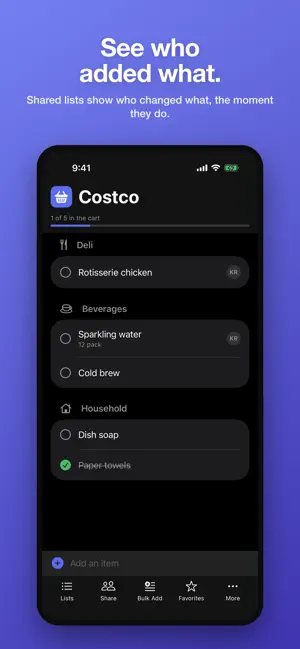
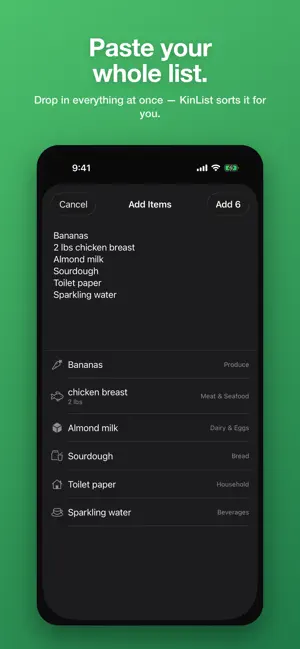
KinList keeps your family on the same page — one shared list everyone can add to, wherever they are. • Shared lists that sync over iCloud — no accounts, no sign-ups. • Smart categories: groceries sort into store aisles automatically; packing lists sort into Tops, Toiletries, Electronics, and more. • Three list types: Groceries, Travel / Packing, and simple Checklists. • See who added what on shared lists, and get a heads-up when someone makes a change. • Add one item at a time, or paste a whole list at once — KinList files everything for you. • Favorites remember the groceries you buy most. Your data stays in your own iCloud. KinList has no ads, no tracking, and never sees your lists. One family, one list.
What’s new
Version 1.1 · Updated July 23, 2026
Your store, your order Give each grocery list a store — Wegmans, Costco, wherever you shop — and arrange the aisles to match how you walk it. Set layouts up in Settings → Store Layouts or right from a list, and keep a generic layout for everything else. Shopping Mode Tap More → Shopping Mode for a full-screen, in-store view. Big, easy-to-hit rows, your aisles in your own order, and items drop away as they go in the cart. The screen stays awake while you shop. Add items with Siri "Hey Siri, add an item to KinList." Works without opening the app, and you can name a specific list. Your items still land in the right aisle automatically. No more accidental doubles Adding something already on the list no longer creates a second copy — it tells you it's there and un-checks it if you'd already grabbed it. Pasting a long list skips repeats too. Edit items, not just names Rename is now Edit. Change "broccoli" to "2 cups broccoli" and the quantity appears; change it to something else entirely and it moves to the right section on its own. Fixes - New section icons: Bread finally looks like bread, plus fresh icons for Baking, Beverages, Household, Personal Care, and Baby. - Fixed a squashed corner on the Lists and More menus. - Removed a stray divider in the Lists menu before you've made a list. - The header count now stays correct after you finish shopping.
App privacy
The developer, Jesse Gingras, reported these privacy practices to Apple.
Data Not Collected
The developer does not collect any data from this app.
Alternatives to KinList: One Family, One List
Looking for apps like KinList: One Family, One List? Here are 6 similar apps on the App Store. The highest rated is Kora - Family AI Assistant (5.0/5), and all 6 are free to download.
-
 Familist - Your Family List
-
 Kunba - Family Task Manager
-
 Chore Chart & Tracker: Burrow
4.8
Chore Chart & Tracker: Burrow
4.8
-
 ToDo List - Tasks, Shopping
-
 Kora - Family AI Assistant
5.0
Kora - Family AI Assistant
5.0
-
 Quartzy
3.2
Quartzy
3.2
| App | Rating | Price | Last updated | Compare |
|---|---|---|---|---|
| KinList: One Family, One List | – | Free | July 23, 2026 | |
| Familist - Your Family List | – | Free | Aug 8, 2026 | Compare |
| Kunba - Family Task Manager | – | Free | Jul 28, 2026 | Compare |
| Chore Chart & Tracker: Burrow | 4.8 / 5 (16) | Free | Oct 19, 2026 | Compare |
| ToDo List - Tasks, Shopping | – | Free | Oct 20, 2026 | Compare |
| Kora - Family AI Assistant | 5.0 / 5 (2) | Free | Oct 9, 2026 | Compare |
| Quartzy | 3.2 / 5 (17) | Free | Oct 21, 2026 | Compare |