

Chore Chart & Tracker: Burrow
Theodore Goldblatt Productivity iPhoneiPadiPod touch
Chore Chart & Tracker: Burrow is a free Productivity app for iPhone and iPad by Theodore Goldblatt. Rated 4.8/5 from 17 ratings. Requires iOS 26.0.
- Rating
- 4.8
- 17 ratings
- Price
- Free
- on the App Store
- Size
- 39 MB
- Age 4+
- Updated
- Nov 2
- 2026 · v2.7.0
Screenshots


About Chore Chart & Tracker: Burrow
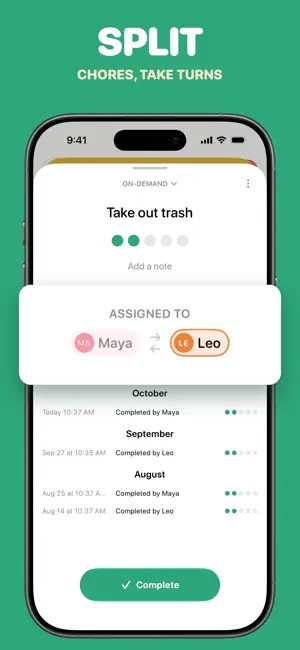
Burrow turns your home into rooms and chores you can see, so nothing quietly piles up. Start on your own. Add someone later if you want to. ORGANIZE BY ROOM Set up your actual home: kitchen, bathroom, bedroom, and beyond. Each room has a progress gauge, so one glance tells you what needs attention. Tap into any room to see its chores, its history, and what's already been done. FLEXIBLE SCHEDULING Make chores that repeat daily, weekly, or on a schedule you build yourself. Add one-time tasks with due dates. Keep on-demand chores parked until you're ready. Going away? Vacation Mode pauses everything and shifts your schedule when you're back. FALL BEHIND WITHOUT FALLING APART Skip a week and Burrow won't bury you in red badges. Overdue chores wait for you, no guilt trip. Pick up where you left off. SEARCH THAT UNDERSTANDS TYPOS AND PHRASES Type "overdue kitchen" and get the right results. Filter by room, assignment, due status, or chore type in one tap. QUICK ACTIONS Your dashboard surfaces the on-demand chores you complete most, so they're one tap away. SHARE IT WHEN YOU'RE READY Living with a partner or roommates? Send them a code and everything syncs in real time. Completion charts show who's done what, so you can see the balance instead of guessing at it. Burrow is built for adults sharing a space: no allowance tracking, no gold stars. GET STARTED IN MINUTES Create your home, pick your rooms, choose from suggested chores, and start. • Room-based organization with visual progress • Recurring, one-time, and on-demand chores • Works on your own, with sharing as an option • Search that handles typos and natural phrases • Vacation mode that adjusts your schedule • Real-time sync when you do share • Widgets, Siri shortcuts, and one-tap completion Questions or feedback? Reach out anytime.
Ratings & reviews
4.8
17 ratings
What’s new
Version 2.7.0 · Updated November 2, 2026
More colors for your rooms. Choose from 15, or pick any shade you like. Your homes and avatar get them too. Arrange your Dashboard. Reorder sections or hide the ones you don't need, from the ••• menu. A better fit on iPad. Burrow uses the whole screen, with your Dashboard in columns. Chores and History open in a card over the page. Fixed: a title you just typed now saves when you tap Complete right away, and chores you last did one cycle ago stay due today.
App privacy
The developer, Theodore Goldblatt, reported these privacy practices to Apple.
Data Linked to You
The following data, which may be collected and linked to your identity, may be used for the following purposes:
- Identifiers: User ID
- Purchases: Purchase History
Used for: Analytics, App Functionality
Data Not Linked to You
The following data, which may be collected but is not linked to your identity, may be used for the following purposes:
- Identifiers: Device ID
- Usage Data: Product Interaction
- Diagnostics: Crash Data, Performance Data
Used for: Analytics, App Functionality
Alternatives to Chore Chart & Tracker: Burrow
Looking for apps like Chore Chart & Tracker: Burrow? Here are 6 similar apps on the App Store. The highest rated is Routinely Chores Tracker (5.0/5), and all 6 are free to download.
-
 Tidywell: Daily Chore Tracker
4.6
-
 Routinely Chores Tracker
5.0
-
 Just Did - Task Tracker
4.5
-
 Planote - Daily Planner Tasks
5.0
-
 Chore Chart: TidyPal Planner
4.5
-
 Wipzie: Home Cleaning Schedule
5.0
| App | Rating | Price | Last updated | Compare |
|---|---|---|---|---|
| Chore Chart & Tracker: Burrow | 4.8 / 5 (17 ratings) | Free | November 2, 2026 | |
| Tidywell: Daily Chore Tracker | 4.6 / 5 (17) | Free | Oct 31, 2026 | Compare |
| Routinely Chores Tracker | 5.0 / 5 (1) | Free | Oct 31, 2026 | Compare |
| Just Did - Task Tracker | 4.5 / 5 (8) | Free | Sep 20, 2026 | Compare |
| Planote - Daily Planner Tasks | 5.0 / 5 (24) | Free | Nov 3, 2026 | Compare |
| Chore Chart: TidyPal Planner | 4.5 / 5 (36) | Free | Jul 26, 2025 | Compare |
| Wipzie: Home Cleaning Schedule | 5.0 / 5 (4) | Free | Oct 6, 2026 | Compare |