

Decaud
Perimtr Music iPhoneiPadiPod touchMac
Decaud is a free Music app for iPhone and iPad by Perimtr. Rated 5.0/5 from 1 ratings. Requires iOS 17.6. Updated October 17, 2026.
- Rating
- 5.0
- 1 ratings
- Price
- Free
- on the App Store
- Size
- 35 MB
- Age 4+
- Updated
- Oct 17
- 2026 · v1.6
Screenshots


About Decaud
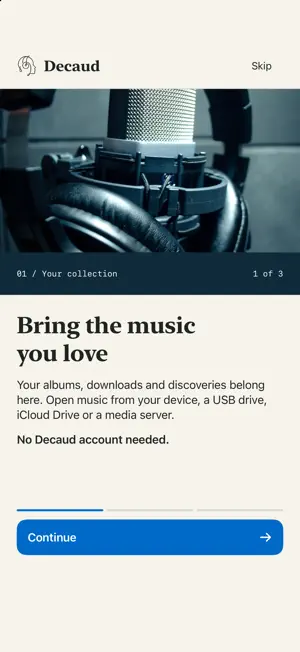
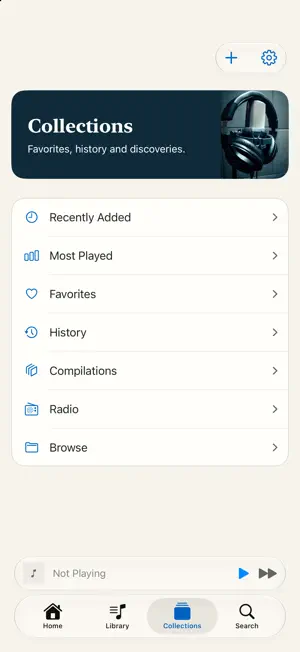
Decaud is free to use, with every feature included. No subscriptions, paid upgrades or locked features. In-app purchases are optional tips to support development; they do not unlock anything. Most players display the label on the file. Decaud looks deeper. TrueHz reads sampled windows across a track for spectral evidence consistent with lossy compression. It is evidence, not provenance. Decaud is a music player for people who care how their files actually reach their ears: hi-res lossless, DSD, and a signal path you can inspect at any moment. KNOW WHAT YOU'RE HEARING • TrueHz reads sampled windows for spectral evidence consistent with lossy compression, on songs whose audio is on this device • Analyzed songs keep their result on the row • Real-time analyzer, goniometer, phase, and LUFS meters BUILT FOR SOUND • An honest signal path: every stage between the file and the output, and what each one does to the audio • FLAC, ALAC, WAV, AIFF, DSF, DFF, APE, WavPack, and more • DSD plays through high-quality PCM conversion, shown in Audio Path. On iPhone and iPad, optional native DSD over USB requires a verified DoP-compatible DAC and device volume at 100%; control listening volume on the DAC • Gapless playback, optional crossfade, and headphone crossfeed • ReplayGain and a 10-band equalizer MORE WAYS TO LISTEN • Internet radio from Radio Paradise, SomaFM, FIP, and your own stations, with live titles and covers • Station creates an endless session from your own library, chosen locally by sound • Classical browsing understands works, movements, and composers • The waveform is the seek bar • Tap the sound information in Now Playing to open Audio Path ANYWHERE IN THE HOUSE • Stream from NAS and SMB shares and DLNA servers • Play to AirPlay speakers through the system AirPlay picker • Control your Mac library from your iPhone over the local network • iCloud keeps your catalog, ratings, and artwork on your devices in your own account. Sending audio is always a separate, explicit action A LIBRARY THAT STAYS YOURS • Copy songs and folders from USB and SD drives to this iPhone or iPad for offline listening, even with the drive disconnected • Or play files from an attached drive without copying them • Download seven complimentary DSD64 tracks courtesy of NativeDSD, listen offline, and optionally upload them to iCloud • Sort As fields change ordering without renaming your music and sync across devices • Browse the playable library in CarPlay • Smart playlists, synced lyrics, and compilations • Your listening history stays private, with optional export to a server you host PRIVATE BY DESIGN No Decaud account required. No analytics. No tracking. Online metadata lookups are opt-in and send text or audio fingerprints only, never your audio.
What’s new
Version 1.6 · Updated October 17, 2026
• Fixed missing album artwork when copying music from iCloud Drive or another folder, including separate cover.jpg and Folder.jpg images. If an album you previously imported is missing its cover, import its original album folder again after updating, using Copy to This iPhone or Copy to This iPad. Updating alone does not restore cover images that were not copied. There is no need to reinstall Decaud. • When selected songs have no readable artwork, Decaud asks for their album folder so the cover can be copied; only the selected songs are imported. • Audio Path no longer shows Bit-perfect when the output's bit depth is unknown, as on a USB DAC; it says the claim is not established. • The Dither setting says the output bit depth is unavailable on iPhone and iPad, so Decaud does not apply dither there. • Audio Path keeps a track's own sample rate after a gapless transition and names any conversion to the output rate. • Tracks without track numbers stay grouped in their album as new music is imported. • Starter Pack rows now indicate the playing track and let you pause or resume it. • On iPhone and iPad, choose whether to remove music from your library or also delete its device copy. • Copying music now identifies files already on this device. • Clearer import and copy feedback, shown until you dismiss it. • Improved iPad status display while navigation panels are open. • Clearer Audio Path explanations on iPhone and iPad. • The Leave a Tip row in Settings is easier to find. • CarPlay Songs opens as an alphabetical list, with Playable Now counts and paging for longer libraries.
App privacy
The developer, Perimtr, reported these privacy practices to Apple.
Data Not Collected
The developer does not collect any data from this app.
Alternatives to Decaud
Looking for apps like Decaud? Here are 6 similar apps on the App Store. The highest rated is Plinth Music (4.5/5), and 3 of the 6 are free to download.
-
 Corvus Music Player
-
 Plinth Music
4.5
Plinth Music
4.5
-
 HypeMuzik - DSP
-
 Lacquer: Hi-Res FLAC Verifier
-
 MyMusic - Offline Player
-
 Musicopy: Music File Transfer
3.0
Musicopy: Music File Transfer
3.0
| App | Rating | Price | Last updated | Compare |
|---|---|---|---|---|
| Decaud | 5.0 / 5 (1 rating) | Free | October 17, 2026 | |
| Corvus Music Player | – | 0.99 USD | Aug 22, 2026 | Compare |
| Plinth Music | 4.5 / 5 (2) | 9.99 USD | Oct 20, 2026 | Compare |
| HypeMuzik - DSP | – | Free | Oct 14, 2026 | Compare |
| Lacquer: Hi-Res FLAC Verifier | – | Free | Oct 19, 2026 | Compare |
| MyMusic - Offline Player | – | 1.99 USD | Sep 24, 2026 | Compare |
| Musicopy: Music File Transfer | 3.0 / 5 (2) | Free | Aug 10, 2026 | Compare |
Compare Decaud with the top alternatives: ratings, updates, ASO score and keyword gaps →