

Lacquer: Hi-Res FLAC Verifier
Sarayut Rungraung Music iPhoneiPadiPod touchApple Watch
Lacquer: Hi-Res FLAC Verifier is a free Music app for iPhone and iPad by Sarayut Rungraung. Requires iOS 17.0. Updated October 12, 2026.
- Price
- Free
- on the App Store
- Size
- 20 MB
- Age 4+
- Updated
- Oct 12
- 2026 · v1.1.0
Screenshots
About Lacquer: Hi-Res FLAC Verifier
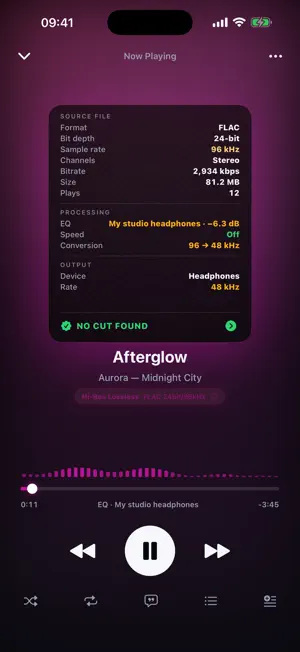
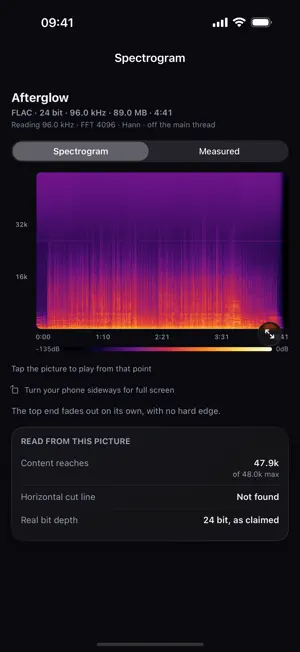
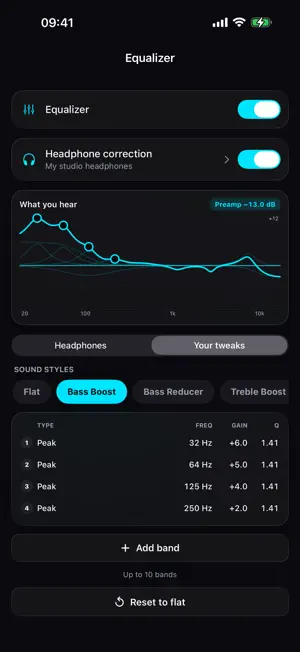
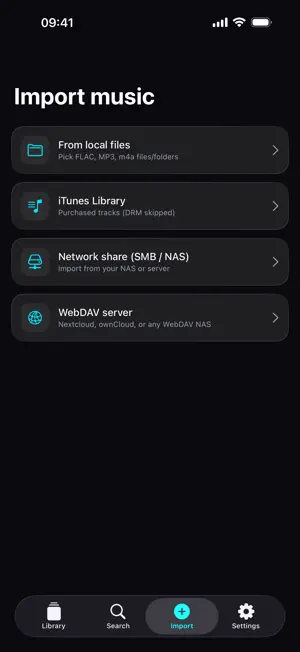
A lot of the "hi-res" music out there isn't. A file can say 24-bit/96kHz on the label and still be an MP3 that somebody re-encoded into a FLAC container and sold on. Your player shows the badge and has no idea. Lacquer does. It reads the audio itself — not the file name, not the metadata tags — and tells you what is actually inside. QUALITY CHECK Every lossless file you import is decoded and analysed on your phone, with an FFT running on Apple's Accelerate framework. Nothing is uploaded. There is no account. The verdict does not come from a single cut-off number. Three things are weighed: how steeply the top end falls away, whether that fall makes sense for the sample rate the file claims, and whether the same edge sits in the same place across different parts of the track. Real recordings fade out, and they wander. An encoder's cut does not. It is also careful about what it says. A flagged file reads "may be upscaled", never "fake" — an old master or a quiet orchestral recording can look suspicious for perfectly honest reasons. When a file's top end simply ends too low for the evidence to point either way, Lacquer says it cannot tell, rather than guessing. Every verdict shows the number it was based on and the line that number was measured against, so you can look at the evidence and disagree. SEE THE EVIDENCE Tap the artwork while a track is playing and it turns over. On the back is the file — format, bit depth, sample rate, size — and under it the device you are actually listening on and the rate coming out of it. Below that is everything between the file and your ears: EQ, speed, sample-rate conversion and Bluetooth re-encoding. A file that failed the check does not get to show off the specs it claims. The label switches to the evidence instead: the claim struck through, where the sound really stops, how wide the roll-off is, and the threshold that decided it. WHAT REACHES YOUR DAC A signal path sheet shows file, engine and output side by side and says plainly whether anything is being resampled on the way through. Switch on "match the file's rate" and Lacquer asks the output to run at the file's own sample rate, and takes the equalizer and speed controls out of the path entirely. iOS will not tell an app which rates a connected DAC accepts, so Lacquer finds out the only way there is: it asks for each rate in turn and reads back what the hardware actually did. The answer is remembered for that device. TUNED TO YOUR HEADPHONES Import the ParametricEQ.txt measured for your headphone model and Lacquer plays everything through that correction. Pair it with a device and it turns on by itself when you connect. Add up to 10 bands of your own on top, dragged right on the graph, or pick a sound style in one tap. The preamp drops automatically so boosts never clip. THE REST OF THE PLAYER Lacquer plays FLAC, ALAC, WAV, AIFF, MP3, AAC and m4a from your own library, gapless, with crossfade, and shows the lyrics embedded in your files. Bring music in from the Files app, from your DRM-free iTunes tracks, or straight off your own server — Lacquer has native SMB and WebDAV clients for the NAS boxes that never appear properly in Files. There is an Apple Watch companion for playback control. Everything stays on the device. It works on a plane. LACQUER PRO Unlocks headphone correction, the parametric equalizer, unlimited imports, cloud import and an ad-free app. Weekly, yearly, or a one-time lifetime purchase. The free version shows ads and includes Quality Check in full. Lacquer never plays DRM-protected tracks and never bypasses any protection. It is a player for music you already own. Privacy Policy: https://lacquer.siamclaw.com/privacy-policy.html Terms of Use (EULA): https://www.apple.com/legal/internet-services/itunes/dev/stdeula/
What’s new
Version 1.1.0 · Updated October 12, 2026
New in 1.1 • Headphone correction: import your headphones' ParametricEQ.txt file and hear them tuned to real measurements. Pair it with a device and it turns on by itself when you connect. (Pro) • Parametric EQ: add up to 10 bands of your own and drag them right on the graph. Sound styles are one tap away. (Pro) • The back of the cover now shows everything between the file and your ears: EQ, speed, sample-rate conversion and Bluetooth re-encoding. • Embedded lyrics now show for FLAC files, Music library songs and M4A files tagged by other apps. • Long song titles and device names scroll on one line. • A new playback engine, ready for more formats.
App privacy
The developer, Sarayut Rungraung, reported these privacy practices to Apple.
Data Used to Track You
The following data may be used to track you across apps and websites owned by other companies:
- Identifiers: Device ID
- Usage Data: Product Interaction, Advertising Data
Data Not Linked to You
The following data, which may be collected but is not linked to your identity, may be used for the following purposes:
- Identifiers: Device ID
- Usage Data: Product Interaction, Advertising Data
Used for: Third-Party Advertising, Analytics
Alternatives to Lacquer: Hi-Res FLAC Verifier
Looking for apps like Lacquer: Hi-Res FLAC Verifier? Here are 6 similar apps on the App Store. The highest rated is iOSamp (4.0/5), and 5 of the 6 are free to download.


| App | Rating | Price | Last updated | Compare |
|---|---|---|---|---|
| Lacquer: Hi-Res FLAC Verifier | – | Free | October 12, 2026 | |
| Auralith Hi-Res | – | Free | Oct 11, 2026 | Compare |
| Sonarc (Sonic Arc) | – | Free | Aug 26, 2026 | Compare |
| Cordata | – | Free | Sep 8, 2026 | Compare |
| iOSamp | 4.0 / 5 (1) | Free | Oct 7, 2026 | Compare |
| Kalliopeia | 3.5 / 5 (2) | 4.99 USD | Jul 15, 2026 | Compare |
| #Ongaku - Ultra Quality Player | – | Free | Sep 5, 2026 | Compare |