

Color Pick Camera: HEX RGB
QAEE CONPUUTENG Graphics & Design iPhoneiPadiPod touch
Color Pick Camera: HEX RGB is a free Graphics & Design app for iPhone and iPad by QAEE CONPUUTENG. Requires iOS 13.0. Updated August 8, 2026.
- Price
- Free
- on the App Store
- Size
- 23 MB
- Age 4+
- Updated
- Aug 8
- 2026 · v1.1.0
Screenshots

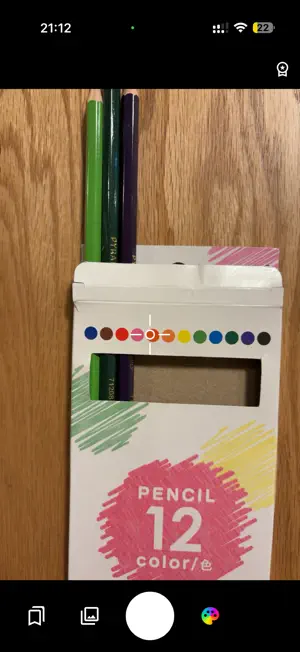

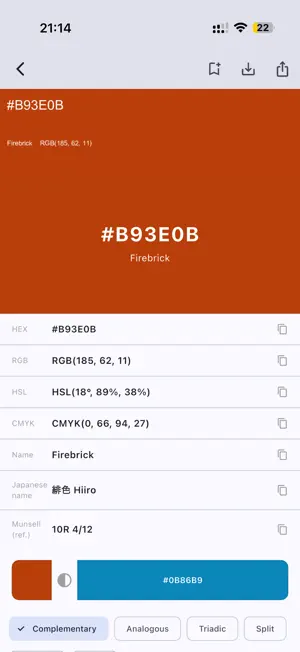
About Color Pick Camera: HEX RGB
See the HEX of the color you are aiming at — before you press the shutter. Color Pick Camera turns your camera into a colour instrument. Don't just grab a colour: prove it matches, and export it as something your work can actually use. ■ Know the colour the moment you see it ・Live readout: aim the crosshair and the colour and HEX update in real time ・From your library: pinch to zoom and sample the exact spot you want ・Multi-point picking: collect wall, trim and floor from one site photo ・Automatic palette: the dominant colours of the whole photo, extracted for you ■ Every colour, fully analysed ・HEX, RGB, HSL, CMYK — tap any value to copy ・Nearest colour name, plus the traditional Japanese colour name ・Munsell notation (reference) — the public, field-grade colour system ・Complementary colour and harmony palettes (analogous, triadic, split, tetradic, monochromatic) ■ Prove it is the same colour ・ΔE (CIEDE2000) — the international standard for how different two colours really are ・Live matching: arm a target colour and the ΔE moves in real time as you sweep the camera — walk the wall until the number drops ・Grey-card white balance: shoot one white or grey card and the room's light is divided back out, so you record the object's colour, not the lighting ■ The numbers design decisions need ・Contrast ratio (WCAG) with AA / AAA verdicts for body and large text ・Colour-vision simulation — see the colour as protan, deutan and tritan viewers do ■ Export it as real work ・CSS custom properties, JSON, CSV ・ASE (Adobe Swatch Exchange) — opens straight in Photoshop, Illustrator and Affinity ・Palette board image — one picture to show a client on the spot ・Dual-capture image: the photo, a magnified loupe and a colour card, with the HEX printed on the sampled spot ■ The more you collect, the more it is worth ・Save colours into folders with a note, the capture photo and the date ・Find by colour: type a HEX and your saved colours are listed nearest-first by ΔE ・Drag and drop to reorganise folders Everything happens on your device. No network, no waiting, and no colour data ever leaves your phone. ■ Made for ・Designers taking real-world colours into UI and web work — and checking accessibility ・Painters and interior pros recording an exact wall colour and matching it to a sample ・Anyone who wants to remember "that colour" and where they found it New installs get a 30-day free trial of everything. After the trial, taking new colours (from the camera or your library) and all Pro features require a subscription — monthly, or yearly (2 months free). Colours you already saved stay viewable without a subscription. Nothing is charged during the trial. Payment is charged to your Apple ID at confirmation. The subscription auto-renews unless cancelled at least 24 hours before the end of the current period; manage or cancel anytime in your Apple ID settings. Terms of Use: https://www.apple.com/legal/internet-services/itunes/dev/stdeula/ Privacy Policy: https://qconp.com/privacy
What’s new
Version 1.1.0 · Updated August 8, 2026
A big update that turns Color Pick into a measuring tool. ・Live readout: the color and its HEX appear before you press the shutter ・ΔE matching (CIEDE2000): put a number on "is this the same color?". Arm a target and the ΔE updates live as you move the camera ・Grey-card white balance: shoot one sheet of white paper to cancel the room light and record the object's own color ・Automatic palette from any photo, and multi-point picking from a single shot ・WCAG contrast ratio with AA/AAA verdicts, and color-vision simulation (protan, deutan, tritan) ・Export to CSS custom properties, JSON, CSV, ASE (opens in Photoshop and friends) and a palette board image ・Search your saved colors by HEX, nearest ΔE first, and export a whole folder
App privacy
The developer, QAEE CONPUUTENG, reported these privacy practices to Apple.
Data Not Linked to You
The following data, which may be collected but is not linked to your identity, may be used for the following purposes:
- Purchases: Purchase History
- Usage Data: Product Interaction
- Identifiers: Device ID
Used for: Analytics, App Functionality
Alternatives to Color Pick Camera: HEX RGB
Looking for apps like Color Pick Camera: HEX RGB? Here are 6 similar apps on the App Store.
-
 Color Picker Eyedropper
-
 Pickly: Color Picker Hex
-
 PainterLab:Paint Mixing
-
 Gradient Maker: CSS Code
-
 Color Picker X
-
 HexCam: Color Picker
| App | Rating | Price | Last updated | Compare |
|---|---|---|---|---|
| Color Pick Camera: HEX RGB | – | Free | August 8, 2026 | |
| Color Picker Eyedropper | – | Free | Aug 16, 2026 | Compare |
| Pickly: Color Picker Hex | – | Free | Sep 22, 2026 | Compare |
| PainterLab:Paint Mixing | – | Free | Aug 18, 2026 | Compare |
| Gradient Maker: CSS Code | – | Free | Aug 19, 2026 | Compare |
| Color Picker X | – | Free | Apr 17, 2026 | Compare |
| HexCam: Color Picker | – | Free | Sep 5, 2026 | Compare |