

Dicta: Voice to Text
ORIOL FARRE BARCONS Productivity iPhoneiPadiPod touch
Dicta: Voice to Text is a free Productivity app for iPhone and iPad by ORIOL FARRE BARCONS. Requires iOS 18.0. Updated August 17, 2026.
- Price
- Free
- on the App Store
- Size
- 19 MB
- Age 4+
- Updated
- Aug 17
- 2026 · v1.2
Screenshots
About Dicta: Voice to Text
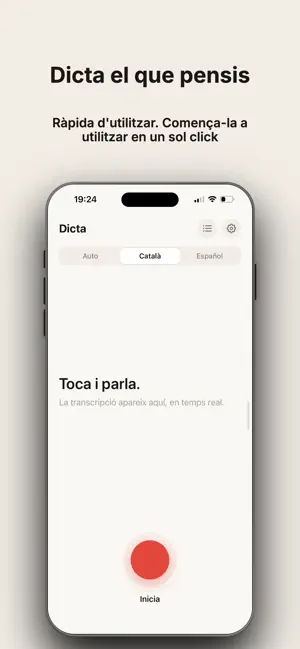
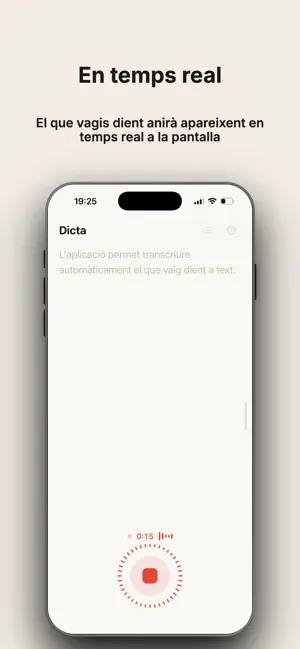
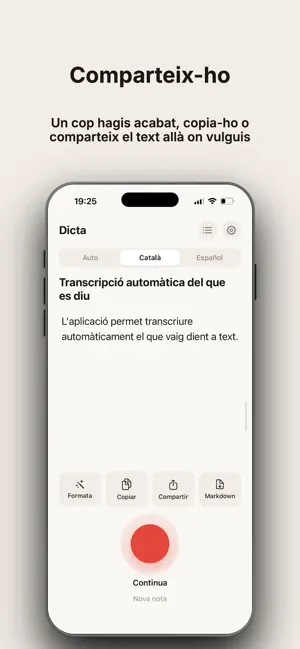
The words appear while you speak. Dicta turns your voice into text as you talk, entirely inside your iPhone. No spinner, no cloud, no account. Tap a button, speak, and watch the transcript grow. — WHY DICTA — REAL TIME Text appears as you dictate and settles at every pause. You never wait for the recording to finish before you can read anything. 100 % ON YOUR PHONE Audio and text never leave the device. No servers, no accounts, no ads, no tracking. Works in airplane mode. PAY ONCE, KEEP IT No subscription. You buy Dicta Pro once and it's yours. Other dictation apps charge more than a hundred euros a year for the same thing. AI INSIDE THE PHONE Automatic titles for every note, filler-word cleanup, summaries as bullet points or minutes, and task detection you can send straight to Reminders. Powered by a local model or by Apple Intelligence — not a single word leaves the device. YOUR NOTES, IN MARKDOWN Every note is saved as a .md file inside the Files app, ready for Obsidian, Notes, Mail or whatever you use. — FREE — • Real-time dictation, with no time limit and no cap on the number of notes • Pick whichever transcription engine you like • Searchable history • Copy, share and export as Markdown • Always works offline — DICTA PRO — One payment, no subscription: • Sync through your own iCloud: your notes on all your devices • Permanent access to your whole history, with no time window • Import audio files: interviews, lectures, recorded meetings • Receive audio from any other app's share sheet • Cleanup and summaries with on-device AI, using your own templates • Personal vocabulary: names and jargon always spelled right • Separate the speakers in a conversation • Export your entire history as a .zip • Recording timer in the Dynamic Island and on the Lock Screen • Start recording from Control Center • Light or dark appearance and alternative app icons — LANGUAGES — Dicta transcribes around a hundred languages. The interface is available in Catalan, Spanish, English, French, Basque and Galician. — PRIVACY, FOR REAL — Dicta only connects to the internet when you ask it to: to download a transcription model and, if you turn syncing on, to store your notes in YOUR own iCloud account. Everything else happens inside your iPhone: the recording, the transcription, the titles and the summaries. There is no server of ours, because none is needed. Made in Catalonia.
What’s new
Version 1.2 · Updated August 17, 2026
More languages, fewer mix-ups, and your notes right where they belong. • Hello, Simplified Chinese: Dicta is now available in 中文. • See which language Dicta detected for each note and change it easily when needed. • Duplicate notes are sorted out without losing anything. • We have fine-tuned the app to make transcription more stable and reliable.
App privacy
The developer, ORIOL FARRE BARCONS, reported these privacy practices to Apple.
Data Not Linked to You
The following data, which may be collected but is not linked to your identity, may be used for the following purposes:
- Usage Data: Product Interaction
- Diagnostics: Crash Data
Used for: Analytics
Alternatives to Dicta: Voice to Text
Looking for apps like Dicta: Voice to Text? Here are 6 similar apps on the App Store. The highest rated is Loggd: Habit Tracker & Planner (5.0/5), and 5 of the 6 are free to download.
-
 stockhome
-
 Quick Draft for Obsidian
3.7
Quick Draft for Obsidian
3.7
-
 Loggd: Habit Tracker & Planner
5.0
Loggd: Habit Tracker & Planner
5.0
-
 Rocket Typist
4.1
Rocket Typist
4.1
-
 Aeon Timeline 3
3.9
Aeon Timeline 3
3.9
-
 a3gestión del tiempo
| App | Rating | Price | Last updated | Compare |
|---|---|---|---|---|
| Dicta: Voice to Text | – | Free | August 17, 2026 | |
| stockhome | – | 6.99 USD | Aug 9, 2026 | Compare |
| Quick Draft for Obsidian | 3.7 / 5 (3) | Free | Sep 24, 2026 | Compare |
| Loggd: Habit Tracker & Planner | 5.0 / 5 (5) | Free | Sep 29, 2026 | Compare |
| Rocket Typist | 4.1 / 5 (24) | Free | Feb 23, 2026 | Compare |
| Aeon Timeline 3 | 3.9 / 5 (50) | Free | Sep 16, 2026 | Compare |
| a3gestión del tiempo | – | Free | Sep 8, 2026 | Compare |