

Quick Draft for Obsidian
Serhii Petrenko Productivity iPhoneiPadiPod touch
Quick Draft for Obsidian is a free Productivity app for iPhone and iPad by Serhii Petrenko. Rated 3.0/5 from 2 ratings. Requires iOS 16.6.
- Rating
- 3.0
- 2 ratings
- Price
- Free
- on the App Store
- Size
- 144 MB
- Age 4+
- Updated
- Sep 24
- 2026 · v1.5.9
Screenshots


About Quick Draft for Obsidian
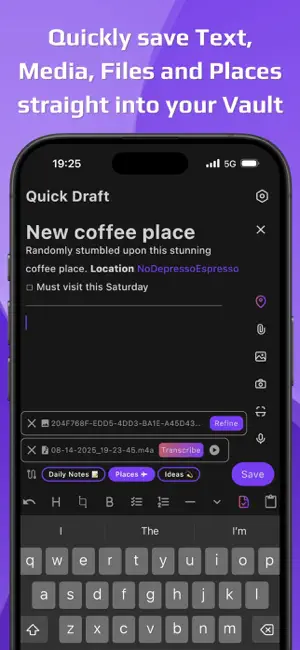
Quick Draft for Obsidian is built for quick capture of ideas. No clutter, no delays—just a blank page ready the instant inspiration strikes. Type, dictate, or snap an capture, and Quick Draft handles the rest. Your notes flow instantly into Obsidian, so you can quickly capture on mobile and organize later on desktop. With deep IOS integration and seamless Obsidian support, Quick Draft makes quick capture effortless—bridging the gap between inspiration and organized action. Built by an Obsidian fan — for the Obsidian community Quick Capture Features - Quickly capture notes directly into Obsidian - Unlimited notes, Routes, and Vaults (free) - Attach images, videos, documents, and files - AI Assist - Voice recording with high-quality transcription - Convert text from images to Markdown (handwriting supported) - Save nearby locations with one tap - Capture into existing files or create new ones—append, prepend, or insert text - Built for IOS: widgets & shortcuts for instant quick capture - Share any content from your phone to Obsidian with no extra prompts - Customizable file destinations - WYSIWYG Markdown editor - Templates from presets or existing notes - Customizable toolbar - Drafts history - No sign-in required Privacy & Setup Your privacy matters—Quick Draft never needs full Vault access. You choose which files or folders (Destinations) your notes go into. Setup is simple with an in-app tutorial. Use Routes to streamline quick capture: send notes to multiple Destinations, apply formatting, and automate actions. Customize everything anytime in Settings. Quick Draft is free, with optional paid features to cover operational costs. This app is developed independently. Obsidian® name and logo are trademarks of Obsidian.md, used here for identification only. Terms Of Use: https://www.apple.com/legal/internet-services/itunes/dev/stdeula/
What’s new
Version 1.5.9 · Updated September 24, 2026
• Introduced Shortcuts and Siri integration • Enhanced Voice Recorder — now supports pause and resume, reattaching existing recordings, and customizing file names • Implemented AI-based note title generation • Added Format Tokens support in Destination Sections • Added option to override the default File Route • Added Light Theme • Text drafts are now persisted even after app dismissal And of course… a ton of UX polish & improvements Full release notes at: https://quickdraftcapture.app/obsidian/wiki/releases
App privacy
The developer, Serhii Petrenko, reported these privacy practices to Apple.
Data Not Linked to You
The following data, which may be collected but is not linked to your identity, may be used for the following purposes:
- Diagnostics: Crash Data
Used for: Other Purposes
Alternatives to Quick Draft for Obsidian
Looking for apps like Quick Draft for Obsidian? Here are 6 similar apps on the App Store. The highest rated is Litho: Screenshot to Obsidian (5.0/5), and all 6 are free to download.
-
 Voice Inbox for Obsidian
4.8
Voice Inbox for Obsidian
4.8
-
 Quick Capture - Vault notes
4.5
Quick Capture - Vault notes
4.5
-
 Litho: Screenshot to Obsidian
5.0
Litho: Screenshot to Obsidian
5.0
-
 Quick Notes - Supasend
4.7
Quick Notes - Supasend
4.7
-
 Actions For Obsidian
4.8
Actions For Obsidian
4.8
-
 VaultSync for Obsidian
| App | Rating | Price | Last updated | Compare |
|---|---|---|---|---|
| Quick Draft for Obsidian | 3.0 / 5 (2 ratings) | Free | September 24, 2026 | |
| Voice Inbox for Obsidian | 4.8 / 5 (4) | Free | Jul 16, 2026 | Compare |
| Quick Capture - Vault notes | 4.5 / 5 (103) | Free | Sep 24, 2026 | Compare |
| Litho: Screenshot to Obsidian | 5.0 / 5 (2) | Free | Jun 20, 2026 | Compare |
| Quick Notes - Supasend | 4.7 / 5 (30) | Free | Sep 20, 2026 | Compare |
| Actions For Obsidian | 4.8 / 5 (40) | Free | Apr 22, 2026 | Compare |
| VaultSync for Obsidian | – | Free | Sep 14, 2026 | Compare |