

Project Notebook +
Yan Kin LEUNG Productivity iPhoneiPadiPod touch
Project Notebook + is a free Productivity app for iPhone and iPad by Yan Kin LEUNG. Requires iOS 18. Updated October 1, 2026.
- Price
- Free
- on the App Store
- Size
- 8 MB
- Age 4+
- Updated
- Oct 1
- 2026 · v27.0.5
Screenshots


About Project Notebook +
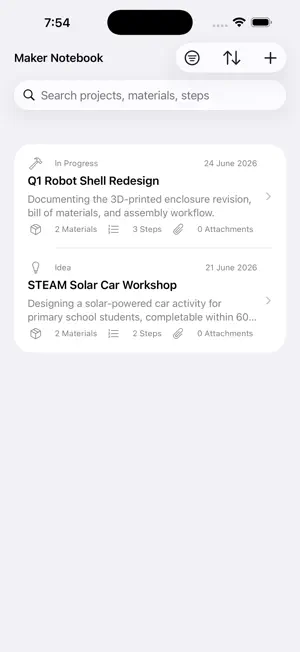
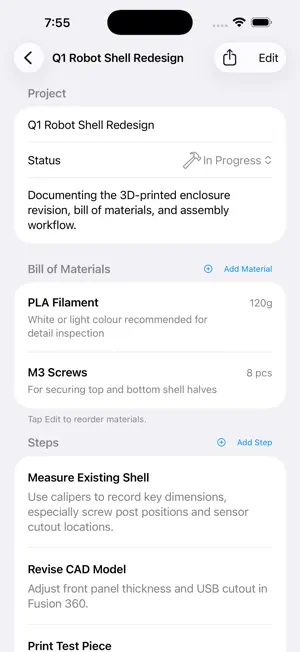
Every project deserves to be remembered. Whether you're a designer, engineer, educator, maker, photographer, or event organiser — you always have projects in motion. But too often, ideas end up scattered across sticky notes, chat threads, voice memos, and emails. By the time you look back, the context is lost and the process is impossible to recreate. Project Notebook was built to change that. It's a structured digital notebook designed for people who make things — giving every step, every material, and every decision a clear and permanent home, from the first spark of an idea to the final deliverable. Who Is It For? Project Notebook is the perfect companion for anyone working on any type of project, including: • Creative projects — branding, illustration, photography, video production • Engineering & technical work — hardware development, circuit design, software features • Education & curriculum design — STEAM lessons, workshops, teaching materials • Event planning & execution — exhibitions, performances, community events • Hobbies & handcraft — 3D printing, woodworking, sewing, cooking experiments • Work tasks & business projects — proposals, reports, client deliverables Core Features • Step-by-Step Documentation Break your project into clear, ordered steps. Attach photos, videos, and handwritten notes (with Apple Pencil support) to each step, so the entire process is captured in full detail. • Bill of Materials (BOM) Record every material, component, or resource you need — with name, quantity, specification, and notes — so procurement and preparation are always organised. • Project Status Tracking Tag each project as Idea, In Progress, Paused, or Completed. Filter and sort your project list to stay on top of what matters most. • Reflection & Review After completing a project, capture what worked, what was challenging, and what you'd do differently next time. Turn every experience into a lesson for the future. • Export as a Web Page Export any project as a fully self-contained HTML page, bundled with all attachments into a single ZIP file — ready to share with teammates, clients, or archive for future reference. How to Use 1. Create a project — Enter a title, description, choose a category (Project / Idea / Note) and set a status. 2. Add your materials — List every material or resource with quantity and specifications. 3. Document each step — Add steps with text descriptions, photos, videos, or Apple Pencil handwriting. 4. Write your reflection — Record what you learned, what was hard, and how to improve next time. 5. Export and share — Export the full project as a ZIP web archive to share or back up.
What’s new
Version 27.0.5 · Updated October 1, 2026
Continuous improvement of the program and interface design
App privacy
The developer, Yan Kin LEUNG, reported these privacy practices to Apple.
Data Not Collected
The developer does not collect any data from this app.
Alternatives to Project Notebook +
Looking for apps like Project Notebook +? Here are 6 similar apps on the App Store. The highest rated is Flyout: Notes, Markdown, Code (5.0/5), and all 6 are free to download.
-
 pocketbrief
-
 Idea Cards
-
 Flyout: Notes, Markdown, Code
5.0
Flyout: Notes, Markdown, Code
5.0
-
 markdown notes - Smolpad
5.0
markdown notes - Smolpad
5.0
-
 SideTrck: Projects & Ideas
-
 iDea - Capture ideas
5.0
iDea - Capture ideas
5.0
| App | Rating | Price | Last updated | Compare |
|---|---|---|---|---|
| Project Notebook + | – | Free | October 1, 2026 | |
| pocketbrief | – | Free | Jun 14, 2026 | Compare |
| Idea Cards | – | Free | Sep 30, 2026 | Compare |
| Flyout: Notes, Markdown, Code | 5.0 / 5 (1) | Free | Oct 15, 2026 | Compare |
| markdown notes - Smolpad | 5.0 / 5 (1) | Free | Oct 17, 2026 | Compare |
| SideTrck: Projects & Ideas | – | Free | Dec 15, 2025 | Compare |
| iDea - Capture ideas | 5.0 / 5 (1) | Free | Sep 15, 2026 | Compare |
Compare Project Notebook + with the top alternatives: ratings, updates, ASO score and keyword gaps →