

Smolpad - markdown notes
BaconWorks, LLC Productivity iPhoneiPadiPod touchMacApple Watch
Smolpad - markdown notes is a free Productivity app for iPhone and iPad by BaconWorks, LLC. Rated 5.0/5 from 1 ratings. Requires iOS 18.0.
- Rating
- 5.0
- 1 ratings
- Price
- Free
- on the App Store
- Size
- 76 MB
- Age 4+
- Updated
- Oct 29
- 2026 · v1.4
Screenshots


About Smolpad - markdown notes
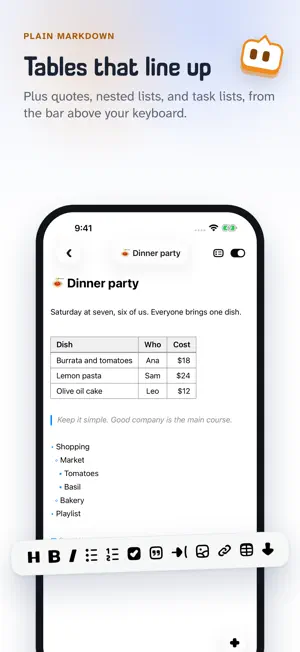
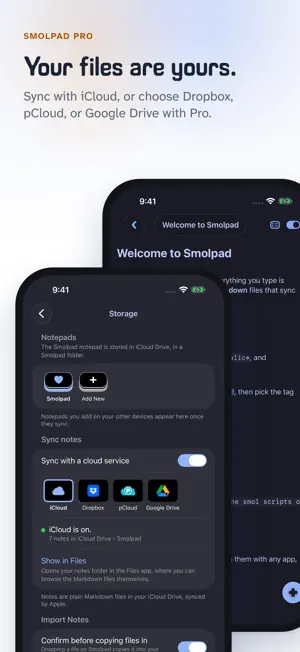
Smolpad is a smol Markdown editor with respect for your files. Every note is a plain .md file you can open with any app, on any device, forever. Your files are your own. No database. No lock-in. No bloat. Just a tiny, fast home for your notes on Mac, iPhone, and iPad. WRITE IN MARKDOWN, BEAUTIFULLY • Syntax dims as you type, or hides away entirely with one tap • Task lists become real checkboxes. Checkboxes that check. • Headings, bold, italic, code, quotes, and tables, styled as you write • A formatting bar for common touches, plus full keyboard shortcuts • Pictures too: drag or paste one in, resize it by its corner, and it lives as a plain file beside the note YOUR FILES, ANYWHERE • Notes sync through your own iCloud Drive, included free • Open your notes folder in Finder or Files any time • Organize with folders, pins, and instant search • A Trash for deleted notes, and a history of every note's earlier versions • Find notes in Spotlight, and open them with Siri or Shortcuts • Your notes never leave your devices except to your own cloud SMOL ON PURPOSE • On the Mac, Smolpad lives in your menu bar, one hotkey away • Tear off a note into its own window when you want to stay a while • On iPhone and iPad, it opens fast and stays out of your way • Eight hand-picked fonts and a clean, quiet interface MAKE IT YOURS WITH SMOLPAD PRO • Unlimited notes (the free tier includes ten) • Dropbox, pCloud, or Google Drive sync, in a folder that belongs to you • Notepads: open any folder of Markdown files as its own notepad, an Obsidian vault or a Bear export among them • Export to PDF, HTML, or rich text, and print • Widgets on the Mac, iPhone and iPad, Lock Screen widgets on iPhone, and Smolpad on Apple Watch • Twenty-nine editor themes, from Tokyo Night to Catppuccin • Seventeen app icons and the full menu bar icon set Smolpad Pro is available as a monthly or yearly subscription, or a one-time lifetime purchase. The free tier is a real notes app, not a trial. Made by a smol team that believes plain text outlives everything. Terms of Use: https://www.apple.com/legal/internet-services/itunes/dev/stdeula/ Privacy Policy: https://smolpad.com/privacy
What’s new
Version 1.4 · Updated October 29, 2026
NEW • Notepads. A notepad is a folder of notes Smolpad shows on its own, with its own folders, Trash and history. On the Mac, point Smolpad at any folder on your disk, an Obsidian vault or a folder of exports, and it edits the files right there; nothing is moved or renamed on the way in. With Sync notes on, a copy travels through your cloud to your iPhone and iPad, where it appears under Notepads too. New Notepad makes a fresh one on any device, and Import from Bear brings a Bear export over with its pictures and dates. Switch with the pill at the foot of the notes list: your three latest notepads, Sync Notepads, Add New and Edit Notepads. Having more than one notepad is part of Smolpad Pro. • Keep notepads in order. Rename one you made, give it one of sixteen icons, archive it for later, and move a note or a whole folder to another notepad. When a folder you added goes missing, Smolpad says so, with Locate and Archive, instead of showing it empty, on every device. • Sync notes has a switch, in Settings > Storage. Off, notes stay on this Mac, iPhone or iPad; on, the cards pick which cloud carries them. • Notes from Obsidian and DEVONthink show their title, tags, dates and aliases from their properties. Finder tags count as tags. Sort by Date Added. • Clear Completed Tasks, in the note's file name menu on the Mac and under the title on iPhone and iPad, with Undo. Checked tasks move to the bottom of their list, unless you turn that off in Settings > Editor. • The note's title is a menu on iPhone and iPad: word count, Rename, Copy Path and Show in Files. Copy Path on the Mac (Option-Command-C) points another app, a script or an AI agent at the file. Import Files in a folder's menu and in the notepad menu. Shift-Command-M hides Markdown syntax. • Smolpad widgets on the Mac (Pro): Open Note and Recently Edited on the desktop and in Notification Center, in your editor theme. Task boxes check right there, and in the iPhone and iPad widget too. • Quick Look for Markdown on the Mac: select any .md file in Finder and press Space. • From the Home Screen: New Note, Today's Note and Search, beside Save Clipboard. Drag several notes at once on the Mac. The Table button asks for the size. • Empty daily notes can tidy themselves away: Settings > General > Daily Note, Never by default. • On iPhone and iPad, notes keep syncing after you leave Smolpad (Dropbox, pCloud, Google Drive). When syncing needs you, a small amber dot appears beside the note and says why. • A new upgrade screen that names what you tapped, and a heads-up at two notes left on iPhone and iPad. CHANGED • Deleting a note says what happens to its pictures, and Delete, Keep Pictures leaves them in place when some would go with the note. • The Default notepad is now called Smolpad, and Store notes in is now Sync notes. The Mac popup resizes from its bottom corners, and the sidebar's buttons have new places. FIXED • On iPhone with iOS 18, going back from a note stays on the list, and the buttons above the list are back. • Fewer conflicted copies with pCloud and Google Drive: the Mac sends what you typed the moment the panel closes and checks for your other devices' edits every time it opens. • The Mac catches up after sleep and after a lost connection. A folder no longer shows up empty on the Mac. Editing a note keeps its Finder tags.
App privacy
The developer, BaconWorks, LLC, reported these privacy practices to Apple.
Data Not Linked to You
The following data, which may be collected but is not linked to your identity, may be used for the following purposes:
- Usage Data: Product Interaction
Used for: Analytics
Alternatives to Smolpad - markdown notes
Looking for apps like Smolpad - markdown notes? Here are 6 similar apps on the App Store. The highest rated is Flyout: Notes, Markdown, Code (5.0/5), and all 6 are free to download.
-
 Flyout: Notes, Markdown, Code
5.0
Flyout: Notes, Markdown, Code
5.0
-
 pocketbrief
-
 Trovu Reminders
-
 OV Notes
-
 Adoluna Shift
-
 QuickSheet - Grid Editor
| App | Rating | Price | Last updated | Compare |
|---|---|---|---|---|
| Smolpad - markdown notes | 5.0 / 5 (1 rating) | Free | October 29, 2026 | |
| Flyout: Notes, Markdown, Code | 5.0 / 5 (1) | Free | Oct 29, 2026 | Compare |
| pocketbrief | – | Free | Jun 14, 2026 | Compare |
| Trovu Reminders | – | Free | Oct 27, 2026 | Compare |
| OV Notes | – | Free | Jun 24, 2026 | Compare |
| Adoluna Shift | – | Free | Oct 26, 2026 | Compare |
| QuickSheet - Grid Editor | – | Free | Oct 5, 2026 | Compare |