

Hello Hillside
Amandeep Thakral Productivity iPhoneiPadiPod touch
Hello Hillside is a free Productivity app for iPhone and iPad by Amandeep Thakral. Requires iOS 17.0. Updated October 1, 2026.
- Price
- Free
- on the App Store
- Size
- 7 MB
- Age 4+
- Updated
- Oct 1
- 2026 · v1.3.3
Screenshots



About Hello Hillside
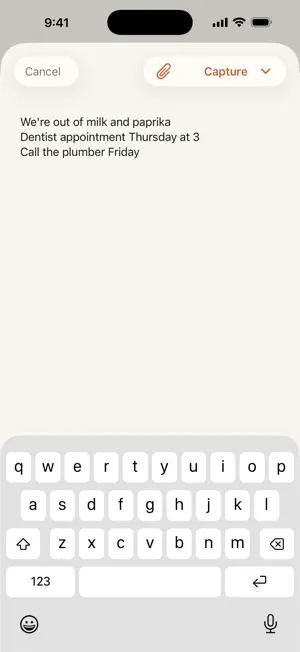
Think of the notepad on the fridge, if it organized itself and lived in everyone's pocket. Jot something down, say it out loud, or snap a photo of a receipt, and Hillside sorts it onto the right list — so anyone at home can find it later. CAPTURE HOW YOU THINK • Type a quick brain-dump and Hillside automatically splits it into groceries, to-dos, notes, and events. • Talk to it — say what's on your mind and it lands on the right list, hands-free. • Snap a receipt or a handwritten note and Hillside reads the text for you. ONE PLACE THE WHOLE HOUSE SHARES • A shopping list everyone keeps current — no more "did you already buy that?" • What's in your fridge, freezer, and pantry, so you stop buying doubles. • Household notes and to-dos, from "call the plumber" to "tacos Thursday." • A shared feed so everyone can see what's been added, and what's been done CALM BY DESIGN • No badges, no buzzing, no streaks to keep. Hillside doesn't nag — you glance at it when you need it. • It remembers, so you don't have to. Or just ask Siri: "Capture to Hillside," and brain-dump without opening the app. Hillside is for the things a household would otherwise forget — kept in one calm, shared place.
What’s new
Version 1.3.3 · Updated October 1, 2026
Hillside can tell you when: your day in one card, alerts through Apple Reminders, and what's next on the Lock Screen. YOUR DAY • A Today card at the top of Home puts today's to-dos and events in the order they actually happen — the all-day things first, then everything with a time. • Your calendar sits alongside them. Hillside reads your events and never writes to your calendar. • Something that's over leaves the card on its own. Overdue to-dos stay where they were, on the to-dos card. ALERTS, THROUGH APPLE REMINDERS • Give a to-do a time under "When to act", then tap Create Reminder. It lands in a Hillside list in Apple Reminders and alerts you on your iPhone, your Watch and your Mac. • Tick it off in Reminders and it's ticked here. Rename it, move its date or put it away, and the reminder follows. • Nothing is ever deleted behind your back: a reminder Hillside retires is ticked off, so it's still there in Completed. • An event can take a time to act on too, the same way a to-do does. • None of this starts until you connect Reminders, and the button stays out of sight until you do. ON YOUR LOCK SCREEN • A Now & Next widget: what you're meant to be doing, and what comes after it. On the Lock Screen and in StandBy. • It's timely rather than constant. A to-do you've missed steps aside after half an hour instead of standing there telling you so, and something with no date on it never appears at all. TO-DOS AND NOTES • Two entries in the menu now, instead of one list with a toggle on top of it. You read a to-do by when it's due and a note by when it last changed — they don't belong behind the same tap. • The + writes what the screen is for: a to-do from To-dos, a note from Notes. THE CAPTURE BOX • The keyboard stays up, and you swipe it down the way you do in Messages. A draft can't be swiped away by accident any more. • When Hillside parks something to ask you about later, it now says what it's asking. FIXES • A to-do due at 7 PM saved as 2 AM, and walked a day further forward every time it was saved again. Times now travel with their time zone. • Saving a to-do after your session had quietly lapsed did nothing and said nothing. Sign-in now opens over the box with your text still in it, so you can save it again. • Events that had already finished stayed on Home. • On the home-screen to-dos widget, captured events sat at the bottom with no day on them, and the "+N more" count ignored them. • At large text sizes the app's own controls could push Capture off the end of the bar.
App privacy
The developer, Amandeep Thakral, reported these privacy practices to Apple.
Data Not Collected
The developer does not collect any data from this app.
Alternatives to Hello Hillside
Looking for apps like Hello Hillside? Here are 6 similar apps on the App Store. The highest rated is The Village Works (5.0/5), and all 6 are free to download.
-
 The Village Works
5.0
The Village Works
5.0
-
 Tempo Calendar: Daily Planner
5.0
Tempo Calendar: Daily Planner
5.0
-
 DRIVN
1.0
DRIVN
1.0
-
 Athena Eye Control - Reader
4.6
Athena Eye Control - Reader
4.6
-
 Chillio Cleaning App
4.1
Chillio Cleaning App
4.1
-
 Sweet Diary - Journal App
4.6
Sweet Diary - Journal App
4.6
| App | Rating | Price | Last updated | Compare |
|---|---|---|---|---|
| Hello Hillside | – | Free | October 1, 2026 | |
| The Village Works | 5.0 / 5 (1) | Free | May 21, 2026 | Compare |
| Tempo Calendar: Daily Planner | 5.0 / 5 (10) | Free | Oct 28, 2026 | Compare |
| DRIVN | 1.0 / 5 (27) | Free | Oct 21, 2026 | Compare |
| Athena Eye Control - Reader | 4.6 / 5 (12) | Free | Dec 14, 2024 | Compare |
| Chillio Cleaning App | 4.1 / 5 (30) | Free | Oct 29, 2026 | Compare |
| Sweet Diary - Journal App | 4.6 / 5 (270) | Free | Jul 11, 2025 | Compare |
Compare Hello Hillside with the top alternatives: ratings, updates, ASO score and keyword gaps →